How to Submit New Page To google for index?

footpunkz leaked onlyfans sex

Submitting a new page in Google for indexing is a crucial step in ensuring that your website gets discovered by search engine users. However, the process can be confusing and intimidating, especially for those who are not familiar with the technical aspects of website optimization. In this step-by-step guide, we will walk you through the process of submitting a new page in Google for indexing, making it easier for you to improve your website’s visibility and reach a larger audience

Importance of Submitting a new Page for Indexing

Submitting a new page in Google for indexing is essential to understand why indexing is crucial for your website. Indexing refers to the process of search engines, like Google, analyzing and categorizing the content of your website to determine its relevance to search queries. When your website is indexed, it becomes searchable and discoverable by users who are looking for information related to your content.Importance of Submitting a new Page for Indexing

  • Increasing the chances of your website appearing in search engine results when users conduct relevant searches. This means that more people will be able to find and visit your website, leading to increased visibility and potential traffic.
  • When your website is properly indexed, it tells search engines that your content is valuable and worthy of being displayed in search results. This can lead to improved organic rankings and higher placement in search engine results pages (SERPs).
  • If you regularly create and publish new content on your website, submitting each new page for indexing ensures that search engines are aware of and can quickly index your latest updates. This helps to keep your website fresh and up-to-date in the eyes of search engines, which can positively impact your rankings and overall website performance.
  • When you submit a new page for indexing, you have the opportunity to optimize it for specific keywords and phrases that are relevant to your content. By targeting the right keywords and optimizing your page accordingly, you can attract a more targeted audience who are actively searching for the information or products you offer.

How to create a new page on your Website?

Creating a new page on your website is the first step in submitting it for indexing by Google. It is important to follow proper web development practices to ensure that your page is structured correctly and can be easily crawled and indexed by search engines.

  1. Determine the Purpose of Your Page: Before you start creating a new page, it is important to define its purpose. Are you creating a blog post, a product page, or an informative page? Understanding the purpose will help you structure the content and layout of your page effectively. 
  1. Choose a Relevant URL: The URL of your page plays a crucial role in search engine optimization. Avoid using random strings of characters or numbers in the URL.
  2. Create Engaging and Informative Content: The content on your new page should be engaging, informative, and relevant to the purpose of the page. Make sure to include relevant keywords throughout the content naturally, without keyword stuffing. Use headers, paragraphs, and bullet points to break up the text and make it easy to read.
  3. Use Proper HTML Structure: When creating the HTML structure of your page, use proper tags and semantic elements. Use header tags (H1, H2, H3, etc.) to structure your content hierarchically. This helps search engines understand the importance and relevance of different sections of your page.
  4. Optimize Meta Tags: Meta tags provide additional information about your page to search engines. The meta title should be concise and contain relevant keywords, and the meta description should provide a brief summary of the page’s content.
  1. Include Internal and External Links: Linking to other pages within your website (internal links) and relevant external websites (external links) helps search engines understand the context and relevance of your page. Include links to related content on your website and authoritative external sources to enhance the user experience.
  2. Optimize Images: If your new page includes images, make sure to optimize them for search engines. Use descriptive file names and include alt text that describes the content of the image.
  3. Check for Errors and Mobile-Friendliness: Before submitting your new page for indexing, ensure that there are no spelling or grammatical errors. Test your page on different devices to ensure that it is mobile-friendly and responsive.

How to Submit New Page To google Google Search Console for indexing?

Now that your content is ready to be seen by the world, you’ll want to ensure that it gets indexed and ranked on Google’s search results. The best way to achieve this is by using Google Search Console.How to Submit New Page To google

Here is the step-by-step process of submitting your website’s new page to Google Search Console to increase your online visibility and reach a wider audience.

Step 1: Access Google Search Console

Before starting with Google Search Console, check whether you have Google account. If you don’t have one already, create a Google account and sign in. Next, visit the Google Search Console website (https://search.google.com/search-console/) and log in using your Google credentials. Once you’re in, click on the “Add Property” button and enter your website’s URL.

Access Google Search Console

Step 2: Verify Website Ownership

To proceed further, Google requires you to verify that you own the website. Google provides multiple verification methods such as HTML file upload, HTML tag, domain name provider, or Google Analytics tracking code. Choose the method that suits you best and follow the instructions to complete the verification process.

Verify Website Ownership

Step 3: Open the URL Inspection Tool

After successful verification, you’ll be directed to the Google Search Console dashboard. Look for the “URL Inspection” tool in the left-hand menu and click on it. This tool allows you to inspect individual URLs on your website and request Google to index them.

Open the URL Inspection Tool

Step 4: Enter the New Page URL

In the URL Inspection tool, you’ll find a search bar. Paste the URL of your newly created page into this bar and click the “Enter” button. Google will then check if the URL is already indexed or not.Enter the New Page URL

Step 5: Request Indexing

If Google hasn’t indexed your new page yet, it will display a message stating “URL is not on Google.” Don’t worry; you can request indexing by clicking the “Request Indexing” button. This will prompt Google to crawl and index your new page, making it eligible to appear in search results.

Request Indexing

Step 6: Monitor Indexing Status

Once you’ve requested indexing, Google will process your request. Keep an eye on the “Coverage” report in the Google Search Console to monitor the indexing status of your new page. It may take a few hours or even a few days for Google to crawl and index your page, depending on various factors like website traffic and Google’s crawl schedule.

Monitor Indexing Status

Step 7: Optimize Your New Page

While waiting for your new page to get indexed, take this time to optimize it for better search engine rankings. Ensure that your page has relevant, high-quality content, optimized meta tags (title and description), and uses relevant keywords naturally throughout the content.

Optimize Your New Page

Final Words:

Submitting your website’s new page to Google Search Console is a crucial step in boosting your online presence and getting your content discovered by a wider audience. By following the simple steps outlined in this guide, you can ensure that your new page is indexed promptly and stands a better chance of ranking higher in search results. Remember to optimize your content and build quality backlinks to maximize its visibility and reach.

Analyzing Your Best Pages for SEO Performance using Google search console

To effectively optimize your website for search engines, it is essential to analyze your website’s performance and identify areas for improvement. Google Search Console is one of the best and valuable tools to analyze your best pages of your website. With Google Search Console, you can gather data and insights about your website’s visibility on Google and make informed decisions to enhance your SEO strategy. Here, we will discuss the process of analyzing your best-performing pages using Google Search Console and guide you on how to use this data to boost your website’s SEO performance.

Analyzing Your Best Pages for SEO Performance

Analyzing your website’s SEO performance is crucial in order to improve your website’s visibility on search engines and drive organic traffic. By using Google Search Console, you can gather valuable data and insights about your website’s performance and make informed decisions to enhance your SEO strategy.

Understanding the importance of analyzing your website’s SEO performance is essential for any website owner or digital marketer. Here are some key reasons why analyzing your website’s SEO performance is crucial:

Best Pages for SEO Performance

  1. Identify Top Performing Pages: By analyzing your website’s SEO performance, you can identify which pages are performing the best in terms of organic traffic, keyword rankings, and conversions. This allows you to focus your efforts on optimizing these pages further and replicating their success throughout your website. 
  1. Optimize Low Performing Pages: On the flip side, analyzing your website’s SEO performance can also help you identify pages that are underperforming. By understanding why these pages are not attracting sufficient organic traffic or conversions, you can make necessary improvements to enhance their visibility and performance.
  1. Identify Keywords That Drive Traffic: Google Search Console provides valuable data on the keywords that are driving traffic to your website. By analyzing this data, you can identify both the high-performing keywords that are already driving traffic and the untapped keyword opportunities that you can target to attract more organic traffic. 
  1. Monitor Click-Through Rates (CTR): Analyzing your website’s SEO performance allows you to monitor the click-through rates (CTR) of your organic search listings. By optimizing your meta titles and descriptions to increase CTR, you can improve your website’s visibility on search engine results pages and attract more clicks. 
  1. Track Website Health: Google Search Console also provides information about any indexing or crawling issues that may be affecting your website’s SEO performance. By regularly analyzing this data, you can identify and resolve any technical issues that could be hindering your website’s visibility on search engines.

Google Search Console for SEO analysis

Google Search Console is a tool that provides valuable insights into your website’s performance and allows you to optimize your SEO strategy. By utilizing the features and data provided by Google Search Console, you can analyze your website’s SEO performance and make informed decisions to improve its visibility on search engines.Google Search Console for SEO analysis

 Here are some key ways in which you can use Google Search Console for SEO analysis:


  1. Monitor Website Traffic: Google Search Console provides data on the number of impressions, clicks, and click-through rates (CTR) for your website’s pages. By analyzing this data, you can understand which pages are attracting the most clicks and optimize them further to increase organic traffic.

  1. Identify Top Performing Queries: Google Search Console provides insights into the search queries that drive traffic to your website. By analyzing this data, you can identify the keywords that are already performing well and leverage them to improve your website’s visibility.

  1. Analyze Page Performance: Google Search Console allows you to analyze the performance of individual pages on your website. You can view data such as the average position in search results, impressions, clicks, CTR, and more. By analyzing this data, you can identify pages that are performing well and replicate their success across your website.

  1. Monitor Website Indexing: Google Search Console provides information on the indexing status of your website’s pages. It alerts you to any indexing errors or issues that may be affecting your website’s visibility on search engines. By regularly monitoring this data, you can identify and resolve any indexing issues to ensure that your website is fully indexed.

  1. Diagnose Mobile Friendliness: With the rise of mobile search, it is crucial to ensure that your website is mobile-friendly. Google Search Console provides a Mobile Usability report that highlights any issues that may affect the mobile user experience on your website. By addressing these issues, you can improve your website’s mobile friendliness and enhance its visibility on mobile search results.


  1. Resolve Crawling Issues: Google Search Console provides data on any crawling errors or issues that may be affecting your website. By regularly monitoring this data, you can identify and resolve any technical issues that could hinder your website’s visibility and indexing.

How to Identify your Best Performing Pages using Google Search Console ?

When it comes to optimizing your website’s SEO performance, it’s important to identify which pages are performing the best. By analyzing this data, you can understand what is working well and replicate its success across your website. Here are some key steps to identify your best performing pages using Google Search Console:

1. Analyze Click-Through Rates (CTR):

 Google Search Console provides data on the number of impressions and clicks for each of your website’s pages. By calculating the CTR, you can determine which pages are attracting the most clicks relative to their impressions. Higher CTRs indicate that your page titles and meta descriptions are effective in enticing users to click on your website.Analyze Click-Through Rates

2. Consider Average Position:

In addition to CTR, Google Search Console also gives you information on the average position of your website’s pages in search results. Pages that rank higher and appear closer to the top of search results tend to receive more clicks. By identifying the pages with higher average positions, you can optimize them further to improve their visibility in search engine rankings.Consider Average Position

3. Evaluate Organic Traffic:

Another important factor for identifying your best performing pages is to monitor the organic traffic they receive. Organic traffic refers to the number of visitors who land on your website through non-paid search engine results. By analyzing the number of visitors and their behavior on each page, you can determine which pages are attracting the most relevant traffic.Organic Traffic

4. Focus on Conversion Rates:

While attracting visitors to your website is essential, it’s equally important to track how many of them convert into desired actions, such as making a purchase, filling out a form, or subscribing to your newsletter. By analyzing the conversion rates for each page, you can identify which pages are most effective in driving conversions. You can then use this information to optimize other pages for better conversion rates.Focus on Conversion Rates

5. Consider Bounce Rates:

Bounce rate refers to the percentage of visitors who leave your website after viewing only one page. A high bounce rate indicates that visitors are not finding what they are looking for or that your page is not engaging enough. By identifying pages with high bounce rates, you can make improvements to increase user engagement and reduce bounce rates.Consider Bounce Rates

6. Use Heatmap Tools:

Heatmap tools can provide valuable insights into user behavior on your website. They use color-coded visualizations to show where users are clicking, scrolling, or spending the most time on a page. By analyzing these heatmaps, you can identify the areas of your pages that are receiving the most attention and optimize accordingly.

Final Words:

With the help of the analyzed data from Google Search Console, you can significantly improve your website’s SEO performance. By analyzing keywords, optimizing content, monitoring website performance, optimizing meta titles and descriptions, and tracking changes in search rankings, you can make informed decisions to optimize your website and attract more organic traffic. Continuously monitoring and analyzing the data provided by Google Search Console will help you stay ahead of the competition and improve your overall SEO success.

How to use google search console for keyword research?

Keyword research is a one among the important SEO component for a successful digital marketing strategy. By identifying the right keywords and search terms that your audience is using, you can create content that resonates with them and improves your search engine visibility. For keyword research there are lots of tool available, Google Search Console is one among them, that can be used for a variety of purposes, including keyword research. By performing keyword research with Google Search Console, businesses can gain valuable insights into the keywords and phrases their target audience is using, and create content that resonates with them. In this article, we will discuss how to use Google Search Console for keyword research.

Google Search Console for Keyword Research

Google Search Console (GSC), also known as Google Webmaster Tools, is a free tool provided by Google that helps website owners and digital marketers to monitor and improve their website’s performance in search results. By understanding and utilizing GSC, businesses can gain valuable insights into their website’s visibility, search traffic, user behavior, and more.

When it comes to keyword research, Google Search Console provides several benefits for digital marketers, including:

  1. Identifying Top Performing Keywords: Google Search Console allows marketers to analyze their website’s search data to identify the top-performing keywords for their website. By understanding which keywords are driving the most traffic, businesses can optimize their content and online marketing efforts for those specific keywords.
  2. Discovering New Keyword Opportunities: Google Search Console helps businesses to identify new keyword opportunities by analyzing their website’s search queries and impressions. This helps businesses to identify untapped areas in their market and create content that targets relevant yet unexplored keywords.
  1. Analyzing Key Metrics: Google Search Console provides essential metrics such as impressions, clicks, and click-through rates (CTR) for each keyword. With these metrics in hand, businesses can optimize their content and website to increase their CTR and attract more traffic.
  1. Spotting Technical Issues : Technical issues on the website can hurt the website’s performance in search results. GSC provides technical insights into areas such as mobile-friendliness, website speed, and website security. Addressing these issues can help businesses to improve their search rankings and attract more traffic.

Step-by-Step Guide to Conduct Keyword Research with Google Search Console

Step 1: Connect your website to Google Search Console

Before you can begin using Google Search Console for keyword research, you need to connect your website to the tool. This can be done by creating a Google account and verifying ownership of your website. Once your website is verified, you will have access to all of the data that Google Search Console collects about your site.

Step 2: Navigate to the Performance section

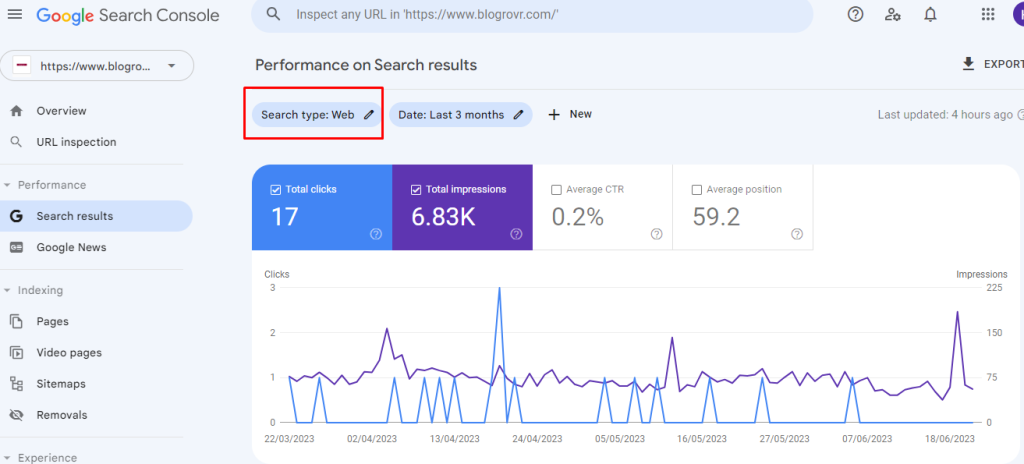
Once you have connected your website to Google Search Console, navigate to the Performance section. Here, you will be able to see a wealth of data about your website’s performance in search results, including impressions, clicks, CTR, and average position.Navigate to the Performance section

Step 3: Analyze your website’s search traffic

The first step in using Google Search Console for keyword research is analyzing your website’s search traffic. Look for patterns in the data, such as which pages are ranking well, which keywords are driving the most traffic, and which pages need improvement.Analyze your website's search traffic

If you want to do keyword research for Google’s standard web then select the filter at the top of your report and set it to default option  Webkeyword research for Google’s standard web

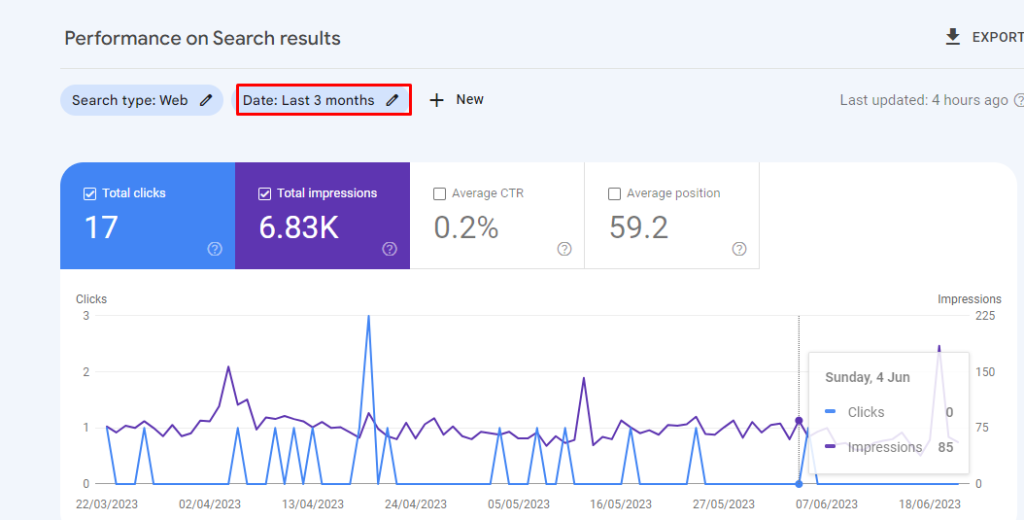
Select the range of report data in the performance report. This will help to utilize more keyword data. We recommend to set a data range as 12 to 16 months.

report data in the performance report

Change the data range to 12 months to get more accurate traffic value for the keywords.Change the data range to 12 months

After selecting the data range select apply to reflect on your performance report.

Step 4: Identify your website’s top-performing keywords

Once you have analyzed your website’s search traffic, you can use Google Search Console to identify your website’s top-performing keywords. Look for keywords that are driving the most traffic to your site, as well as those that have high search volumes and low competition.

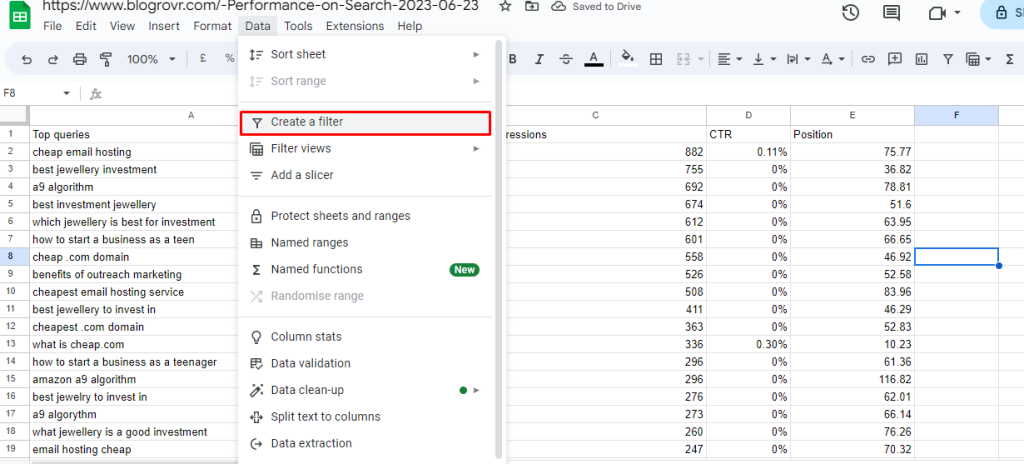
Exporting your keywords from the Google search console to G-sheet helps to identify your websites top performing keywords.

Select Export in the top right-hand corner of the search performance report. Export your keyword data  in a given Google Sheet, Excel, or CSV file.

Identify your website's top-performing keywords

Step 5: Use keyword data to identify keyword opportunities

By analyzing your website’s top-performing keywords, you can also use the Performance report in Google Search Console to identify keyword opportunities.

Look for keywords that have high search volumes but low click-through rates, as these are areas where you may be able to improve your content to better target those keywords.

After exporting a file to G-sheet, you can easily track your keywords.

Use keyword data to identify keyword opportunities

Find the top ranking keywords by using the position option. Set a filter  by applying the position less than or equal to 10.

top ranking keywords by using the position

Now you can get the list of  Top raking keywords.

Top raking keywords.

Step 6: Utilize the Search Analytics report

The Search Analytics report in Google Search Console can also be a valuable tool for keyword research. This report provides data on what keywords people are using to find your site, as well as impressions, clicks, and CTR for each keyword.Utilize the Search Analytics report

You can navigate the each sheet to evaluate your keywords for each pages and location.

Final Words :

Google Search Console for keyword research can be a highly effective strategy for improving your website’s search engine optimization and overall performance. By following the steps outlined in this article, you should be able to identify your website’s top-performing keywords, analyze search traffic, and uncover new keyword opportunities. Remember to also utilize other keyword research tools for a more thorough analysis of your target audience’s search behavior

Ways To Improve performance on Google Search

Ranking higher in Google’s search results will automatically increase your website’s visibility, traffic, and overall success. To help you to improve your search engine performance on Google, we have compiled proven strategies that can make a real difference. Specifically, appearing at the top of Google search results is essential for driving traffic and increasing conversion rates. To boost your search engine performance and improve your visibility on Google we have listed the top strategies that can bring difference in the real time. Check out the ways improve performance on Google search and increase your online presence.

Importance of search engine performance on Google

Investing in search engine optimization (SEO) to improve your search engine performance on Google can have a significant impact on your online visibility and success. By understanding Google’s algorithm and implementing proven strategies and techniques such as keyword research, content optimization, link building, and user experience improvements website owners can improve their search engine performance on Google. It is important to constantly monitor and adapt your SEO strategies to keep up with changes in Google’s ranking algorithm and stay competitive in your industryImportance of search engine performance on Google

1. Conducting keyword research

Keyword research helps to identify and target the specific terms and phrases that your target audience is searching for online. By optimizing your content and website around these targeted keywords, you increase your chances of showing up higher in Google search results, driving more traffic, and boosting your overall search engine performance.Conducting keyword research

To conduct effective keyword research, you can use a range of tools, including Google Keyword Planner, SEMrush, and Ahrefs, among others. These tools help you to identify the most relevant and high-volume search terms in your industry, as well as assess the competition level for each keyword.

Once you have identified your target keywords, you need to focus on optimizing your website content around these terms. This includes incorporating the keywords in your website metadata, URLs, headlines, and body content in a natural and engaging way. Sametime, it is important to note that keyword stuffing can harm your search engine performance and lead to penalization by Google. By conducting comprehensive keyword research and optimizing your website content and structure, you can significantly boost your search engine performance on Google.

2. Optimizing your website structure for search engines

Optimizing your website structure is a key component of improving your search engine performance on Google. One essential factor to consider when optimizing your website structure is the organization and categorization of your web pages. Search engines prioritize websites that have a clear and logical hierarchy, with well-labeled categories and subcategories.

The title tag and meta description provide a summary of what the page is about and appear in Google search results, so they should be compelling and attention-grabbing.Optimizing your website structure for search engines

Another essential factor to consider is the mobile responsiveness of your website. With the increasing use of mobile devices, Google now prioritizes mobile-friendly websites in search results. This means that your website should be optimized for viewing on mobile devices, with fast loading times and easy navigation. lil_midgetbaddie bottomnwv420

Improving the speed of your website is also crucial for search engine optimization. Google prioritizes websites that load quickly, so remove any unnecessary plugins, compress images to reduce their file size, and use a fast and reliable web host to improve your website’s loading time.

Optimizing your website structure also involves creating an XML sitemap that lists all the pages on your website. This makes it easier for Google’s crawlers to index your site and improves your chances of ranking higher in search results

3. Creating high-quality Content

Creating high-quality, relevant, and engaging content is the cornerstone of any successful SEO strategy. Google values informative and original content that addresses users’ needs. Focus on delivering value to your audience through well-written articles, blog posts, videos, and infographics. Make sure to optimize your content with appropriate keywords to increase its visibility in search results.

  • Focus on your audience – Understand your target audience and create content that resonates with them.
  • Keyword research – Conduct keyword research to understand what your audience is searching for and include those keywords in your content.
  • Use headlines and subheadings – Use clear and concise headlines and subheadings to make your content easy to read and scan.
  • Write for humans, not search engines – While it’s important to include keywords in your content, remember to write for humans first and foremost.
  • Write in-depth content – Creating in-depth and comprehensive content can help establish your website as a authority in your industry.

4. Improving website loading speed

Improving website loading speed is essential for a better user experience and improved search engine performance on Google. Here are 6 proven ways to boost your website loading speed:Improving website loading speed

  • Optimize images – Large images can significantly slow down your website. Compress and resize images to reduce their file size without compromising their quality.
  • Minimize HTTP requests – Each element on your webpage, including images, CSS files, and JavaScript files, requires an HTTP request to load. Minimize the number of requests by combining files and removing unnecessary elements.
  • Minify CSS and JavaScript – Minify your CSS and JavaScript files to reduce their file size by removing unnecessary whitespace, comments, and characters.
  • Use a Content Delivery Network (CDN) – A CDN can significantly reduce load times by caching your website’s content on servers located in different parts of the world.
  • Enable browser caching – Browser caching allows the browser to store resources downloaded from your website, reducing the number of requests in subsequent visits.

5.      Building high-quality backlinks

Building high-quality backlinks is an integral part of improving your search engine performance on Google. Backlinks are links from other websites that direct traffic back to your site. They are an indicator of your website’s credibility and relevance, and search engines use them to determine your ranking.Building high-quality backlinks

To build high-quality backlinks:

  • Create valuable and shareable content – Creating content that people want to read and share is crucial in generating backlinks naturally.
  • Guest blogging – Submitting guest posts on relevant websites in your niche with a link back to your website can significantly improve your backlink profile.
  • Broken link building – Finding broken links on other websites and offering a link to your content as a replacement is an effective way to generate high-quality backlinks.
  • Infographics – Infographics are shareable and visually appealing, making them an excellent way to generate backlinks.
  • Blogger outreach – Reaching out to bloggers and influencers in your niche and asking them to share your content can generate valuable backlinks.

Final Words:

Boosting your search engine performance on Google requires an. approach that combines keyword research, on-page optimization, engaging content creation, technical optimization, and strategic promotion. By implementing these proven techniques, you can enhance your website’s visibility, attract organic traffic, and improve your overall online presence. Keep in mind, SEO is an ongoing process, so stay up-to-date with the latest trends and continuously adapt these strategies to maintain a competitive edge in the ever-evolving digital world.

How to Use Microsoft Bing Site Explorer for SEO?

Microsoft Bing Site Explorer is a one of the AI powered tool that can be used to improve your website’s search engine optimization (SEO). It provides valuable insights into how Bing sees your website, allows you to submit sitemaps, and offers various tools to monitor and optimize your site. This guide will show you how to use Bing Site Explorer to your advantage and improve your website’s ranking in search engines. Bing Site Explorer is a tool that allows you to see how popular a website is and what pages on the website are being linked to. The tool also shows you the top keywords that are being used to find the website.

You can use Bing Site Explorer to competitor analysis and keyword research. You can also use the tool to find link opportunities to improve your website’s SEO. Microsoft Bing Site Explorer is a powerful tool that can be used to improve your website’s search engine optimization (SEO). This guide will show you how to use Bing Site Explorer to your advantage and improve your website’s ranking in search engines.

Microsoft Bing Site Explorer

What is Microsoft Bing Site Explorer?

Microsoft Bing Site Explorer is a free tool from Microsoft that allows you to analyze and explore websites and domains for SEO purposes. It provides detailed analytics and insights into how search engines evaluate and rank websites.

Some of the features of Bing Site Explorer include:

  • Deep website insights: See the top keywords people use to find your website and the pages that get the most visits.
  • Backlink analysis: Find websites and domains linking to your website, as well as any potentially toxic links.
  • Competitor analysis: Analyze competitor’s sites to see what keywords they’re targeting and what kind of content is popular on their website.
  • Export data: Export your website’s analytics data into a file format so you can review it in detail.

What are the benefits of using Microsoft Bing Site Explorer for SEO?

Using Microsoft Bing Site Explorer for SEO allows you to gain a better understanding of how search engines view your website and how you can make changes to improve its ranking. Here are some of the benefits of using Bing Site Explorer for SEO:

Target more relevant keywords:

Bing Site Explorer will help you analyze the top keywords people use to find your website, allowing you to target more relevant keywords.

Monitor backlinks:

You can monitor your backlinks to determine which websites are linking to your website and if there are any toxic links you need to disavow.

Perform competitor analysis:

You can use Bing Site Explorer to analyze your competitors’ websites, allowing you to see what content and keywords they’re targeting.

Export reports

You can export your website’s analytics data into a file format so you can review it in detail and make changes accordingly.

By exploring your website through Bing Site Explorer, you can gain a better understanding of what SEO strategies you need to focus on to improve your website’s ranking in search results.

Let’s see how to use Bing site Explorer effectively for the SEO performance and growth of the website in detail.

How to use Microsoft Bing Site Explorer for SEO?

Using Microsoft Bing Site Explorer for SEO helps you improve your website’s visibility and ranking on search engines.  It offers a range of features and functionalities that can help you monitor your site’s performance, identify issues, and optimize it for better visibility.

Follow these steps to use Microsoft Bing Site Explorer for SEO:

Step 1: Verification and Submission

To begin, you’ll need to verify your website ownership and submit it to Bing Site Explorer. This process involves adding a verification code or file to your website’s root directory or using other methods like DNS verification or XML file authentication. Once verified, you can submit your site’s sitemap to Bing to ensure all your pages are indexed correctly.Verification and Submission Bing Webmaster

Input your domain name into Bing Site Explorer. If you already have an account, log in with your credentials.

There are two options to input domain. If you already have a Google Search Console, you can directly access your domain in Webmaster Tool. Otherwise, you need to manually verify the domain by adding it manually.

Add site Manually in Bing webmaster

Once signed in, click on the “Add Site” button and enter the URL of your website. Follow the instructions to verify ownership of the site. Bing provides multiple verification methods, such as adding a meta tag to your website’s HTML or uploading a verification file.

site added in Bing webmaster

Step 2: Explore Site Explorer

To explore the entire site, choose the “Site Explorer” section in the left-hand menu. This is where you’ll find a range of SEO tools and reports to analyze your website’s performance on Bing.Explore Site Explorer in Bing webmaster

Step 3: Monitor Indexing Status

Bing Site Explorer provides valuable information about how Bing crawls and indexes your website. By regularly monitoring the indexing status, you can identify any potential crawling issues, such as broken links or pages that are not being indexed.Monitor Indexing Status

Use the “Index Now” feature to view the list of URLs indexed by Bing and analyze their status codes and metadata.

Step 4: Analyze Backlinks

Backlinks play a significant role in SEO, and Bing Site Explorer allows you to analyze your site’s backlink profile. The “Inbound Links” feature provides insights into the websites linking to your pages, helping you evaluate the quality and quantity of backlinks. Use this information to identify opportunities for building new backlinks and optimizing your link-building strategy.Analyze Backlinks

Step 5: Identify Keyword Opportunities

Discovering the right keywords is essential for optimizing your website’s content. Bing Site Explorer’s “Keyword Research” feature can help you identify relevant keywords and phrases that align with your target audience’s search queries. By understanding the search volume and competition for specific keywords, you can optimize your content accordingly and improve your chances of ranking higher in Bing’s search results.

Identify Keyword Opportunities

Step 6 : Monitor Performance Metrics

Bing Site Explorer provides a range of performance metrics that can assist you in measuring the effectiveness of your SEO efforts. From click-through rates (CTR) to impressions and average position, these insights help you track the performance of your website and individual pages on Bing’s search results pages. Utilize this data to refine your SEO strategy and make data-driven optimization

Monitor Performance Metrics

The “SEO Reports” feature provides a comprehensive overview of common SEO issues like missing meta tags, duplicate content, and crawl errors. By addressing these issues promptly, you can ensure that your website is optimized for maximum visibility in Bing’s search results.

Step 7 : Diagnose and Fix Issues

Regularly check the reports and metrics in Bing Site Explorer to monitor your website’s performance on Bing. Look for improvements you can make based on the insights provided and continue optimizing your site for better visibility.


Diagnose and Fix Issues


Wrapping Up

Using Microsoft Bing Site Explorer for SEO is a great way that can help you improve your website’s visibility and ranking on search engines. By following the steps outlined in this blog, you can use Microsoft Bing Site Explorer to uncover valuable insights into your competitors’ activities, identify popular keywords, and export reports to optimize your website for SEO.

With the proper implementation of Microsoft Bing Site Explorer for SEO, you can closely monitor the data and monitor your website’s performance. Implementing SEO strategies on your website is important for better ranking on search engines and staying ahead of your competitors.

How to use the Performance Report in Google Search Console?

If you have a website, you need to track your performance to see how well you are doing. Google Search Console is one among the free used to track your website performance and generate reports based on the live data.  The Performance Report helps to identify how your website is performing in Google search results.  The performance includes data on clicks, impressions, Average CTR and position. The Performance Report is a valuable tool for understanding your website’s visibility and traffic. It can help you identify opportunities and optimize your site for better performance. In this article, we’ll show you how to use the Performance Report in Google Search Console.Performance Report in Google Search Console

The Metrics of Google Search Console

The Performance Report in Google Search Console provides detailed information about how your website is performing in terms of certain metrics includes clicks, impressions, Average CTR and position in Google search results.

Clicks – This tells you how many people have clicked on a link to your website in Google search results. If the clicks stay inside a search results, then it is not considered as a one click.Clicks Metrics Google Search Console

Impressions – This tells you how many times your website has been seen in Google search results.Impressions

Average CTR:  CTR stands for Click-Through Rate. It is a metric used in digital advertising and marketing to measure the effectiveness of an online campaign or advertisement. CTR represents the percentage of people who click on a specific link or advertisement after being exposed to it.

CTR is calculated by dividing the number of clicks an ad receives by the number of impressions it generates and multiplying the result by 100. The formula is as follows:

CTR = (Clicks / Impressions) * 100  Average CTR

Position – The average position is determined by Google based on the relevance and quality of your website’s content compared to other websites competing for the same search queries. This tells you the average position of your website in the results for a particular query.Average Position

The Performance Report also provides data on average click-through rate (CTR), average position, queries, and pages, which can be used to optimize your website’s performance and visibility in search results.

How to use Performance Report in Google Search Console?

The data from the Performance Report can be used to optimize your website’s performance and visibility in search results. Here are some ways you can use the Performance Report data to improve your website’s visibility and performance in Google search results:

Queries

Analyze queries to determine which keywords are most effective in driving organic traffic to your website. It provides valuable insights into how your website is being discovered and the specific terms people are using to find your content. By analyzing the Queries report in Google Search Console, you can identify the keywords that are driving traffic to your website, monitor changes in rankings and click-through rates, and optimize your content and SEO strategy accordingly to improve your website’s organic search performance.Queries on Google search console

Pages

The “Pages” metric refers to the specific web pages on your website that appear in the search engine results pages (SERPs) for different search queries. It provides information about which pages of your website are being indexed and displayed by Google in response to user searches. By analyzing the “Pages” metric, you can identify the pages that are receiving the most impressions and clicks, as well as those that may require optimization to improve their visibility and performance in search results. It helps you understand which pages are driving organic traffic to your website and enables you to make data-driven decisions to enhance your overall SEO (Search Engine Optimization) strategy.Pages on Google search console

Country

The “Country” metric refers to the geographical location or country from which the search impressions and clicks are originating. By analyzing the country-specific data in Google Search Console, you can understand where your website is receiving impressions and clicks, allowing you to tailor your SEO strategies and content to better target specific regions or markets. This information can be valuable for businesses operating in multiple countries or those looking to expand their international presence.Countries on Google search console

Devices

The “Devices” metric refers to the breakdown of your website’s performance in organic search results across different devices. It provides insights into how your website performs on desktop computers, mobile devices, and tablet

The Devices report in Google Search Console provides the following information:

Desktop: This segment shows the performance of your website’s pages in organic search results when accessed from desktop computers or laptops.

Mobile: This segment displays the performance of your website’s pages in organic search results when accessed from mobile devices such as smartphones.

Tablet: This segment shows the performance of your website’s pages in organic search results when accessed from tablet devices.

What are some Best Practices for using the Performance Report?

Using the Performance Report can help you identify areas of improvement and ensure that your website is optimized for search results. Here are some best practices for using the data from the Performance Report:

  • Focus on the queries that are most relevant to your website.
  • Set up goals to track progress and measure success.
  • Monitor the average position of your website on the SERP and look for areas of improvement.
  • Analyze click-through rates for specific queries to determine which queries are most effective in driving organic traffic to your website.
  • Track changes in organic traffic volume over time.
  • Monitor page performance to identify underperforming pages and opportunities to optimize them.
  • Look for any changes in SERP position to determine the impact of changes such as new content or link building efforts.

How can the Performance Report be used to improve your website’s ranking?

Here are some ways you can use the Performance Report to improve your website’s ranking:

  1. Monitor click-through rate and SERP position – Use the Performance Report to track click-through rate, SERP position, and impression volume over time. This data will help you determine which queries are most effective in driving organic traffic to your website and identify areas of improvement.
  2. Identify underperforming pages – Compare page performance data to identify which pages are underperforming. Use the data to identify opportunities to optimize these pages.
  3. Use keyword data to optimize content – Monitor keyword data to determine what query terms are associated with organic traffic to your website. Use this data to determine what type of content to produce or optimize, and focus on long-tail queries for content targeting.
  4. Test changes to the SERP – Monitor changes in SERP position to determine the impact of any changes you have made such as new content or link building efforts.

Final Words:

After you have taken the necessary measures to improve your website’s ranking, you can start to analyse the outcome. Wrap things up with data collected from the Performance Report to see how effective your efforts have been. Use the data to determine if there were any changes to the click-through rate, SERP position, and impression volume. With this data in hand, you can quickly identify areas that still require further optimization and adjust your strategy accordingly. Sydney Sweeney porn videos