How To do Keyword Research Using Bing Webmaster Tool?

Keyword research plays a vital role for any successful online marketing strategy. By finding which keywords are most relevant and popular in your industry, you can optimize your website and content to rank higher in search engine results. While Google is often the go-to search engine, it’s important not to overlook the benefits of Bing. With its Bing Webmaster Tool, you can gain valuable insights into keyword intent, search volume, and competition. In this blog, we explain the step-by-step process of keyword research using the Bing Webmaster Tool, helping you take your online presence to the next level.

What is Bing Webmaster Tools?

Bing Webmaster Tools is a free service offered by Bing, the search engine owned and operated by Microsoft. This toolset is designed to help website owners and SEO professionals enhance their website’s visibility in Bing’s search results. Besides providing valuable information about your site’s performance, it also offers a range of SEO-related tools to optimize your website and attract more organic traffic.

Keyword Research Using Bing Webmaster

Bing has special features in the field of SEO and offering Free tools for the site performance. Ignoring Bing’s audience means missing out on potential visitors and customers. By utilizing Bing Webmaster Tools, you can access exclusive data about how your site performs on Bing’s search engine and gain valuable keyword insights specific to this platform.

Features of  Bing Webmaster Tool

The Bing Webmaster Tool is an invaluable resource provided by Microsoft, designed to help website owners and marketers improve their website’s performance in search results. Lets check out the some of the features of Bing Webmaster Tool.

  • The Bing Webmaster Tool provides comprehensive data and insights into how your website is performing in Bing search results. You can track your website’s indexing status, crawl errors, and sitemap submission status
  • Bing Webmaster Tool, helps you to access a variety of keyword research tool to discover relevant keywords for your website. These tools provide insights into search volumes, keyword suggestions, and trending searches.
  • The Site Explorer feature of the Bing Webmaster Tool allows you to explore and analyze the structure of your website. You can view the hierarchical structure of your website, identify the most linked-to pages, and analyze the internal linking structure
  • The Bing Webmaster Tool allows you to control how Bing crawls and indexes your website. You can set crawl rates and specify which parts of your website should be crawled more frequently.

Step-by-step guide for Keyword research using the Bing Webmaster Tool

Keyword research is important aspect for optimizing your website for search engines. By understanding the keywords and phrases that your target audience is using, you can create content that aligns with their search intent and improve your website’s visibility in search results. The Bing Webmaster Tool offers a variety of features and tools that can assist you in conducting effective keyword research. In this section, we will provide a step-by-step guide on how to use the Bing Webmaster Tool for keyword research.

Step 1: Access the Bing Webmaster Tool

To begin using the Bing Webmaster Tool, you first need to sign in or create an account. Once you have successfully logged in, you will be taken to the dashboard.Access the Bing Webmaster Tool

Step 2: Submit your website

If you haven’t already done so, you need to submit your website to the Bing Webmaster Tool. Enter a URL and give “Add” to add a new website to check the search performance and to access the keyword research tool. Follow the instructions to verify ownership of the website.Submit your website

Step 3: Access the keyword research tools

Once your website is verified and added to the Bing Webmaster Tool, navigate to the “SEO” section. Here, you will find a range of tools to assist you in keyword researchAccess the keyword research tools

Step 4: Utilize the Keyword Research tool

Click on the “Keyword Research” tab to access the keyword research tool. This tool provides insights into search volumes, keyword suggestions, and trending searches. Enter a relevant keyword or phrase related to your website’s content and click on the “Search” button.Utilize the Keyword Research tool

Step 5: Analyze the results

The keyword research tool will display a list of keyword suggestions, along with their search volumes and trend data. Take the time to analyze these results and identify keywords that are relevant to your website and align with your target audience’s search intent.Analyze the results

Step 6: Refine your keyword selection

Based on the insights provided by the Bing Webmaster Tool, refine your keyword selection. Choose keywords that have a sufficient search volume and are relevant to your website’s content. Consider the competitiveness of each keyword and aim for a balance between high search volume and lower competition.Refine your keyword selection

Step 7: Optimize your website’s content

Once you have selected your target keywords, it’s time to optimize your website’s content. Incorporate the keywords naturally into your page titles, headings, meta descriptions, and throughout the body of your content. Don’t stuff more keywords.

Step 8: Monitor and track your keyword performance

Regularly monitor and track the performance of your chosen keywords using the Bing Webmaster Tool. Evaluate how your website is ranking for these keywords and make necessary adjustments to your optimization strategies if needed.

Review the list of suggested keywords along with important metrics like search volume, competition, and expected click-through rates (CTR). This data will help you identify keywords with the most potential for your website.

Final Words :

Keyword research is an indispensable part of any successful SEO strategy, and Bing Webmaster Tools provides a powerful platform to conduct this research effectively. Utilize the insights offered by this free tool, you can unlock opportunities to improve your website’s visibility on Bing’s search engine and attract a broader audience to your online presence.

Remember that SEO is an ongoing process, and regularly analyzing the data provided by Bing Webmaster Tools will enable you to adapt your strategies and stay ahead in the competitive digital landscape. So, don’t hesitate to explore this valuable resource and watch your website soar to new heights!

How to use google search console for keyword research?

Keyword research is a one among the important SEO component for a successful digital marketing strategy. By identifying the right keywords and search terms that your audience is using, you can create content that resonates with them and improves your search engine visibility. For keyword research there are lots of tool available, Google Search Console is one among them, that can be used for a variety of purposes, including keyword research. By performing keyword research with Google Search Console, businesses can gain valuable insights into the keywords and phrases their target audience is using, and create content that resonates with them. In this article, we will discuss how to use Google Search Console for keyword research.

Google Search Console for Keyword Research

Google Search Console (GSC), also known as Google Webmaster Tools, is a free tool provided by Google that helps website owners and digital marketers to monitor and improve their website’s performance in search results. By understanding and utilizing GSC, businesses can gain valuable insights into their website’s visibility, search traffic, user behavior, and more.

When it comes to keyword research, Google Search Console provides several benefits for digital marketers, including:

  1. Identifying Top Performing Keywords: Google Search Console allows marketers to analyze their website’s search data to identify the top-performing keywords for their website. By understanding which keywords are driving the most traffic, businesses can optimize their content and online marketing efforts for those specific keywords.
  2. Discovering New Keyword Opportunities: Google Search Console helps businesses to identify new keyword opportunities by analyzing their website’s search queries and impressions. This helps businesses to identify untapped areas in their market and create content that targets relevant yet unexplored keywords.
  1. Analyzing Key Metrics: Google Search Console provides essential metrics such as impressions, clicks, and click-through rates (CTR) for each keyword. With these metrics in hand, businesses can optimize their content and website to increase their CTR and attract more traffic.
  1. Spotting Technical Issues : Technical issues on the website can hurt the website’s performance in search results. GSC provides technical insights into areas such as mobile-friendliness, website speed, and website security. Addressing these issues can help businesses to improve their search rankings and attract more traffic.

Step-by-Step Guide to Conduct Keyword Research with Google Search Console

Step 1: Connect your website to Google Search Console

Before you can begin using Google Search Console for keyword research, you need to connect your website to the tool. This can be done by creating a Google account and verifying ownership of your website. Once your website is verified, you will have access to all of the data that Google Search Console collects about your site.

Step 2: Navigate to the Performance section

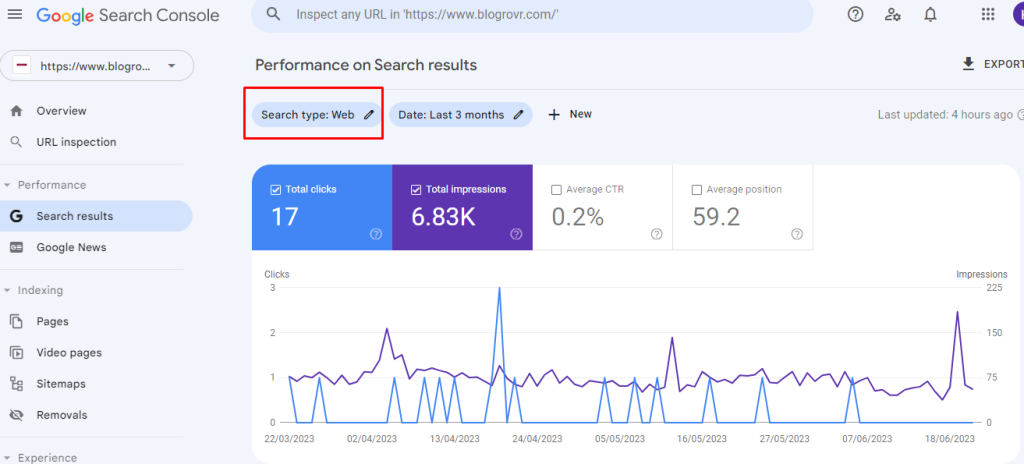
Once you have connected your website to Google Search Console, navigate to the Performance section. Here, you will be able to see a wealth of data about your website’s performance in search results, including impressions, clicks, CTR, and average position.Navigate to the Performance section

Step 3: Analyze your website’s search traffic

The first step in using Google Search Console for keyword research is analyzing your website’s search traffic. Look for patterns in the data, such as which pages are ranking well, which keywords are driving the most traffic, and which pages need improvement.Analyze your website's search traffic

If you want to do keyword research for Google’s standard web then select the filter at the top of your report and set it to default option  Webkeyword research for Google’s standard web

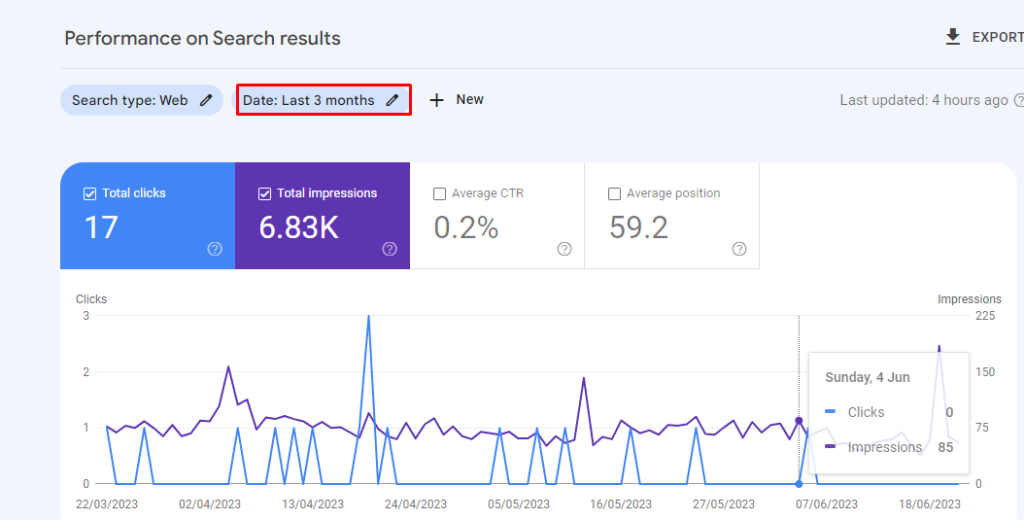
Select the range of report data in the performance report. This will help to utilize more keyword data. We recommend to set a data range as 12 to 16 months.

report data in the performance report

Change the data range to 12 months to get more accurate traffic value for the keywords.Change the data range to 12 months

After selecting the data range select apply to reflect on your performance report.

Step 4: Identify your website’s top-performing keywords

Once you have analyzed your website’s search traffic, you can use Google Search Console to identify your website’s top-performing keywords. Look for keywords that are driving the most traffic to your site, as well as those that have high search volumes and low competition.

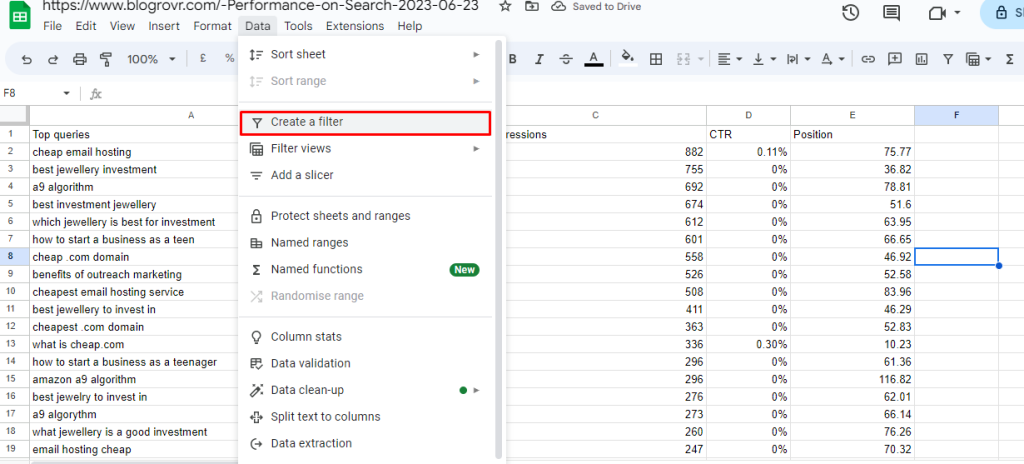
Exporting your keywords from the Google search console to G-sheet helps to identify your websites top performing keywords.

Select Export in the top right-hand corner of the search performance report. Export your keyword data  in a given Google Sheet, Excel, or CSV file.

Identify your website's top-performing keywords

Step 5: Use keyword data to identify keyword opportunities

By analyzing your website’s top-performing keywords, you can also use the Performance report in Google Search Console to identify keyword opportunities.

Look for keywords that have high search volumes but low click-through rates, as these are areas where you may be able to improve your content to better target those keywords.

After exporting a file to G-sheet, you can easily track your keywords.

Use keyword data to identify keyword opportunities

Find the top ranking keywords by using the position option. Set a filter  by applying the position less than or equal to 10.

top ranking keywords by using the position

Now you can get the list of  Top raking keywords.

Top raking keywords.

Step 6: Utilize the Search Analytics report

The Search Analytics report in Google Search Console can also be a valuable tool for keyword research. This report provides data on what keywords people are using to find your site, as well as impressions, clicks, and CTR for each keyword.Utilize the Search Analytics report

You can navigate the each sheet to evaluate your keywords for each pages and location.

Final Words :

Google Search Console for keyword research can be a highly effective strategy for improving your website’s search engine optimization and overall performance. By following the steps outlined in this article, you should be able to identify your website’s top-performing keywords, analyze search traffic, and uncover new keyword opportunities. Remember to also utilize other keyword research tools for a more thorough analysis of your target audience’s search behavior

How to rank your Internal Pages Higher?

On-Page SEO is important for all websites and blogs that helps to improve their online presence. Some website owners neglecting the internal pages and concentrate only on the main pages that is home page, while doing an optimization. This will affect the website traffic and missed the opportunity to rank the other pages in your website. One of the main ways to improve your online presence is to boost the ranking of your internal pages.  Internal pages can target specific keywords, provide valuable content, and enhance user experience. This blog is about improving your internal page ranking and strategies to rank your internal pages higher in search engine results and maximize their visibility

Internal Pages Ranking

Internal page rankings can either directly or indirectly supports for the success of any website. While it’s easy to focus on the main landing page or homepage, internal pages are just as important in terms of attracting and retaining users. In fact, internal pages can contribute significantly to the website’s overall search engine ranking and online visibility.

Internal pages should be optimized to enhance the user’s experience, providing them with valuable information and encouraging them to stay on the website for longer periods. A well-optimized internal page can also help to drive traffic to the main landing page, increasing the chances of conversions.

Having high-ranking internal pages provides numerous benefits, including increased website visibility, higher traffic volumes, and better engagement metrics. These metrics can ultimately lead to better conversions and sales for businesses.Internal Pages Ranking

By keeping these things on mind, we focusing on improving the internal page rankings through various optimization strategies.

Effective strategies to rank your internal pages higher in search engine results

1. keyword research

Keyword research is a fundamental step towards optimizing internal pages for search engine rankings. It involves identifying the right keywords and phrases to target in your content, based on their relevance to your business, target audience, and the search queries they use. Begin by identifying the most relevant and high-traffic keywords that are relevant to your business niche. You can use keyword research tools such as Google AdWords Keyword Planner, Ahrefs Keyword Explorer, or SEMrush to generate a list of potential target keywords. Consider using long-tail keywords in your content. These are phrases that are more specific and narrower in scope than your primary keywords.Research Keyword

2. Create High Quality- link for Internal page

When it comes to improving the rankings of your internal pages, creating high-quality, unique content is important.Create High Quality- link for Internal page

  • First understand your target audience is, and create content that speaks to their needs and interests.
  • Use headlines that include your target keywords to help search engines understand what your content is about.
  • Use images, videos, and infographics to make your content more engaging and shareable.
  • Include links to other relevant pages on your website to help visitors find more information and to help search engines understand the structure of your site.
  • Write compelling meta descriptions that include your target keywords and entice users to click through to your page
  • Update your content regularly with new information or insights to keep visitors coming back to your site.

3. Optimize On-Page

On-page optimization is one of the important metric, that can be used to improving the visibility of your internal pages. Focus on the following elements:Optimize On-Page

  1. Page Title: Craft unique, descriptive, and keyword-rich titles for each internal page. Keep them concise (around 60 characters) while accurately representing the content.
  2. Meta Description: Write compelling meta descriptions that entice users to click on your page. Include relevant keywords and maintain a length of around 150-160 characters.
  3.  Headers and Subheadings: Use header tags (H1, H2, H3) to structure your content and make it more readable for both users and search engines. Incorporate targeted keywords in these headings when appropriate.
  4. URL Structure: Create user-friendly and SEO-friendly URLs for your internal pages. Include relevant keywords and keep them concise and descriptive.
  5.  Internal Linking: Establish a strong internal linking structure by linking relevant internal pages within your content. Internal links help search engines understand the relationship between pages and distribute link equity.

4. Build More Links to Internal Pages

Building more links to your internal pages is an effective strategy to improve their ranking and increase their visibility.Build More Links to Internal Pages

Internal Link :

Start by creating a strong internal linking structure within your website. Link relevant internal pages to each other using keyword-rich anchor text. This not only helps search engines understand the relationship between your pages but also directs traffic from one page to another, increasing the visibility of your internal pages

Guest Blogging :

Guest blogging is an effective way to build links to your internal pages. Find authoritative blogs in your niche that accept guest posts and offer to write informative and relevant content for them. In your guest post, include links to your internal pages that provide additional information or resources. This not only helps build backlinks but also drives targeted traffic to your internal pages.

Resource Page Outreach:

Look for resource pages or lists within your industry that feature relevant websites or content. Reach out to the owners of these resource pages and suggest your internal pages as valuable additions to their lists. Provide a brief description of your content and explain how it can benefit their audience. If they find your content relevant and valuable, they may add a link to your internal page on their resource page

5. Use keyword Mapping

Keyword mapping is a crucial technique that can significantly improve the ranking of your internal pages. By mapping specific keywords to relevant internal pages, you ensure that each page is optimized for a particular set of keywords, allowing search engines to understand the content’s relevance and user intent. Start by conducting thorough keyword research and identifying the most relevant keywords for each internal page. Then, strategically incorporate these keywords into the page titles, headers, meta descriptions, and content. By aligning your content with targeted keywords, you enhance the page’s visibility and increase the likelihood of ranking higher in search engine results.

Use keyword Mapping

keyword mapping helps you create a logical internal linking structure, where you can strategically interlink related pages using keyword-rich anchor text. This not only enhances user navigation but also signals to search engines the importance and relevance of your internal pages. By implementing keyword mapping, you can maximize the potential of your internal pages and improve their rankings in search engine results.

Final Thoughts:

To maximize your website’s visibility and drive organic traffic, it’s crucial to focus on ranking your internal pages higher. By conducting comprehensive keyword research, optimizing on-page elements, creating high-quality content, earning quality backlinks, and optimizing page loading speed, you can boost the visibility and authority of your internal pages.

Google Keyword Planner: How To Use Location Groups?

The Google Keyword Planner is a free tool that allows you to do keyword research in an efficient manner and also helps to target your ads to a specific location.  To target your ads to a location you can use location groups metrics that to target your ads to people in certain geographic areas.

To use location groups, simply create a new campaign and select the “Location groups” option under “Targeting.” From there, you can add the locations you want to target.

Keep in mind that you can target multiple location groups in a single campaign. This can be very useful if you want to target different geographic areas with different messages.

If you’re not using location groups in your campaigns, you’re missing out on a great opportunity to reach your target audience

Why is targeting important in advertising?

Targeting is key to effective advertising. There are two main purposes when using location groups:

  1. Reach the right audience – By targeting the areas you want to reach, you can ensure that your ads are seen by people who are more likely to be interested and engaged in your message. This saves you money by reducing your ad spend on those who would not be likely to respond.
  2. Maximise your budget – By geo-targeting your ads, you can make the most out of your budget by only sending ads to people who are likely to purchase your product or sign up for your service. This way, you can get a better return on investment.

Targeting can also be used to target different areas with different messages. For example, you could target business owners in one area with a message about corporate services, while targeting homeowners in another area with a message about home improvements. This allows you to create tailored messages that are more likely to resonate with the people in each area.

Google Keyword Planner

Google Keyword Planner is a free keyword research tool available to Google Ads advertisers. It can be used to identify new keyword opportunities, get insights on their search volume, and estimate the cost for running keyword-based ads. It also provides data on the keywords that are already used in different locations, helping you tailor your ads to be targeted to those locations.

Google Keyword Planner has many features and benefits. It provides historical performance data, competition level, and average cost-per-click of related keywords. It also includes the “Location Groups” feature, which lets you group locations together to target your ads to specific geographic regions. This feature is particularly useful when you are trying to target an audience in different cities, or countries.

What are location groups and how do they work?

Location Groups is a feature in the Google Keyword Planner that enables you to group and target your ads to specific geographic regions. It allows you to create campaigns that are tailored to users in different cities, states, regions, or countries.

The feature uses a flexible hierarchical structure made up of groupings. For example, a region might have several states, each with its own target regions, and then each state with its own cities to target. By grouping multiple locations, you can more easily target ads based on more specific criteria. tom brady sydney sweeney

Location Groups also helps you understand the differences in traffic in different locations, enabling you to identify potential opportunities and gaps in markets. This is important to optimize bids and improve the efficiency of your ad campaigns.

The data provided through Location Groups will enable you to glean insights about user behavior in different locations, so you can identify better targeting strategies in order to boost the success of your campaigns.

How to use location groups effectively with Google Keyword Planner?

Using Location Groups effectively can help you to maximize the impact of your SEO and PPC campaigns.

  1. Identify Competitor Locations: Identify your competitors and target the locations where they are strong. This will allow you to tap into their customer base and gain market share.
  2. 2. Research Demographics: Understand the demographics of the people living in targeted locations. This will help you to target specific ads to match the market’s needs.
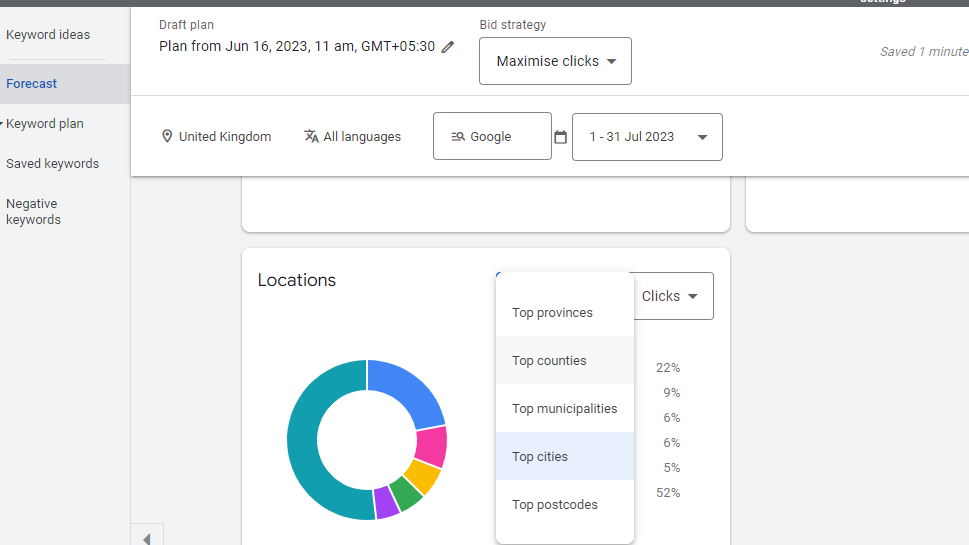
  3. Analyze Traffic Patterns: Understand how different locations affect search behavior. This will allow you to optimize bids, as well as the content and design of ads to best meet the needs of customers in different areas.
  4. Optimize Bids: Use the best mix of bids and budget across locations

How to Use Location Groups in Google Keyword Planner?

The process of using location groups in Google Keyword Planner involves following steps

Step 1: Access Google Keyword Planner

To begin, log in to your Google Ads account. Once logged in, click on the wrench icon (Tools & Settings) at the top right corner of the page. From the dropdown menu, select “Keyword Planner” under the “Planning” section. This will open the Keyword Planner interface.

Access Google Keyword Planner

Step 2: Set up a New Campaign

Within the Keyword Planner interface, click on the “Discover new keywords” tab. This option allows you to explore keyword ideas for your campaign and refine your targeting based on specific locations.

Set up a New Campaign

Step 3: Enter Keywords and Locations

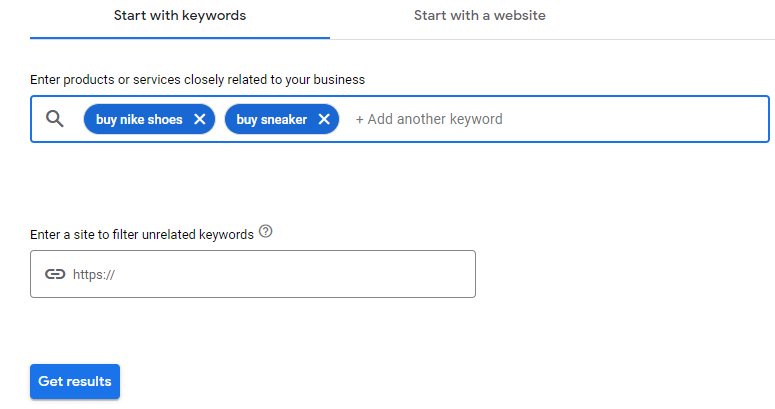
In the keyword input field, enter the keywords or phrases that are relevant to your products, services, or target audience. Then, in the “Enter locations” field, input the locations you want to target. You can enter countries, cities, regions, or even specific areas depending on your targeting strategy.Enter Keywords and Locations

Step 4: Use Location Groups

Below the location input field, you’ll find a link that says “Refine location targeting.” Click on this link to access advanced location targeting options, including the use of location groups.Use Location Groups

Step 5: Create a Location Group

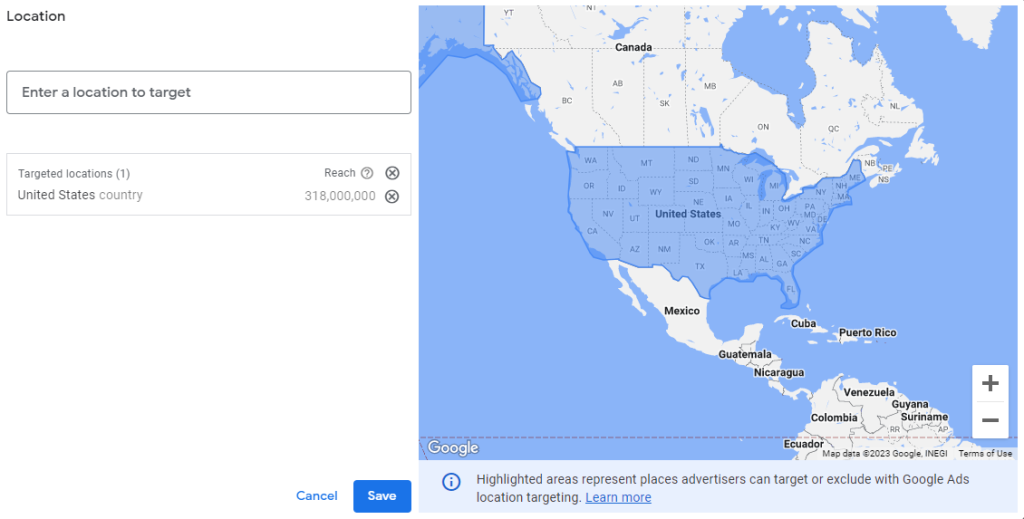
Within the “Refine location targeting” section, you have the option to create location groups. Click on the “Create location group” button to start creating your group.Create a Location Group

Step 6: Name Your Location Group

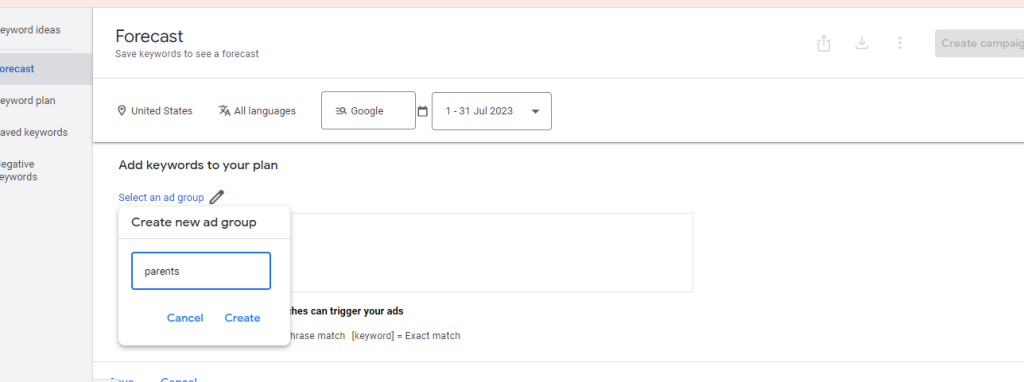
Give your location group a descriptive name that reflects the locations it will include. For instance, if you want to target specific countries or regions, you could name your location  group “Europe” or “United Kingdom”.

Name Your Location Group

Step 7: Add Locations to the Group

Once you have named your location group, you can start adding locations to it. Use the location search box to search for and select the desired countries, cities, regions, or areas. As you add locations, they will be included within the location group.Add Locations to the Group

Step 8: Save Your Location Group

After adding all the relevant locations, click on the “Save” button to save your location group. This allows you to easily access and apply the group to your campaigns.

Final Words:

Google Keyword not only helps you discover relevant keywords but also allows you to optimize your ad campaigns by utilizing location groups. By targeting specific locations, you can reach your desired audience effectively and increase the success of your Google Ads campaigns. By following the step-by-step process outlined in this blog, you can harness the full potential of location groups in Google Keyword Planner and drive targeted ads to the right location

Keyword Intent: How to Maximizing Traffic for Your Website?

InkedKitty nude boobs

When it comes to maximizing more traffic to your website, keywords play a vital role. Keyword research is not just about finding the right keywords – it’s about understanding the intent behind those keywords and how they relate to the customer journey. Keyword intent refers to the reason behind a user’s search query, and it can have a significant impact on the success of your website in terms of traffic, engagement, and conversions. Here in this blog let’s explore the basics of keyword intent and how to maximize traffic for your website

What is keyword intent?

Keyword intent refers to the understanding the purpose or goal behind a user’s search query or the use of specific keywords. In other terms, it is the intention or desired outcome that the user has when they perform a search online. Keyword intent can be categorized into different types

1. Informational Intent – These are keywords used by people looking for information on a specific topic. This type of keyword intent is used by individuals looking for information on a specific topic. Such keywords often start with “how to”, “what is”, “best ways to” and similar phrases. Website owners looking to target this type of intent should aim to create informative and educational content that answers common questions asked within their niche.

For example, “how to build a blog” or “best money making websites.”

2. Navigational Intent: These are keywords used by people looking for a specific website or brand. This type of keyword intent is used by individuals looking for a specific website or brand. These keywords include company names or website URLs. Companies looking to target this type of intent should focus on optimizing their website for brand identity and visibility, using Meta descriptions, header tags, and internal linking to lead users to the desired pages.

For example, “Amazon” or “Facebook login.”

3. Transactional Intent: These are keywords used by people looking to make a purchase or complete a specific action. This type of keyword intent is used by individuals who are ready to make a purchase or complete a specific action, such as booking a flight or buying a product. Website owners looking to target this type of intent should create content that highlights their products or services’ selling points, such as pricing, features, and benefits. By optimizing product pages, adding product reviews, and including calls-to-action, website owners can drive more conversions from transactional intent keyword searches.

For example, “buy shoes” or “book red bus”.

4. Commercial intent: The user is in the research phase and considering different options before making a purchase. Develop comparison articles, product reviews, buying guides, or expert opinions that help users make informed decisions.

For example, “reviews,” “comparison,” or “top-rated.”

5. Local intent: The user is looking for specific products, services, or information within a particular location. Optimize your website or blog content for local SEO by including location-specific keywords. Create location-specific landing pages, local business directories, or guides that cater to the needs of users searching for products or services in a specific area.

For Example, “near me,” or “in [location].”

Understanding the intent behind the keywords used by your target audience is crucial for creating content that resonates with them and meets their needs.

How to Create a content around keyword intent?

Once you have identified the right keywords, the next step is to create content around them that matches the intent of the searcher. Here are five tips for creating content that aligns with keyword intent: 

  1. Understand the Different Types of Keyword Intent – As discussed earlier, there are three types of keyword intent: Commercial, informational, navigational, and transactional. Understanding the intent behind your chosen keywords is crucial in creating content that is relevant and useful to your target audience. 
  1. Create Content That Answers Questions – Informational keywords are often used by people who are searching for answers to specific questions. Creating content that answers those questions can help you rank higher in search results and attract more visitors to your website. 
  1. Provide Value – Your content should be informative, engaging, and useful to your target audience. It should offer value and answer their questions in a clear and concise manner.
  2. Use Long-Tail Keywords – Long-tail keywords are longer, more specific phrases that target a niche audience. They are often less competitive and can help you to increase traffic for specific search terms.
  3. Optimize for SEO – Use your chosen keywords in your content, meta descriptions, and header tags. Additionally, make sure your content is easy to read and includes relevant images and videos to engage your audience.

Keyword Intent Analysis using Google Keyword Planner

Google Keyword Planner is a free keyword research tool provided by Google Ads. Although it primarily focuses on helping advertisers find keywords for their ad campaigns, it can still provide insights into keyword intent. Below sessions shows how to use Google Keyword Planner for keyword intent analysis:

1. Generate keyword ideas:

Start by entering a seed keyword or a topic related to your industry or niche into the Google Keyword Planner. The tool will provide you with a list of keyword ideas related to that topic. These keyword suggestions can give you an understanding of the various intents users might have when searching for those keywords.

Generate keyword ideas

2. Explore search volume:

Review the search volume data provided by Google Keyword Planner for each keyword. Generally, higher search volume indicates a higher level of interest in that topic or keyword. By analyzing the search volume, you can identify keywords that are likely to have more intent behind them due to their popularity.

Explore search volume

3. Analyze keyword variations:

Google Keyword Planner often provides variations and related keywords for the seed keyword you entered. By analyzing these variations, you can gain insights into different keyword intents. Look for keywords that have specific modifiers or qualifiers that indicate intent, such as “best,” “top,” “how to,” “reviews,” “buy,” or “near me.” These modifiers often indicate different stages of the buying process or specific user needs.

Analyze keyword variations:

4. Review suggested bid amounts:

Google Keyword Planner provides estimated bid amounts for keywords based on their competitiveness. Higher suggested bid amounts usually indicate commercial intent keywords, as advertisers are willing to pay more for those keywords due to their potential for conversions. Keywords with lower suggested bid amounts may have more informational intent or be less competitive.

Review suggested bid amounts

5. Refine keyword list:

After analyzing the keyword suggestions and their intent, refine your keyword list by selecting the keywords that align with your content objectives and target audience’s intent. Focus on keywords that match the intent you want to target, whether it’s informational, commercial, navigational, or local.

Refine keyword list

Final words:

It’s important to remember that keyword intent is not a one-time fix, but an ongoing process that requires consistent effort and adaptation to stay ahead of the competition. By staying up-to-date on the latest trends and optimizing your website for user experience, you can unlock the full potential of keyword intent and achieve long-term success for your online presence.

How to Choose the Right Focus Keywords for Your Website?

With the ever-changing SEO game, it’s more important than ever to choose the right focus keywords for your website. But with so many SEO options and so much of advice, it can be difficult to know where to start.

In this blog we will give you some tips on how to choose the right focus keywords for your website. Here we’ll also provide importance of using a right focus keyword and where it can be used in the SEO process. We sure that the end, you should have a good understanding of how to choose keywords that will help your website rank higher in search engine results pages (SERPs).

What are Focus Keywords?

Focus keywords are the primary keywords that you focus on to integrate into your website content. These words are usually related to what your website is about, and will be what search engine algorithms use to identify and rank your website.

Focus keywords should be as specific as possible, in order to be more targeted and rank better in SERPs. For example, rather than using the keyword “dog”, a better keyword would be “cute puppy breeds”.

Focus keywords should be used in the title and headings of your website, as well as in the descriptions and content. This helps search engines better understand the content of your website and relevance to searches.

Why are focus keywords important?

Focus keywords are important for two primary reasons. The first is that search engine algorithms use focus keywords to identify and rank your website, which can influence the visibility and traffic coming to your website.What are Focus Keywords

The second reason focus keywords are important is that they provide insight into the topics that your content should be focused on. This insight helps you to create content that is more targeted and relevant to the people reading it.

Focus keywords can also be used to research topics that people are searching for, providing insights into potential content ideas that can help keep your website up to date and relevant.

How to choose the right focus keywords for your website?

Choosing the right focus keywords for your website is crucial for search engine optimization (SEO) and attracting the right audience. Here are some steps to help you choose the right focus keywords:the right focus keywords

1.Understand your target audience

Begin by identifying your target audience and understanding their needs, preferences, and search behavior. Consider their demographics, interests, and the specific language they use to search for information related to your website’s topic.

2. Define your website’s goals

Determine the primary goals of your website. Are you aiming to sell products, provide information, or generate leads? Clarifying your goals will help you align your keyword selection with your website’s purpose.

3. Conduct keyword research

Use keyword research tools such as Google Keyword Planner, SEMrush, or Ahrefs to explore relevant keywords and phrases related to your website’s topic. Look for keywords with a good search volume and a reasonable level of competition.

4. Analyze keyword relevance

Review the list of potential keywords and evaluate their relevance to your website’s content. Consider the intent behind each keyword and whether it aligns with the information or services you provide.

5. Consider long-tail keywords

Long-tail keywords have lower search volumes and more specific that can be highly targeted. Including a mix of both broad and long-tail keywords can help you attract a more focused audience.

6. Assess competition:

Evaluate the level of competition for each keyword. Highly competitive keywords may be challenging to rank for, especially if your website is new or lacks strong authority. Consider targeting keywords with moderate competition that still offer a reasonable search volume.

7. Use keyword variations:

Instead of focusing solely on one keyword, consider using variations and synonyms throughout your content. This strategy helps you rank for related searches and provides a more natural and diverse keyword presence.

8. Create a keyword list

Start by creating a list of keywords related to your website. Brainstorm the keywords, phrases, phrases, topics and any other words or phrases that are related to your website or business.

9. Analyze the data

Analyze the data to find the focus keywords that have the highest search volume and the lowest competition.

10. Set Focus Keywords

Once you have identified the focus keywords, make sure to set up the focus keywords on your website.

Tips for choosing the right focus keywordsTips for choosing the right focus keywords

Now that you know how to choose the right focus keywords for your website, here are some tips to help you:

  1. Keep It Relevant – Make sure the focus keywords you choose are related to the topic of your website.
  2. Avoid overly competitive keywords – It is important to choose focus keywords that are not overly competitive. If the competition for the focus keyword is too high, then it will be hard for your website to rank.
  3. Narrow Your Focus – Narrow down your focus keywords by focusing on specific topics, products, or services. This will help to target the right audience and make it easier for your website to rank.
  4. Keep It Short – Focus keywords should be short and to the point. Longer, more complex focus keywords can be harder to rank for.
  5. Monitor Performance – Monitor the performance of the keywords you are targeting. This will allow you to adjust your focus keywords if necessary.

Using these tips, you can choose the right focus keywords that are relevant to your website and will help to improve your website’s visibility and ranking in search engine results.

Final Words:

Choosing the right focus keywords for your website is essential for improving visibility and ranking in search engine results. It is important to take the time to research and select relevant, non-competitive, and concise focus keywords that are related to the topic of your website.  By using these tips, you can ensure that your website is optimized for the right focus keywords and that your website and its content are easily discoverable in search engine results. This will help to attract more visitors to your website and maximize your online visibility.

How to do keyword research for a blog using Ahrefs?

big tited women nude margomistress

Keyword research

is essential for any blog and choosing the right tool can make a big difference in its success. Ahrefs offers an easy-to-use keyword generation tool with features such as analyzing competitor’s backlinks, identifying new opportunities for organic traffic growth, filtering out irrelevant keywords and much more. Using ahrefs will allow you to easily access large amount of data that can be used to identify relevant topics along with related long tail keywords which could help boost your online visibility. It also helps analyze your own website behind the scenes which further assists towards maximizing search engine performance through SEO practices like optimizing title tags or metadata descriptions etc.

How to generate keywords for blogs in Ahrefs?

In Ahrefs, the first step of keyword research is to generate keywords based on phrases, topics or industry related words that are relevant to your content topic. Once you’ve generated these keywords, then you need to determine their “search volumes”, which indicates how many people use them in searches per month. Lastly, compare those search volumes against each other and pick the most popular ones for your blog post’s focus keyword phrase – making sure they match exactly the context of what you want to write about in order refer readers more accurately!
By taking advantage of Ahrefs’ advanced keyword generation functionality, bloggers and marketers alike can gain a better understanding of their audience while optimizing their website’s SEO performance at the same time!

A step-by-step guide for keyword research on Ahrefs tool

If you’re looking for a step-by-step guide to keyword research on the Ahrefs tool, then you’ve come to the right place. We’ll provide a step-by-step guide on how to use Ahrefs for keyword research.

 Step 1: Setting Up Your Account

The first step is creating an account with Ahrefs if you don’t already have one. You can sign up using your email address or through Google/Facebook accounts. After signing up, you’ll need to select a plan that best suits your needs – there are several plans available depending on what features you require from the tool.

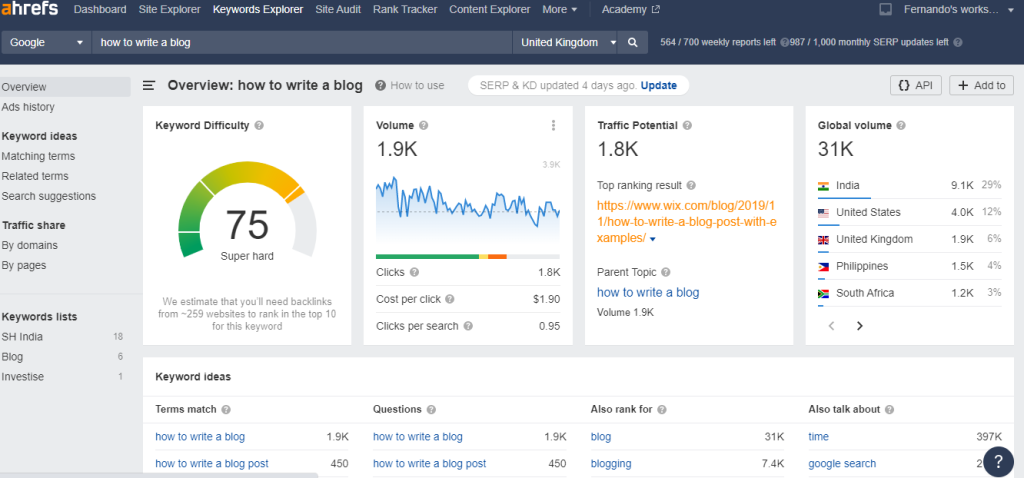
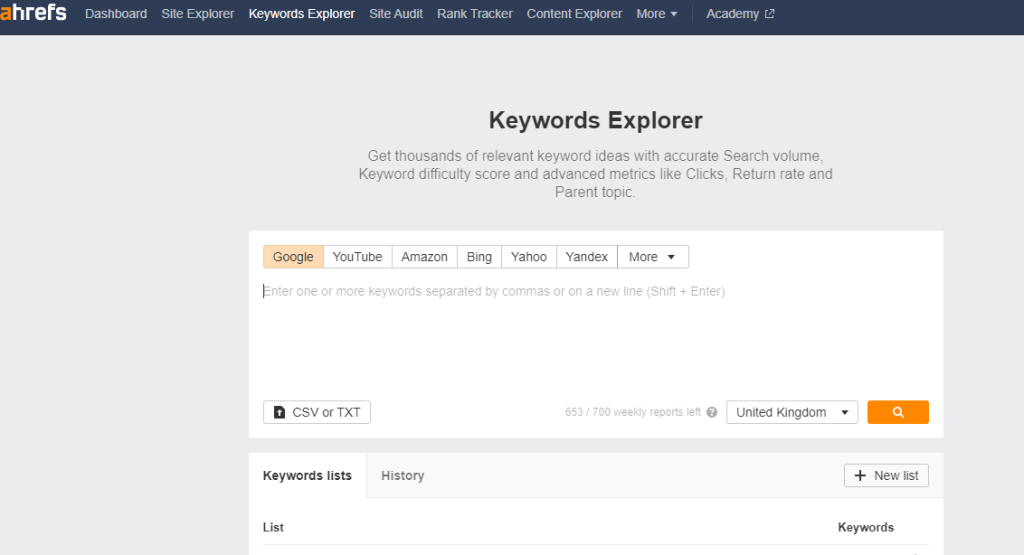
This will take you to the Ahrefs dashboard , there you enter a blog idea or keyword to get the detailed analysis of keywords

Ahref keyword explorer

Step 2: Finding Relevant Keywords

Once your account is set up and ready to go, it’s time to start searching for relevant keywords related to your business or website topic. To begin searching for keywords within Ahrefs’ database of over 10 billion words and phrases simply type in some seed terms into the search bar at the top of the page – these could be related words or phrases associated with what you’re trying to promote online (e.g., “How to write a blog“).

How to find keyword for blog using Ahref

From here Ahrefs will generate hundreds of potential keyword ideas based off those initial seed terms which can then be further refined by adding additional filters such as location targeting (country/region), language preference etc..

Step 3: Analyzing Search Volume & Competition Levels

Now that we’ve found some potentially useful keywords it’s important that we analyze them further before deciding whether they should form part of our overall SEO strategy or not – this is where tools like Ahrefs come into play!

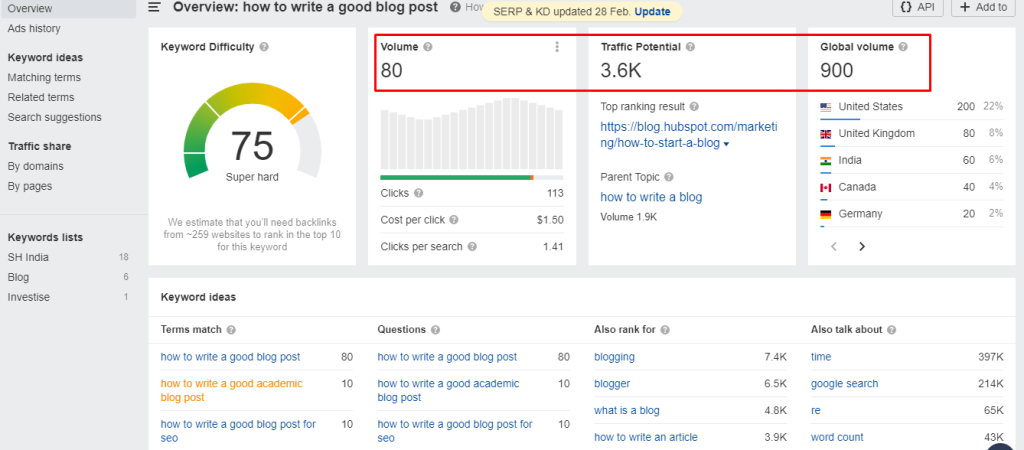
Analyzing Search Volume & Competition Levels

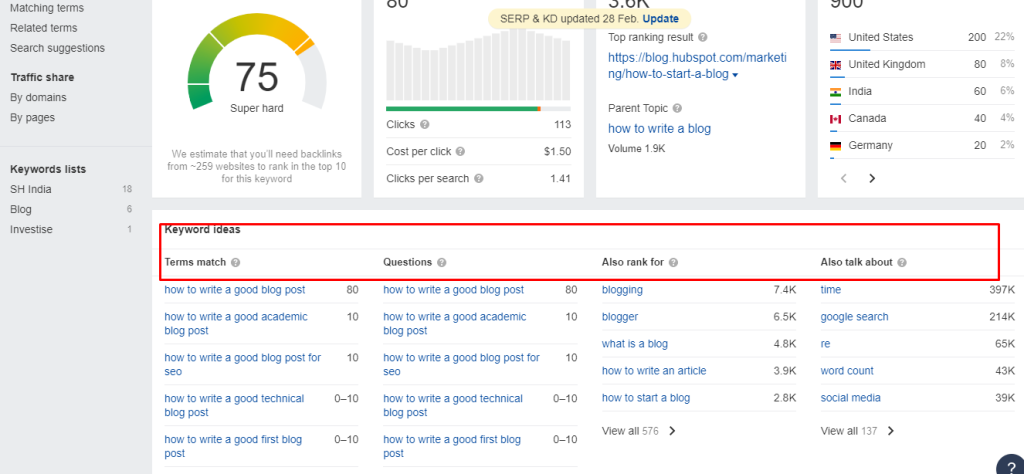
By clicking on any given keyword suggestion within its dashboard users can view detailed information about each term including monthly search volumes (how many people are actually searching for this phrase) as well as competition levels (how difficult would it be rank highly in SERPs), and Global Volume of that particular keyword.

Identifying and analyzing competitor keywords


Step 3: Analyzing Keyword Metrics

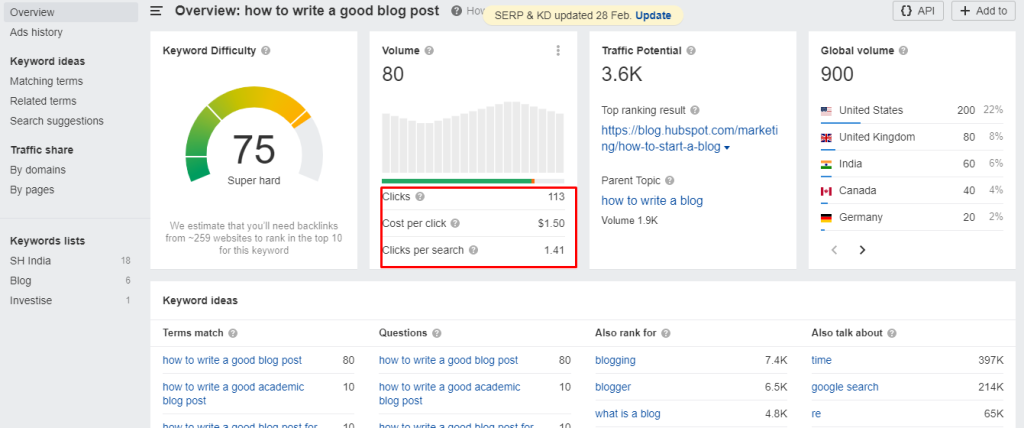
After generating a list of potential keywords, the next step is to analyze the metrics associated with each keyword to determine which ones are worth pursuing. Ahrefs provides a range of metrics that can help you to evaluate the potential of each keyword, such as:

Analyzing Keyword Metrics

Search Volume: This metric indicates the number of monthly searches for a particular keyword.

Keyword Difficulty: This metric measures how difficult it would be to rank for a particular keyword, based on the strength of the existing competition.

Clicks: This metric shows the estimated number of clicks that the top-ranking page for a particular keyword receives.

Cost Per Click (CPC): This metric indicates the estimated cost per click if you were to bid on a particular keyword in Google Ads.

By analyzing these metrics, you can determine which keywords are likely to be the most valuable for your website for writing a blog.

Step 4: Go-Thorough other keyword ideas suggested by Ahrefs

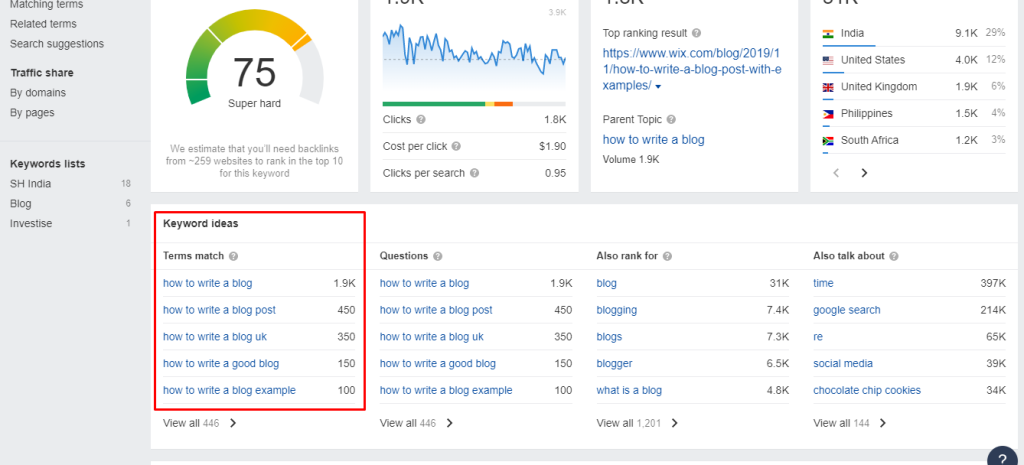
While entering more keywords, Ahrefs Keywords Explorer will generate thousands of content or blog ideas in six different ways by selecting to 10 popular keywords from the suggestions list.

Analyzing search intent for keyword research

  • Terms match 
  • Also rank for 
  • Also talk about
  • Search suggestions 
  • Questions 

This data helps us determine which terms may offer better opportunities than others when it comes down optimizing blog content.

Step 5: Refine your Keyword List

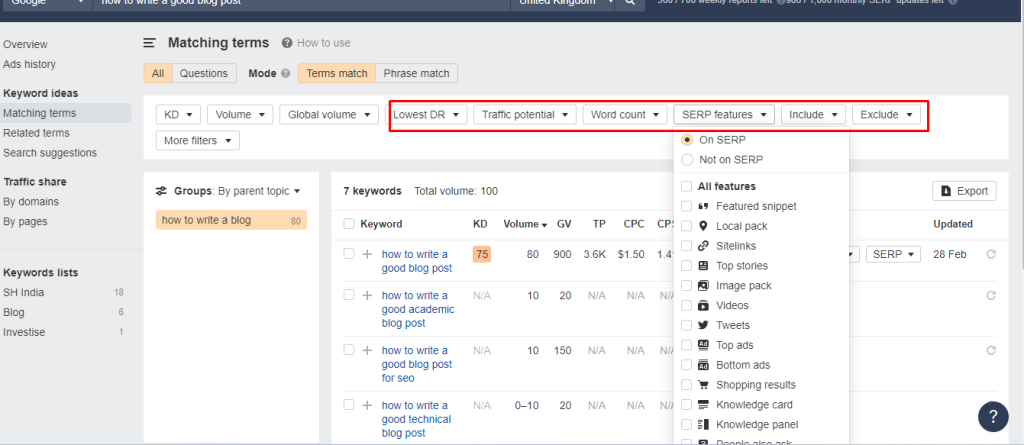
Once you’ve analyzed the metrics associated with your potential keywords, it’s time to refine your keyword list further. This can be done by applying additional filters and sorting options within Ahrefs, such as:

Keyword mapping

Traffic Potential: This filters allows you to select the list by applying min and max words

Exclude Keywords: This filter allows you to exclude certain keywords from your list.

Include Keywords: This filter allows you to include only certain keywords in your list.

Keyword Difficulty: This sorting option allows you to sort your list by keyword difficulty.

SERP Features: This sorting allows you to sort your keyword list by SERP features

Search Volume: This sorting option allows you to sort your list by search volume.

By applying these filters and sorting options, you can narrow down your keyword list to the most relevant and valuable keywords for your website.

By using Your refined keyword list, you can start using these keywords to optimize your website’s content. This includes:

  • Incorporating your target keywords into your website’s meta tags, headlines, and content.
  • Creating new content based on your target keywords.
  • Using related keywords and phrases throughout your website’s content to increase relevance.

Step 6: Tracking Performance & Optimizing Content

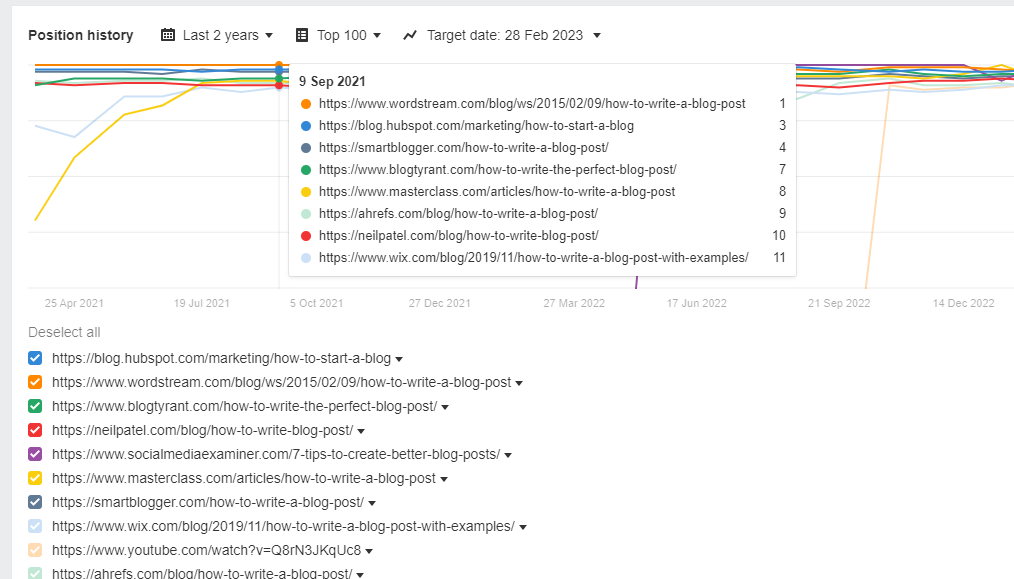
Finally once all desired keyterms have been identified and analyzed its time track performance over time via regular reporting metrics such as organic traffic growth rates etc. You can achieve this process by using “SERP position History”

Tracking and monitoring keyword performance

The report shows you the result of top 5 ranking positions of blog content in the ranking history. You can use this to ensure the maximum visibility across major search engines thus increasing chances success even further!

Final Words

Once you have identified your target keywords, you can use them to optimize your blog content. This includes optimizing your headlines, meta descriptions, and content to include the target keywords, as well as using related keywords and phrases throughout your content. Same time don’t stuff more keywords in your content, search engine easily will identify the keyword stuffing and more chances are there to blacklist your content.