How to boost your Local Ranking – Local SEO?

Are you a local business owner looking to attract customers in a specific geographic area? Then fix with local SEO, that can help businesses optimize their online presence and boost their local ranking in search engine results. From optimizing Google My Business listings to implementing targeted keywords, there are numerous strategies that businesses can employ to improve their local visibility. This blog will explore some essential local SEO strategies that businesses can use to increase their online visibility and attract more local customers to boost your local ranking.

Importance of local SEO for Local Ranking

Importance of local SEO for Local Ranking

With the increasing competition in local markets, it is important for small businesses to optimize their online presence and local visibility in order to attract more local customers. Here is some reasons why local SEO is important for Local ranking.

  • Local SEO allows small businesses to target specific geographical areas and reach potential customers who are located nearby
  • Implementing local SEO strategies helps small businesses to appear in local search results, increasing their visibility to potential customers
  • Having a strong online presence and appearing in local search results builds trust and credibility among potential customers.
  • People often search for products or services on their mobile devices or through voice search, and optimizing for local SEO helps small businesses to appear in these search results.
  • Local SEO provides an opportunity for small businesses to compete with larger businesses in their local area.

How to optimize your website for Local Ranking?

Optimizing your website for local search is an essential step in boosting your local ranking and driving more targeted traffic to your small business.

1. Localize your website content

Include relevant keywords and phrases that are specific to your local area throughout your website content. This will help search engines understand the geographical relevance of your website and improve its visibility in local search results.

2. Create location-specific landing pages

Create specific landing pages for each business location, if you have multiple business locations. These pages should include unique and localized content, such as address, phone number, business hours, testimonials, and promotions. This will help search engines identify the specific locations you serve and increase your chances of appearing in local search results.

How to optimize your website for Local Ranking

3. Optimize your meta tags and URL structure

 Ensure that your meta tags, including title tags and meta descriptions, contain relevant keywords and accurately describe the content of each page. Include your location in the URL structure of your web pages, if possible. This will further enhance the local relevance of your website and improve its visibility in local search results.

4. Claim and optimize your Google My Business listing

Google My Business is a free and powerful tool that allows you to manage your business information and appear in Google Maps and local search results. Claim your Google My Business listing and ensure that all information, such as your business name, address, phone number, and website URL, is accurate and up to date. Additionally, encourage customers to leave reviews on your Google My Business page, as positive reviews can significantly improve your local ranking.

5. Build local citations and backlinks

Mention your business name, address, and phone number on other local websites, directories, and social media platforms. Building consistent and accurate local citations across reputable websites can boost your local SEO efforts. Additionally, acquiring backlinks from local websites and relevant industry directories can further enhance your local search visibility.

6. Optimize for mobile and voice search

With the increasing use of smartphones and voice assistants, it is crucial to ensure that your website is mobile-friendly and optimized for voice search. Make sure your website loads quickly, is easy to navigate on mobile devices, and provides a seamless user experience. Additionally, consider optimizing your content for voice search by including natural language queries and long-tail keywords.

Google My Business listing for Local Ranking
Google My Business listing for Local Ranking

Claiming and optimizing your Google My Business listing is an important step in improving your local SEO and increasing your visibility in Google Maps and local search results. 

Step 1: Claim your listing

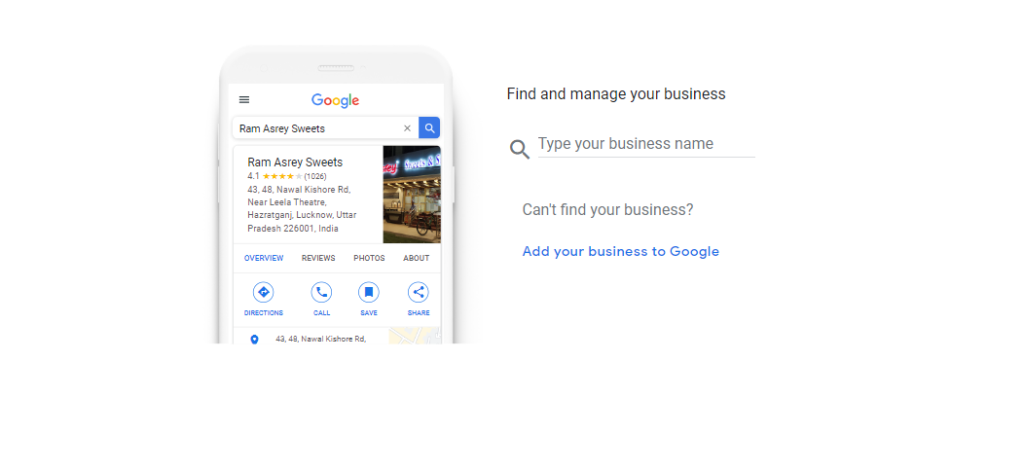
Google My Business listing is the first process if you are looking forward to increasing your local ranking. Visit the Google My Business website and follow the instructions to verify and claim ownership of your business. This will give you control over the information displayed about your business on Google.Claim your business

Step 2: Provide accurate information

Once you have claimed your listing, it’s crucial to provide accurate and complete information about your business. This includes your business name, address, phone number (NAP), website URL, business hours, and a brief description of your offerings. Make sure all this information is up to-date and consistent across all online platforms.

Step 3: Choose relevant categories

Google My Business allows you to choose categories that best describe your business. Select the most relevant categories that accurately represent your products or services. This will help Google understand your business and display it in relevant searches.

Step 4:  Add high-quality photos

Including high-quality photos of your business, products, and services can significantly improve your listing’s visibility and attractiveness to potential customers. Make sure the photos showcase your business in the best light and accurately represent what you offer.

Step 5: Utilize Google Posts

Google Posts allow you to share updates, offers, and announcements directly on your Google My Business listing. Take advantage of this feature to keep your audience informed about new products, events, or promotions. These posts can help attract more traffic and increase engagement with your business.

Some of the key points that helps to increase your local Ranking

  • List your business on industry-specific directories
  • Seek local partnerships and collaborations
  • Encourage online reviews and testimonials
  • Guest blogging on local websites
  • Create location-specific landing pages
  • Include location-specific information in your content
  • Set up Google Analytics and Google Search Console
  • Track online reviews and ratings

In addition to all, regularly monitor and track your efforts using tools like Google Analytics and Google Search Console to stay informed about your performance and make data-driven decisions. With consistent effort and strategic execution, you can boost your local SEO and achieve long-term success for your business.


What Are The Main Types Of Local Links And How To Earn Them?

Local Links are the one among the strategy that can significantly improve your website’s rankings. Local links are links from other websites within your local community, and they can help boost your visibility in local search results. Same time all local links are not treated as equal. So, it’s important to understand the different types of local links and how to earn them strategically. Here in this blog, we will explore the various types of local links and provide you with strategies on how to earn them effectively for your business.

Importance of local links for your business

Local links are an essential aspect of optimizing your website for local search results. These links are vital because they provide credibility and authority to your business in the eyes of search engines like Google. When other websites within your local community link to your website, it signals to search engines that your business is relevant and reputable in the local area.Importance of local links for your business

There are several reasons why local links are crucial for your business:

  1. Improved Local Search Visibility: Local links can significantly improve your visibility in local search results. When your website has high-quality and relevant local links, search engines are more likely to rank your website higher in local search queries. This increased visibility can lead to more organic traffic and potential customers in your local area.
  2. Increased Website Traffic: Local links not only boost your visibility in search results but also drive more traffic to your website. When users come across local links on other websites, they may be curious to learn more about your business and click on the link to visit your website. This increased website traffic can result in more leads, conversions, and sales for your business.
  3. Enhanced Credibility and Authority: When other trusted websites in your local community link to your website, it enhances your credibility and authority in your industry. These local links act as endorsements, showing that other businesses or organizations value and trust your services. This credibility and authority can be influential in attracting new customers and building a positive reputation for your business.
  4. Targeted Local Audience: Local links are an effective way to reach and engage with your target audience. When your website is linked on local directories, business listings, or community websites, you are directly reaching the people in your local area who are more likely to be interested in your products or services. This targeted approach can result in higher conversion rates and a stronger customer base.Different types of local links and how to earn them

Different types of local links and how to earn them

There are various types of local links that you can target for your website. Each type serves a different purpose and can contribute to improving your local search visibility and driving more traffic to your website. Here are some of the different types of local links and strategies to earn them

  1. Local Directory Links:

Local directories are online platforms that list businesses in specific geographic areas. These directories often allow businesses to create a profile and include a link to their website. To earn local directory links, you can start by submitting your business to popular local directories such as Google My Business, Yelp, Yellow Pages, and local chamber of commerce directories. Ensure that your business information is accurate and consistent across all directories. Local Directory Links

  1. Community Sponsorship and Event Links

Sponsoring local community events or organizations is a great way to earn local links. When you sponsor an event or organization, they may include a link to your website on their event page or website. Look for local events, charities, sports teams, or community organizations that align with your business values and target audience. Reach out to them and inquire about sponsorship opportunities that include a link back to your website.Community Sponsorship and Event Links

  1. Local Content Contribution and Guest Blogging Links:

Another effective strategy to earn local links is by contributing local-focused content to websites or blogs that reach your target audience. Look for local blogs, news outlets, or online publications that accept guest contributions or have a contributor network. Write informative and engaging articles or blog posts that provide value to the local community and include a link back to your website in your author bio or within the content when relevant.Local Content Contribution and Guest Blogging Links:

  1. Local Business Partnerships and Collaborations:

Collaborations with other local businesses or organizations that complement your products or services. This could include joint marketing campaigns, cross-promotions, or co-hosted events. By partnering with local businesses, you can utilize their online presence and audience to earn relevant local links. Reach out to potential partners and propose mutually beneficial collaborations that include linking back to each other’s websites. Local Business Partnerships

  1. Local Reviews and Testimonials:

 Encourage your satisfied customers to leave reviews or testimonials on local review platforms such as Google My Business, Yelp, or industry-specific review sites. Positive reviews not only contribute to your overall online reputation but can also earn you local links when the review platform includes a link to your website. Provide exceptional products or services, engage with your customers, and politely ask for reviews to generate more positive testimonials and potential links.Local Reviews and Testimonials

Final Words:

Implementing a comprehensive local link building strategy is crucial for improving your website’s visibility, driving traffic, and boosting your brand’s authority in the local community. By following the steps outlined in this guide, you can effectively earn local links and track their success to make informed decisions for future campaigns.

Start by setting clear goals for your link building efforts, whether it’s increasing website traffic, improving search engine rankings, or enhancing brand visibility. This will help you track and measure the success of your strategies accurately. Utilize tracking tools such as Google Analytics to monitor the performance of your local link building efforts. Set up goals and events to track the impact of local links on your website’s traffic and user behavior. Track referral traffic in Google Analytics to identify which local links are driving the most traffic to your website. This data will help you determine the effectiveness of your link building efforts.

Analyze your backlink profile using tools like Ahrefs to evaluate the quality and quantity of links pointing to your website. This will help you assess the impact of your local link building efforts on your website’s authority and visibility.

A Complete Guide on Local SEO and its Optimization process

Local marketing in your area and word-of-mouth referrals may be effective ways to attract customers. However, an online search can have just as much, if not more, impact. According to Social Media Today, approximately 90% of search engine users have looked online to locate a local business. So, local SEO might be the secret to expanding your company and remaining current.

Additionally, local information was sought after in more than 40% of all Google searches. Therefore, if a company doesn’t appear in local search engine results, it might be starting to lose out on profitable business traffic and clients. In other words,

If you’re relatively new to local SEO, you may have many questions and need help with how to begin optimising. This blog will help you to get that knowledge.

What is Local SEO?

What is local seo

Local SEO plays an essential role in the whole process of Search Engine Optimization (SEO). The process of optimising your website for a particular local area is known as local SEO. If you run a local business, such as a store, restaurant, or agency, you want your web pages to appear high in local customers’ search results. Making sure that customers can find you both online and offline is the goal of optimising the website for your local business. Even though you might not be getting many people into your building, you’re still trying to reach people who live nearby. You should therefore make sure that the region’s online presence is optimised. You can partially accomplish that via your webpage, but Local SEO offers you many more options!

How Local SEO Works

Google’s local search algorithm uses three factors in addition to the standard ranking factors to help find the best match:

  • Relevance
  • Distance
  • Prominence

Then, for local searches, Google shows two different types of search results, the organic results and the “local pack” results (Google Maps and Business Profiles).

The typical blue link search results on Google that we are all accustomed to seeing are called organic results.

A Google feature called a local pack (or map pack) displays the top local business listings along with a map.

However, Google doesn’t limit its local search results to those that include a particular city, state, or “near me” keyword. Google will show local results if it determines that your search has a regional focus, even though the keyword isn’t localised explicitly.

How to Optimize the Business for Local SEO?

Let’s look at the most vital Google local search ranking factors and advice on adjusting your website.

Google Business profile

A Google Business Profile, formerly Google My Business, is a free listing containing details about your company. You can include information like your location, services, goods, and photos. Google will then have it in the local search results.

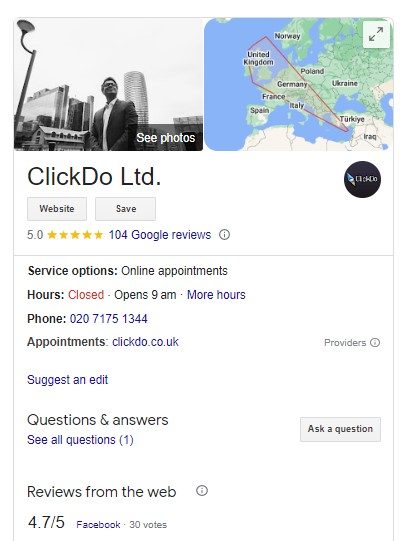
For instance, this is how it might appear to a user on the internet.

Google Business Profile

In Google’s opinion, the most crucial element of local SEO ranking is optimising your business profile. Therefore, you must have a Google Business Profile to appear on the local pack.

Here are some tips for writing a business profile:

  • Schedule specific business hours
  • Choose a variety of characteristics to describe your company
  • Upload videos and pictures frequently

NAP (Name, Address, and Phone) Citations

NAP (Name, Address, and Phone) Citations

Your name, address, and phone number (NAP) may appear online in citations. They typically show up on social media profiles and business directories. NAPs are crucial because Google relies on them as evidence that the information about your company is accurate. The more NAP citations Google sees for your company, the more certain it is that the address and phone number you provide are valid. Therefore, you should obtain consistent NAP citations on as many trustworthy websites as possible.

Keyword Research

Several elements influence the optimisation of local SEO of your website, and keyword research is a key tool. Finding valuable keywords that potential clients use when looking for products is a technique called local keyword research. But it takes a lot of work. As a result, businesses assume the search terms that potential clients will use to find their services or products.

keyword research

Here are some things to think about when conducting keyword research:

  • Choose keywords that are pertinent to the services you provide while keeping your offerings in mind
  • Think of and develop ideas in local strategy
  • Ensure that you pay attention to implicit and explicit keywords, such as “Flower Shop” and “Flower Shop in Greenwich, London.”
  • Choose long-tail keywords to focus on
  • For popular queries, take a look at the frequently asked sections

Local Online Directories

Investigate the online listings of your rivals. Anyone looking to tap into the local market should use local business directories like Yelp, UK Small Business Directory, Cylex UK and others. To advance your local SEO strategy, it is best to conduct additional research to discover any domain-specific directories. Citations are another name for this, a precise NAP reference to your company name on the internet.

Difference between Local SEO and Organic SEO

Let’s look at the fundamental difference between Local SEO and Organic SEO.

Local and Organic SEO viewers

The audience for local vs organic searches and their search intentions is the first notable differences.

People actively looking for a nearby good or service conduct local searches, they will specifically mention the category of good, service, or company as well as the name of their town or the phrase “near me.” They usually choose a store that day and have every intention of making a purchase there.

Organic searches are typically done by people who are looking for information. They are researching, not necessarily transacting. They seek knowledge and facts to help them resolve their current problem. However, they might agree to subscribe to a newsletter.

Local and Organic SERPs

Local and Organic SERPs

For instance, some Google searches will display a combination of local and organic results. Local SEO will aim for different outcomes or positions than organic SEO.

Local SEO aims to improve a business’s position in searches on sites like Yelp, Bing Places, Apple Maps, and Google Maps. Local companies are specifically listed in these results. In addition, links to websites as well as contact details, store photos, business categories, and other information, are included in the search results.

Organic SEO is used to appear higher in the primary search results on Google, Bing, Yahoo!, and other search engines. The outcomes may include your home page or deeper website pages like blog posts, detailed informational guides, and more.

Local Citations and Organic Links

Like backlinks to the organic SEO, citations are to local SEO. Both act as the cornerstones of their respective SEO optimisation strategies.

Online mentions of your company that typically include your location’s name, address, and phone number are known as local citations. Citations are frequently found on websites that list and review local businesses, like Yelp, Google My Business, and Angie’s List. They may also contain information about your business’s hours, parking options, etc.

In the meantime, you want your backlinks to come from other trustworthy and authoritative websites. Various links to different pages on your website are preferred, and you want the anchor text to contain essential keyword phrases.

Conclusion

Not everyone needs to use local SEO. You should stick to worrying about organic SEO strategies if you don’t need local traffic and conduct the majority of your business online with international audiences. However, you should concentrate on local SEO if your business is conducted primarily (or partially) at a physical location.

They say that word-of-mouth is the best form of advertising, and these days, word-of-mouth appears to occur more frequently online than in person, thanks to sites like Yelp, Facebook, and Google. So be sure to concentrate on both organic and local SEO.


Google My Business Profile – How To Optimise It Best For Local SEO?

A Google My Business Profile is a free tool from Google that aids business owners in managing their online presence across the search engine and a growing number of its services, such as Google Maps. This blog will give a detailed explanation of Google My Business Profile and the optimisation process of this for local SEO.

What is Google My Business Profile?

What is Google My Business Profile?

It’s important to note that Google recently changed the name of its service from Google My Business to Google Business Profile before we get started. Although it now goes by a different name, Google Business Profile is still your one-stop shop for controlling the information about your company and how it will be displayed in search results.

It is a crucial tool for modifying how Google Maps, the Knowledge Graph, and organic search results display information about your company. The most recent Local Search Ranking Factors Survey shows that reviews come second to Google My Business as the most significant influencer of local SEO success.

You can edit your company listing by adding NAP information, business hours, photos, etc. Even unusual choices demonstrate various shopping options (delivery or store pickup). You also have access to many other options, such as controlling the feedback your clients leave. Reviews should be a crucial component of your local SEO efforts, as you may already be aware.

How does it work?

How does Google My Business work?

Making an account and claiming your business are the only two steps to begin using Google Business Profile. After providing your information, Google will send a physical postcard to the address you provided. They send you this card to ensure you’re being truthful and are the company’s owner listed at the address. There are exceptions, and some companies can be confirmed by phone or email.

Once verified, you can enter all the required information and monitor the performance of your listing. In addition, you can receive regular insights to see how many impressions, clicks, and subscribers your listing received over time. It’s a great way to learn how Google and your customers view your company.

Why is Google My Business Important?

An optimised Google My Business profile can help your company in some ways, including the following.

To Engage with more Users

People who search for businesses frequently see your company’s Google My Business listing. It represents your brand and, depending on the details and assets included in the listing, can influence how customers perceive your business.

Having current information and utilising all features (uploading photos, goods, services, Google posts, etc.) creates a positive user experience and aids businesses in informing their clients.

To Boost Local Ranking

Well, it all begins with these three crucial elements, which Google mainly takes into account when determining local search results:

Relevance: This term describes how closely a local business profile’s data corresponds to a user’s search query.

Distance: Takes into account the distance between each search result and the location term used in the search query. If no location is specified, Google will determine the distance based on its understanding of the user’s location.

Prominence: The business’s prominence indicates how well-known it is. This factor also depends on the data Google has on a company (backlinks, reviews, articles, etc.).

The Practices to optimise it best for the Local SEO

The Practices to optimise it best for the Local SEO

Having an optimised, current Google My Business listing is more crucial than ever as the digital landscape changes constantly. Your business profile is essential for satisfying the needs of your existing customers and enhancing your online presence to draw in new ones, regardless of whether you operate locally or on a much larger scale.

If you want to increase your organic presence and generate quality leads, it takes more than just creating a Business Profile or claiming an existing listing. Here are a few Google My Business best practices and optimisations to help you increase engagement and your Search Engine Optimization ranking.

Complete Data on your Business Profile

First and foremost, you should include all relevant contact details for your company, including name, address, phone number, website, and opening times. In addition to helping Google rank your business higher in local search results, having a complete business profile increases the number of actions potential customers can take after discovering your profile.

Make sure the details in each section match those on your website, social media profiles, and other listings as you complete them. Although it might seem obvious, even minor inconsistencies, such as using “Street” on your website address but “St” on your listing address, can cause Google to raise an alert. Consistent Name, Address, and Phone (NAP) data are among the most important ranking factors in Local SEO.

Sharing Business Operating Hours

Sharing Business Operating Hours

It is not surprising that we now research everything we do on Google first. For instance, before going to a restaurant, you would research it online and look up its opening and closing times. By doing this, you can mentally prepare yourself for what to anticipate and when. This is why Google My Business’s feature is useful.

Since you can also add your business opening and closing time, it helps to make things easier for the customers. They are, therefore, aware of the days you will be available, the time you will be available, and when there will be the most incredible rush.

Create a Business Description

One of the most crucial elements of your listing is the business description because it informs users about the nature of your company and boosts your company’s SEO. A good business description follows Google’s rules, uses relevant information about the company, and includes essential search terms (Information about the company’s history, what makes it unique, the products and services it offers, and other information that is useful to customers).

Add Business Products

The Google My Business product editor feature is a fantastic tool for enhancing your company’s online presence by showcasing your products and encouraging customer interaction. For example, product title, photo, description, and price are just a few details that can be included for potential customers when featured on a business profile.

Another option is to add a Call To Action (CTA) button that directs users to the product page.

Call To Action

Add Business categories

Google provides over 3,000 categories for companies to describe themselves, ranging from “accounting firm” to “website designer.” Customers can use these categories to find precise, targeted results for the services they need. One primary category and several subcategories can be assigned to a business profile. The individual can add up to 9 subcategories.

It is crucial to choose a primary Google My Business category that accurately represents the company as a whole because many local SEO experts believe it to be the most essential local pack ranking factor. To ensure that all of your various departments and services are represented, be as specific as you can when selecting your primary category and make use of subcategories.

For example, a grocery store might select “Grocery Store” as its primary category and add the subcategories “Pharmacy” and “Deli” as additional options.

Create Blog Posts

Google introduced the option to add posts to your business listing to maintain a consistently updated platform, sometimes in real-time. This straightforward, functional, and appealing feature of Google My Business will help you with marketing, advertising, and SEO.

The user can share their most recent offerings using this feature. In addition, you can advertise your company’s services to people directly by clicking posts on the Google My Business dashboard. Not to mention, locally relevant content is essential for boosting local SEO.

Manage Reviews

Manage Reviews

An essential component of any business is its reviews. It is one of the most crucial aspects of managing your brand’s online reputation. Therefore, having a system in place that makes it simple for you to view and respond to reviews is ideal because prompt responses, even to some negative reviews, will increase consumer trust in your brand.

The Google My Business managing review component enters the picture at this point. You can manage customer reviews by responding to them directly on the dashboard.

Conclusion

As well as, Google Business Profile is a great tool and a significant strategy for SEO, remember that Google My Business (also known as Google Business Profile) is not a one-size-fits-all solution for local SEO. It must complement your other off-page and on-page SEO initiatives. If your profile is reliable, you won’t likely move up the rankings, but you also will only succeed with a properly optimised website and regionalised content. These things are related.