How the Google Image Search Engine Works?

Google Images search is same like a web search engine that allows users to search the Web for image content. It was launched on June 27, 2001, and has since been integrated with Google Search.

The service has two primary functions:

The first is to provide an interface for users to search for images. The second is to serve as a back-end for other Web applications that need to access Google Images content.

Here, we will take a detailed look on how the Google Image search engine works, the search engine’s interface, algorithms, and benefits of using Google Lens..

What is Google Image Search?

Google Image Search is a search engine that enables users to search the Internet for images. It works by assigning each image an algorithm-based score. This algorithm considers three elements: relevance, freshness, and quality.

When users search for an image, the Google Image Search engine uses these signals to rank the images and show the most relevant ones first. The engine also looks for images that match the user’s search query, and shows them to the user in order of relevance.Google Image Search

The search engine also makes use of Optical Character Recognition (OCR) technology. This technology allows the search engine to recognize text in images, making it an even more powerful tool when it comes to search.

Google Image Search engine also works to make sure that the images that are displayed are safe and secure to use. All images must be checked and verified in order to be displayed, and any images that are deemed to be inappropriate will not be displayed.

Ways to get access the Google Images:

  • Use Google.com and select the “Images” option in the top right corner.
  • Use the URL of images in Google.com as URL images.google.com
  • Place a query on the “Search Tab” and select “Images “from the menu.

How does Google Image Search Engine work?

Google Image Search works by ranking each image according to a scoring system based on relevance, freshness, and quality. Google’s algorithms are constantly analyzing user searches and photos in order to recognize patterns and identify the most relevant images.

Once an image has been found, Google Image Search’s algorithms will rank the image according to relevance, freshness, and quality. The most relevant images will be ranked higher, while less relevant images will be ranked lower.

Google makes use of Optical Character Recognition technology to identify text in images. This means that Google can search for images even if they don’t have any text in them.

Google Image Search also verifies images, making sure that all images that are displayed are safe and secure to use. Any images that are deemed to be inappropriate will not be displayed.

The role of algorithms in Google Image Search

Google’s algorithms play a major role in the success of Google Image Search. Google algorithms use several different techniques, such as page rank and neural networks, to analyze images and provide the most insightful and accurate search results.

Google’s algorithms use page rank to assign importance to each image. The page rank looks at the number of links that point to a particular page, and uses this to determine the importance of the page.

Google also uses algorithms to detect similar images and clustered images. This will allow the search engine to find images even if the exact search terms aren’t entered. Algorithms can also be used to identify and eliminate duplicate images.

Google also uses deep learning algorithms to recognize different types of images, such as people, objects and landscapes. Deep learning algorithms can then be used to suggest similar images to the user or to recommend images relevant to their search query. The algorithms can also be used to detect inappropriate content.

How to optimize your images for Google Image Search?

Optimizing images for Google Image search is an important part of any SEO strategy. Images are one of the top three elements that often get more attention from potential readers or customers. Hence, it is important to ensure that your images are optimized properly to appear in Google Image Search results.

To optimize your images for Google Image Search, here are some of the key elements to consider:

  1. Image format – Use the appropriate image format that best suits the type of image, such as JPG and PNG for photographs and illustrations, and GIF for banners and logos.
  2.  Image size – Make sure that the image size is not too big. It should be optimized so that it loads quickly on the webpages.
  3. Image name – This is an important factor. Using relevant keywords in filenames helps make your images easier to find in Google Image search.
  1. Image alt tags – Describe the image accurately using a few relevant keywords. This helps in giving your images a better ranking on Google Image Search.
  1. Image descriptions – Add descriptive captions to your images to provide more context and value. This will help in improving its relevance and ranking on Google Image Search.

By following these guidelines, you’ll be able to optimize your images properly for Google Image Search and make them stand out from the crowd.

Google Images: Now With Google Lens

Google Lens can recognize objects in your photos and provide more details about them. It works with different kinds of photos, including pictures of flowers, landmarks, animals, artwork, and more. When you select an object in your photo, Google Lens will show you more information from the web. This includes information such as scientific facts, related Wikipedia articles, reviews of nearby restaurants, and more.

Google Lens can also be used to scan barcodes and QR codes, help you copy text from a photo and paste it somewhere else, and answer basic questions about an object. It helps you to quickly learn more about the things in your photos, and is an increasingly useful tool for anyone passionate about photography.

Steps you need to follow in order to use Google Lens:

  1. Open the Google Lens optionGoogle Lens
  2. Drag an image or just past ethe URL of the image that you want to learn more about.
  3. Select the object and then zoom in or out to choose from different areas of the image.Google Lens Google image search
  4. Tap the “Lens” button at the bottom of the screen and Google Lens will provide more information about the object.
  5. Once you are done exploring the object, you can close the Google Lens.

Wrapping up

Optimizing your images for Google Image Search is something that you should definitely pay attention to. Not only will it help you appear in the search results more often, it will also allow you to show up in the top results with higher ranking.

By following the guidelines you should be able to improve the visibility of your images and get the most out of Google Image Search. It takes a bit of effort, but if you put some thought into it and execute the strategy properly, it should pay off in the long run.

How to Optimize Your Technical SEO With the Google Search Console?

If you’re looking to improve your website’s search engine rankings, then you need to know about Google Search Console. Google Search Console provides valuable insights into your site’s performance, helping you to identify issues and opportunities for optimization. From monitoring your site’s health to analyzing search traffic, there’s a lot you can do with Search Console. But with so many features and metrics to keep track of, it can be overwhelming for beginners. That’s why we’ve put together this guide to help you maximize your SEO strategy with Google Search Console. Here we’ll cover the tips and tricks you need to know to get the most out of this essential tool.

Understanding the importance of SEO for your website

Search engine optimization (SEO) is the process of optimizing your website for better visibility on search engines like Google. It involves a variety of techniques, such as ensuring your website has relevant content, optimizing your website’s structure, and building quality backlinks. The goal of SEO is to increase your website’s visibility and rank higher on search engine results pages (SERPs), which can lead to increased traffic and revenue.

SEO is essential for any website owner, regardless of the size or niche of their website. With millions of websites competing for attention on the internet, it’s crucial to take steps to ensure your website stands out from the crowd. While there are many different factors that contribute to a website’s SEO, using Google Search Console is one of the best ways to monitor and improve your website’s performance.

Benefits of using Google Search Console for your SEO strategy

Google Search Console is a free tool provided by Google that allows website owners to monitor and optimize their website’s performance on search engines. There are many benefits to using Search Console for your SEO strategy, including:

  1. Monitoring your website’s health

One of the most important features of Google Search Console is the ability to monitor your website’s health. Search Console will alert you if there are any issues with your website, such as crawling errors or security issues. This can help you identify and fix problems before they have a negative impact on your website’s performance.

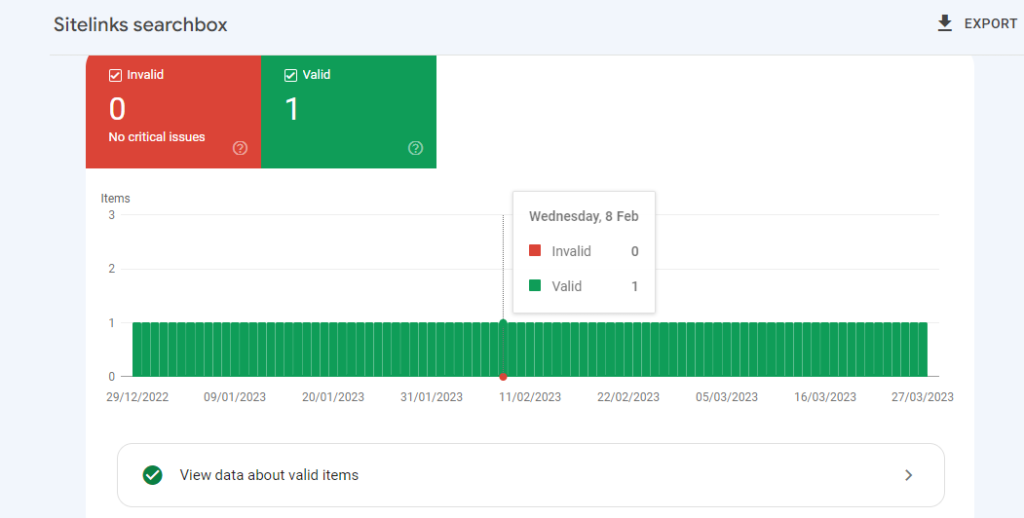
Monitoring your website's health using Google Search Console

  1. Analyzing search traffic

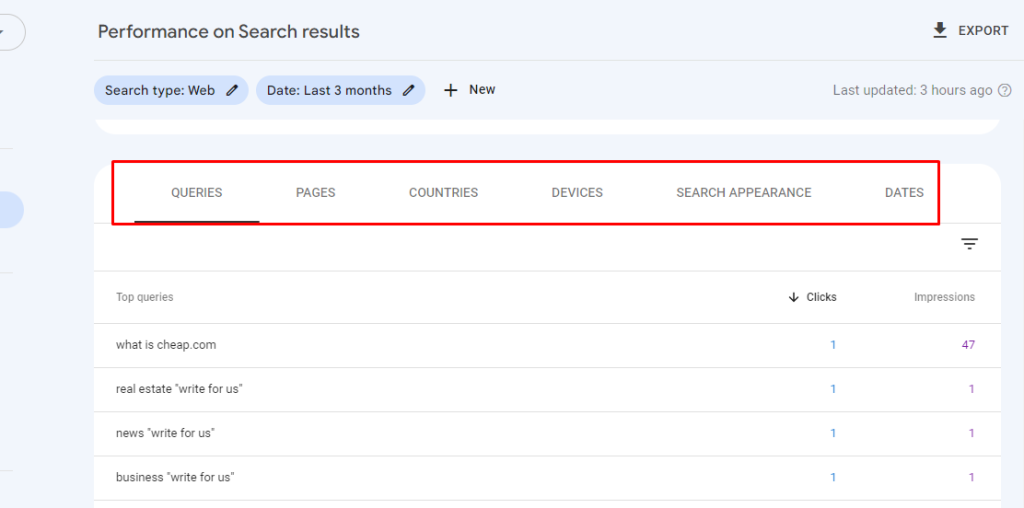
Google Search Console provides detailed information about the search terms people are using to find your website. You can see which keywords are driving the most traffic to your site and identify opportunities to target new keywords. This information can be used to optimize your website’s content and improve your SEO strategy.

Analyzing search traffic

  1. Identifying and fixing technical SEO issues

Search Console can help you identify technical SEO issues that may be affecting your website’s performance. For example, you can see if there are any pages on your website that are returning 404 errors or if there are any pages that are taking a long time to load. By fixing these issues, you can improve your website’s search engine rankings and user experience.

  1. Submitting sitemaps and URLs for crawling

Google Search Console allows you to submit sitemaps and individual URLs for crawling. This can help ensure that all of your website’s pages are indexed by Google and can be found by users searching for relevant keywords.

Submitting sitemaps and URLs for crawling

Setting up Google Search Console for your website

Setting up Google Search Console for your website is a straightforward process. Here’s how to get started:

  1. Sign in to Google Search Console

To sign in to Google Search Console, you’ll need a Google account. If you don’t have one, you can create one for free. Once you have a Google account, go to the Google Search Console homepage and sign in.

Sign in to Google Search Console

  1. Add your website

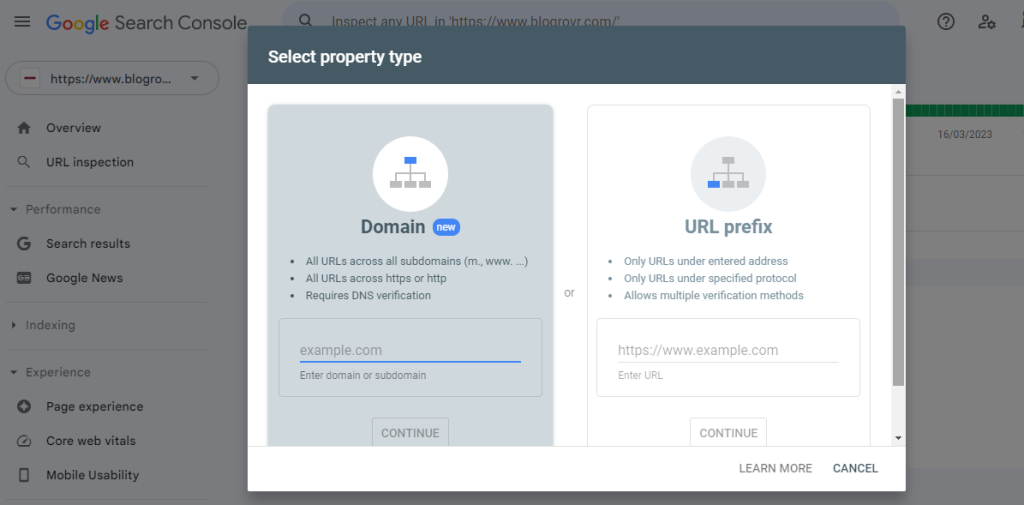
Once you’re signed in to Google Search Console, you’ll need to add your website. To do this, click the “Add Property” button and enter your website’s URL. Follow the instructions to verify that you own the website.

Add property Google Search Console

  1. Set up Google Analytics

To get the most out of Google Search Console, you should also set up Google Analytics. This will allow you to track your website’s traffic and see how users are interacting with your site. To set up Google Analytics, go to the Google Analytics homepage and sign in. Follow the instructions to set up your account and connect it to your website.

Navigating the Google Search Console dashboard

Once you’ve set up Google Search Console for your website, you’ll be taken to the dashboard. The dashboard is where you’ll find all of the information about your website’s performance. Here are some of the key sections of the dashboard:

  1. Search Appearance

The Search Appearance section of the dashboard provides information about how your website appears in search results. You can see how many pages on your website are indexed by Google, as well as the search queries that are driving the most traffic to your site.

Search Appearance

  1. Search Traffic

The Search Traffic section of the dashboard provides information about how users are finding your website. You can see the search terms people are using to find your site, as well as the pages on your site that are receiving the most traffic.

Search Traffic

  1. Google Index

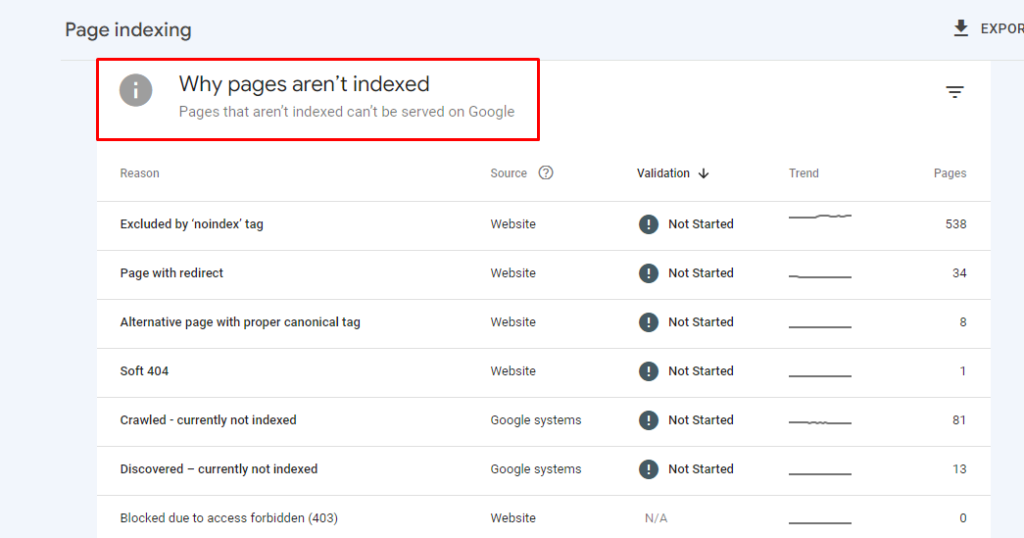
The Google Index section of the dashboard provides information about how many pages on your website are indexed by Google. You can see if there are any pages that are being blocked by robots.txt, as well as any crawl errors that are preventing Google from indexing your site.

Google Index

page indexing

  1. Crawl

The Crawl section of the dashboard provides information about how Google is crawling your website. You can see if there are any crawl errors on your site, as well as any pages that are taking a long time to load.


Analyzing your website’s performance with Google Search Console

One of the most useful features of Google Search Console is the ability to analyze your website’s performance. Here are some of the key metrics you should be monitoring:

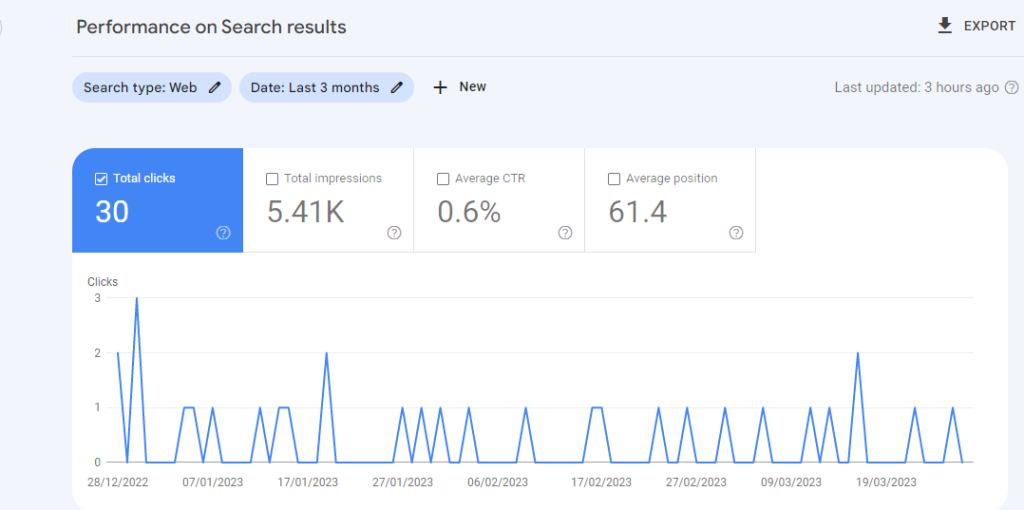
  1. Clicks

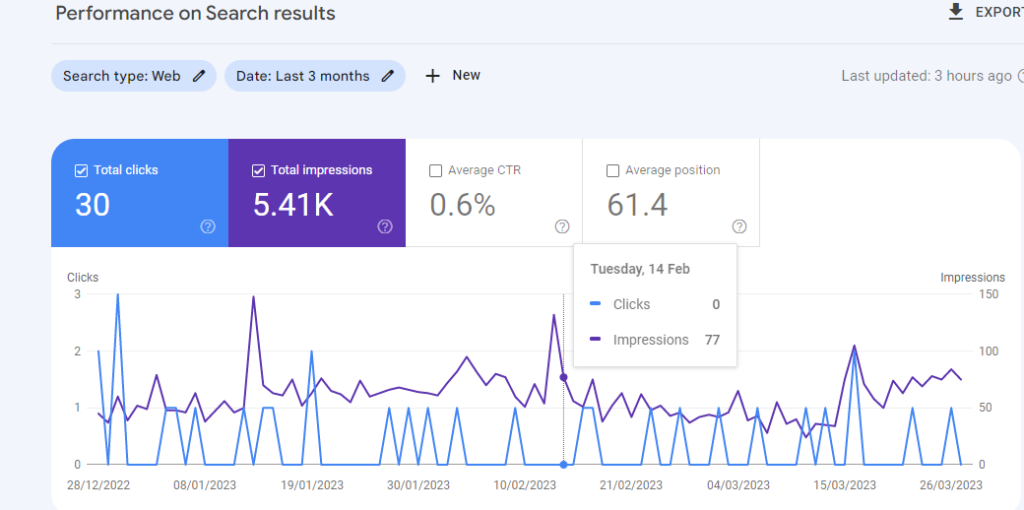
Clicks refer to the number of times users clicked on your website’s link in search results. Monitoring clicks can help you identify which keywords and pages are driving the most traffic to your site.

clicks on Google Search Console

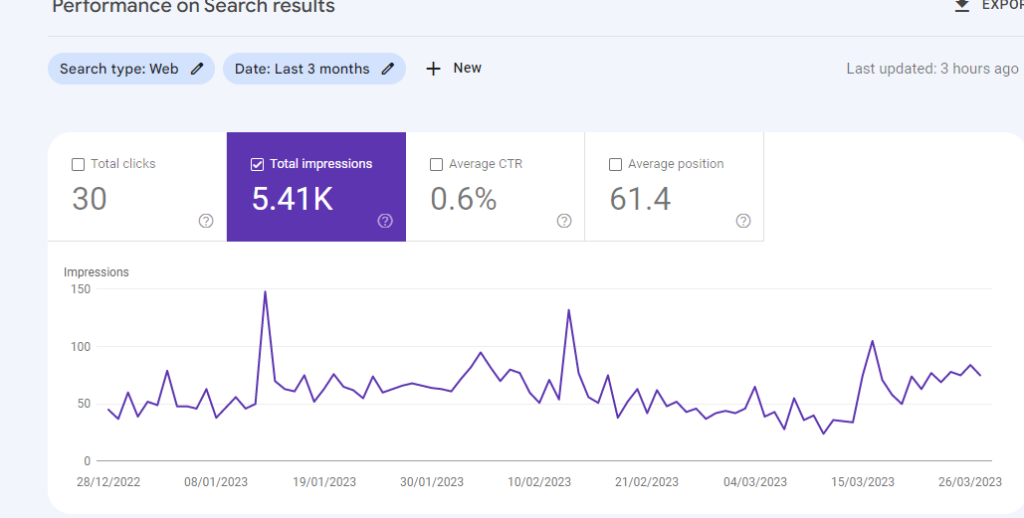
  1. Impressions

Impressions refer to the number of times your website’s link appeared in search results. Monitoring impressions can help you identify which keywords and pages are getting the most visibility on search engines.

Impressions on Google Search Console

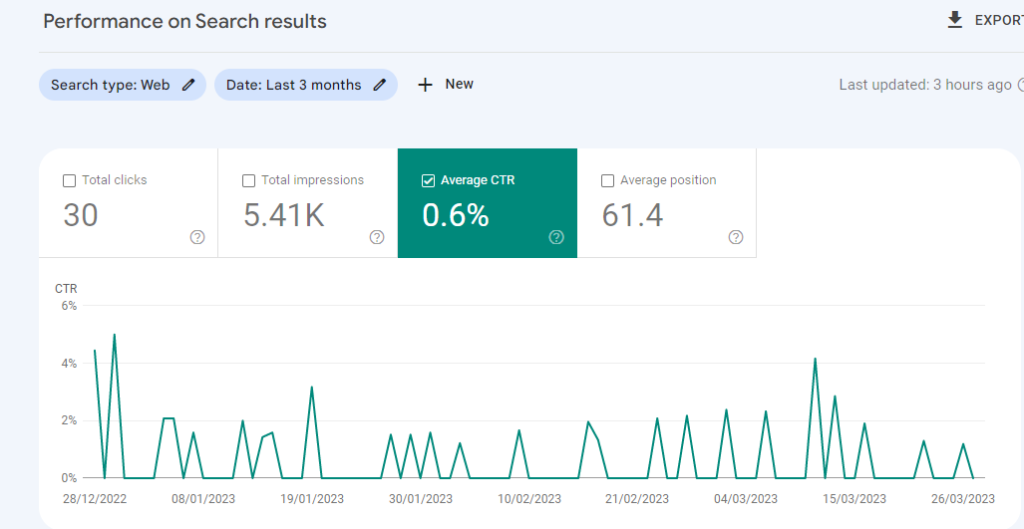
  1. Click-through rate (CTR)

CTR refers to the percentage of users who clicked on your website’s link after seeing it in search results. Monitoring CTR can help you identify opportunities to improve your website’s meta descriptions and titles.

CTR in Google Search console

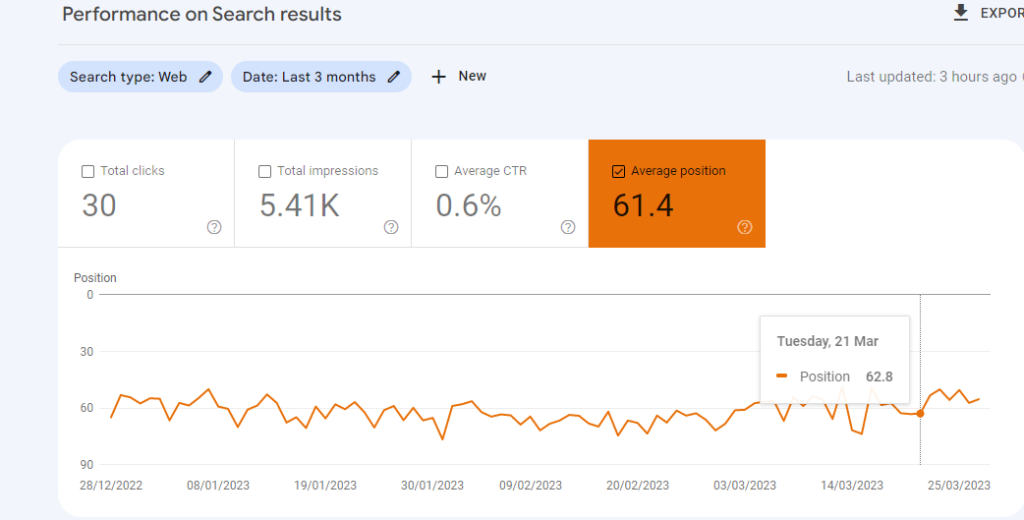
  1. Average position

Average position refers to the average ranking of your website’s pages in search results. Monitoring average position can help you identify opportunities to improve your website’s SEO strategy and rank higher on search engine results pages.

Average position

Identifying and fixing technical SEO issues with Google Search Console

Google Search Console can help you identify and fix technical SEO issues that may be affecting your website’s performance. Here are some of the most common technical SEO issues to look out for:

  1. Crawl errors

Crawl errors occur when Google is unable to crawl a page on your website. This may be due to a broken link or a page that has been deleted. Crawl errors can negatively impact your website’s search engine rankings, so it’s important to fix them as soon as possible.

  1. Security issues

Security issues, such as malware or hacking, can have a significant impact on your website’s search engine rankings. Google Search Console can alert you if there are any security issues on your site, allowing you to take action quickly.

  1. Duplicate content

Duplicate content occurs when two or more pages on your website have the same content. This can negatively impact your website’s search engine rankings, as Google may not know which page to rank higher. Google Search Console can help you identify duplicate content and take steps to fix it.

Advanced tips and tricks for maximizing your SEO strategy with Google Search Console

Here are some advanced tips and tricks for maximizing your SEO strategy with Google Search Console:

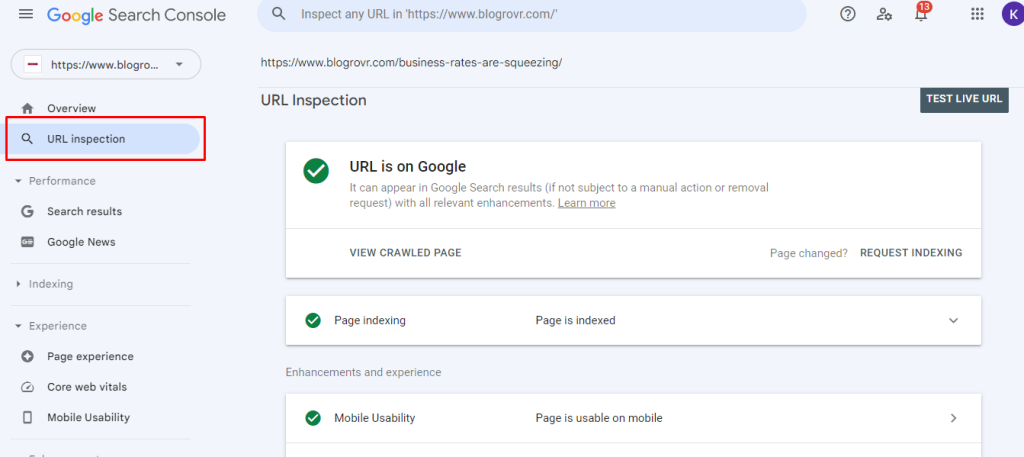
  1. Use the URL inspection tool

The URL inspection tool allows you to see how Google sees a specific page on your website. This can help you identify and fix issues that may be affecting your website’s search engine rankings.

URL inspection tool

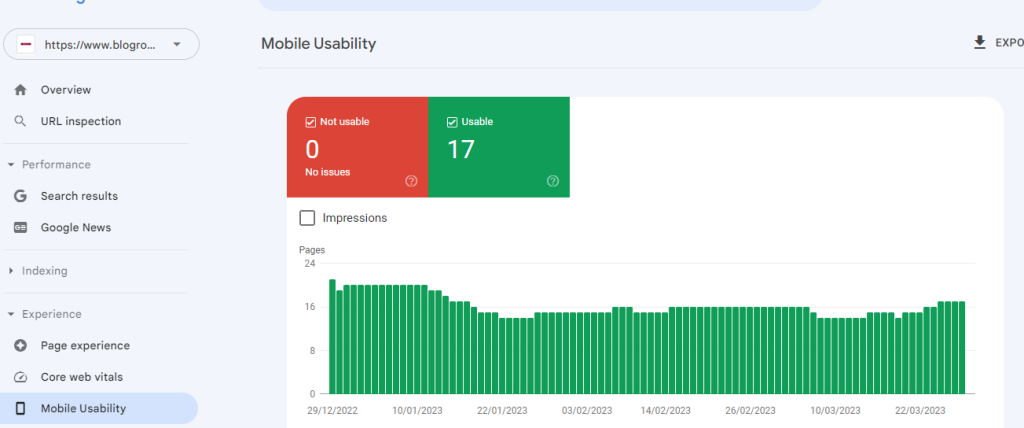
  1. Monitor your website’s mobile performance

With more and more users accessing the internet on mobile devices, it’s crucial to ensure your website is optimized for mobile. Google Search Console can help you monitor your website’s mobile performance and identify areas for improvement.

Google Search Console Mobile Usability

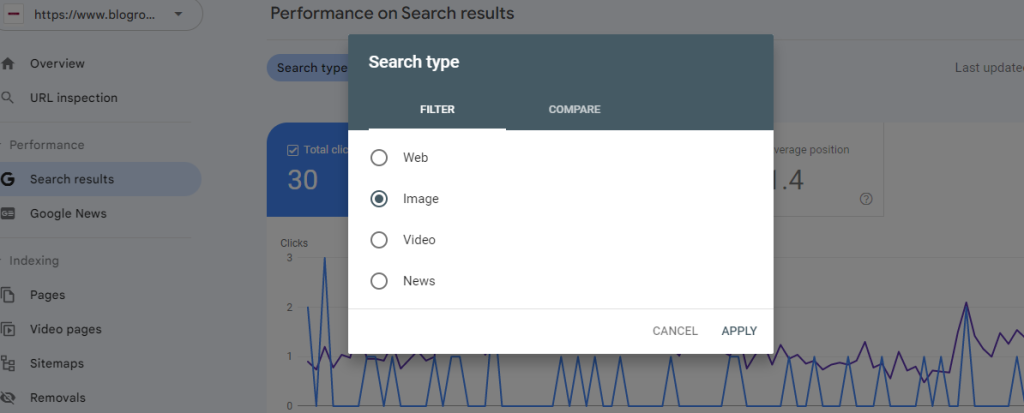
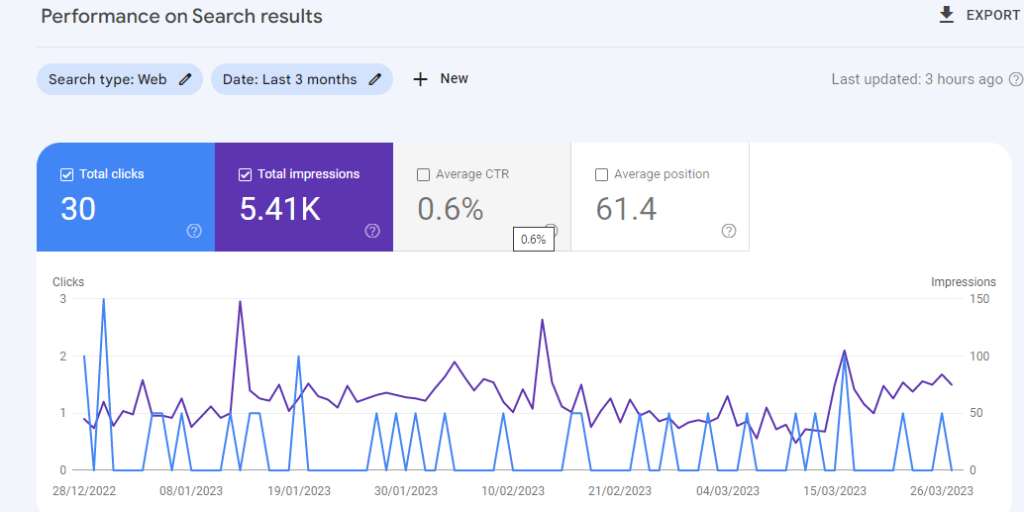
  1. Use the performance report to analyze your website’s performance over time

The performance report allows you to see how your website’s performance is changing over time. Use this information to identify trends and opportunities for optimization.

Google Search Console performance report

Conclusion

Google Search Console is an excellent tool for optimizing your website’s search engine rankings. By monitoring your website’s health, analyzing search traffic, and identifying and fixing technical SEO issues, you can improve your website’s performance and drive more traffic to your site. If you have a website, using Google Search Console is essential for maximizing your SEO strategy. So, start using Search Console today and take your website to the next level in a search appearance,