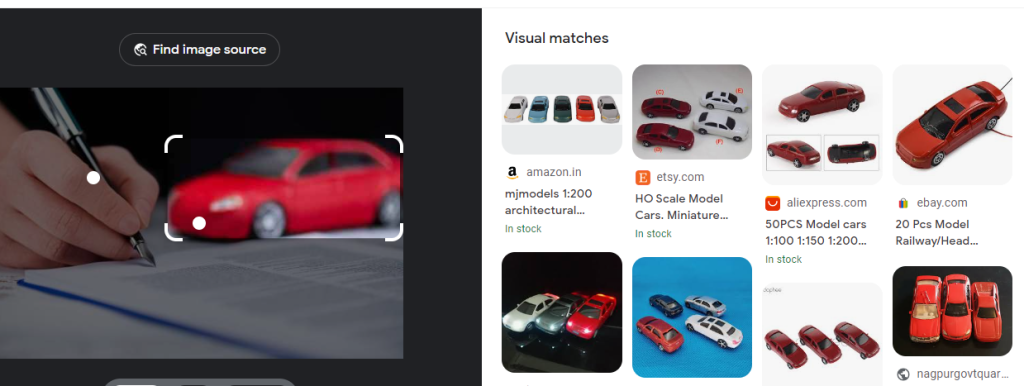
With the release of Google Lens, visual search is about to become the next big thing. This technology allows users to search for information about the physical world around them by taking a picture.
For example, if you see a flower that you can’t identify, you can take a picture of it with Google Lens and the search engine will tell you what it is. This technology can also be used to translate text, identify landmarks, and even read QR codes.
Google Lens is still in its early stages, but it has the potential to change the way we search for information forever. In this blog, we will take a detailed look at Google Lens and what it could mean for the future of visual search.
Google Lens
Google Lens is an advanced image recognition technology developed by Google. It is able to recognize what’s in front of you using the camera on your smartphone. To use Google Lens, you just have to take a picture of whatever it is you are looking for. Google Lens will then use its AI-powered algorithms to identify the object or text.
Google Lens works by using a combination of image recognition and deep learning technologies. It uses the camera on your phone to capture a still image and then analyzes it using its deep learning algorithms to identify the objects, text, and other information in the image.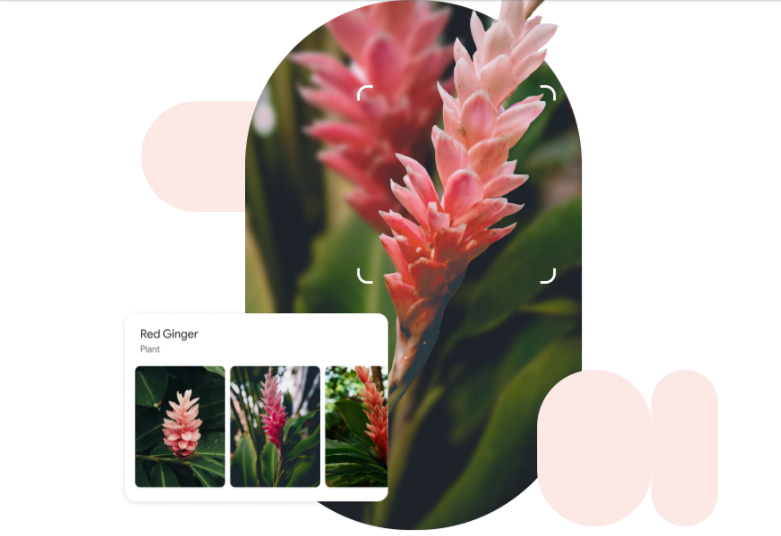
Google Lens uses visual context analysis and deep neural networks to understand what it sees. It can identify objects and then provide information about them. For example, if you take a picture of a restaurant, Google Lens will recognize it and then offer information about the restaurants such as its Yelp reviews, its menus, and phone numbers. Google Lens can also recognize text in images, allowing you to copy text from the image and paste it into another document.
Features of Google Lens
Google Lens can do a multitude of things to make your everyday life easier. Some of its key features include:
Object Recognition:
Google Lens can recognize objects in an image and provide you with information related to it. For example, if you take a picture of a restaurant, it can provide you with reviews, ratings, menus, and more.
Text Extraction:
Google Lens can recognize written text from an image and extract it into a digital format so you can edit it in another program.
Text Translation:
If you take a picture of a sign written in a different language, Google Lens can translate it into your native language.
Visual Search: You can use Google Lens to search the web for similar images.
Shopping Assistance: Google Lens can help you find and purchase products quickly and easily. All you have to do is take a picture of what you want to buy and it will provide you with options.

Home Automation: With Google Lens, you can easily program your home automation systems, such as connected lights or appliances
How to get started with Google Lens?
Getting started with Google Lens is a straightforward process. Here’s a step-by-step guide to help you begin your journey with this powerful visual search tool:
1.Device Compatibility
Ensure that your device is compatible with Google Lens. Google Lens is available on Android devices running Android 6.0 or higher. For iOS users, Google Lens is integrated within the Google Search app, which can be downloaded from the App Store.
2. Install the App
If you’re using an Android device, check if Google Lens is pre-installed on your device. If not, download the Google Lens app from the Google Play Store. For iOS users, download and install the Google Search app from the App Store.
3. Launch Google Lens
Open the Google Lens app or launch the Google Search app on your device. If you’re using the Google Search app, you can access Google Lens by tapping on the Lens icon located within the search bar.
4. Grant Permissions
Make sure to grant the necessary permissions, such as access to your device’s camera and microphone. Google Lens requires camera access to capture and analyze images, while the microphone access can be useful for voice commands and translations.
5. Capture and Analyze Images
Point your device’s camera at an object, text, or any visual item you want to search for. Google Lens will automatically capture the image and analyze its content using image recognition and machine learning algorithms.
6. Explore Search Results
After analyzing the image, Google Lens will provide you with relevant search results and information based on the identified objects or extracted text. You can tap on the search results to access additional details, related images, articles, or products.
7. Additional Features
Experiment with the various features offered by Google Lens, such as text translation, product search, and augmented reality overlays. Use the text translation feature to translate foreign text in real-time, or scan barcodes to get product details and shopping options.
8. Integration with Google Apps
Google Lens seamlessly integrates with other Google apps. For example, you can use it within Google Photos to analyze and search your saved images or use it within Google Assistant for hands-free access to visual search.
9. Practice and Explore
The more you use Google Lens, the better it becomes at recognizing objects and providing accurate search results. Explore different scenarios, experiment with object recognition, and utilize its features in your day-to-day life to fully unlock its potential.
Google Lens is one of the most powerful AI-powered tools available today. So if you’re looking for an easy and accurate way to search for information about the world around you, Google Lens is definitely worth a try
Google Lens and AI
Google Lens, powered by Artificial Intelligence (AI) technology, is the future of search. It allows users to identify objects in real time using their smartphone, which makes it easier for them to search for information related to what they are seeing.
Google Lens is able to understand the context of the image it captures. It then uses computer vision techniques to analyse the image and identify its category. It is also capable of more advanced tasks, such as language translation and image recognition.
AI has made it possible for Google Lens to recognize complex patterns in large collections of data. This allows Google Lens to provide more accurate results for its users.
Google Lens is constantly being improved and is expected to provide more advanced features in the future. This will enable it to do more than just identify objects. For example, it could be used to detect objects in videos and give you information about them, or to detect facial recognition patterns and provide more precise results.
Wrapping up
Google Lens is transforming the way we interact with our environment. It has already taken several revolutionary steps forward towards full-scale visual search and is set to continue developing in the coming years. Google Lens has the potential to revolutionize how we access information and has the potential to power the next generation of search technology.
The possibilities of Google Lens are vast and will continue to develop with the introduction of new features and integrations. In the near future, Google Lens could be integrated with other Google products such as Google Maps and Google Assistant in order to better serve user needs and give a more seamless user experience.