
How to set-up Google Tag Manager?

Google Tag Manager is a tool recommended by a search engine Google that helps more businesses to optimize their digital marketing efforts. It enables marketers to easily add and manage tags on their websites, without modifying the code. With Google Tag Manager, website owners can quickly and easily track website visits, measure conversions, and analyze user behavior. twitter lisahaazel In addition to that , it provides businesses to customize its tracking codes for specific campaigns and events. By using Google Tag Manager in conjunction with Google Analytics, businesses can gain valuable insights into customer behavior and can also take more changes in the SEO strategies.

What is Google Tag Manager?

Google Tag Manager helps webmasters to  manage their website tags easily and efficiently. It is an all-in-one tag management system that allows users to quickly and easily add, update, and manage website tags without editing HTML or JavaScript code. With Google Tag Manager, users can easily track user behavior on their websites and use the data to optimize their marketing campaigns.Also, it can be used to deploy tracking codes for third-party services such as Google Analytics and AdWords. By using Google Tag Manager, marketers can save time while ensuring accuracy in their website tagging efforts.
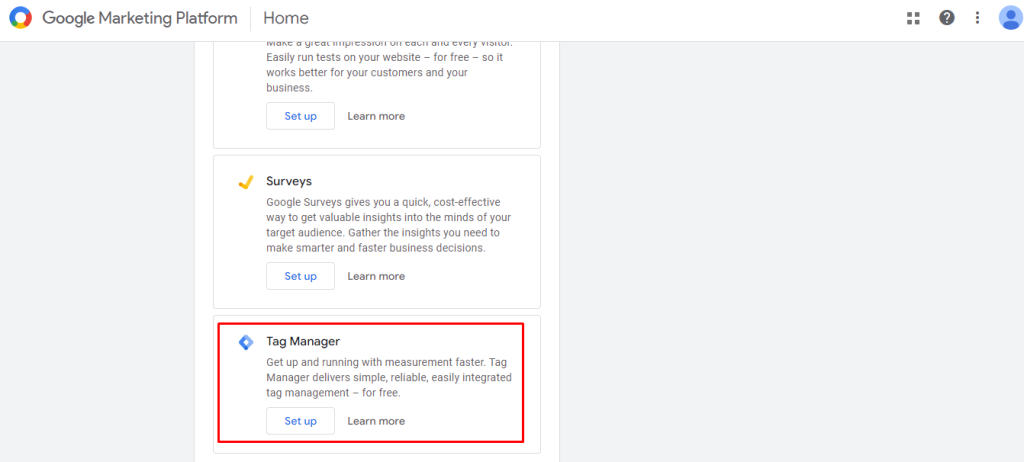
Google Tag Manager?

How to Use Google Tag Manager for Effective Digital Marketing?

Google Tag Manager (GTM) is a marketing analytics tool that can help you track and measure the performance of your digital campaigns. It allows you to quickly and easily set up tracking for websites, apps, and other web-based properties. With GTM, marketers can gain valuable insights into how their campaigns are performing and make data-driven decisions to optimize their marketing efforts.

What is Google Tag Manager?

GTM tracking provides marketers with detailed web analytics data such as pageviews, bounce rates, conversions, and more. This data can be used to refine marketing strategies and improve campaign performance. GTM also allows marketers to quickly set up advanced analytics setups such as A/B testing or funnel analysis. By using GTM, digital marketers can accurately measure their results and make informed decisions about their campaigns.

 Steps to Implementing Google Tag Manager For Maximum Results

Google Tag Manager (GTM) is a powerful tool that can help you to track and optimize website performance. It allows you to quickly add tags and tracking codes to your website without having to manually edit the code. Implementing GTM can be time consuming process, but with the right steps, it can be done quickly and easily.  We will discuss of setting up the new account, creating tags, triggers, variables and testing your setup for maximum results. With these five steps, you’ll be able to make sure that your website is properly tagged and ready for optimization.

  1. Create an Account

First step is creating a Google Tag Manager account. You will need a Google account for this, so if you don’t already have one, create one now. Once logged in, go to tagmanager.google.com and click “Create Account” at the top right of the page.
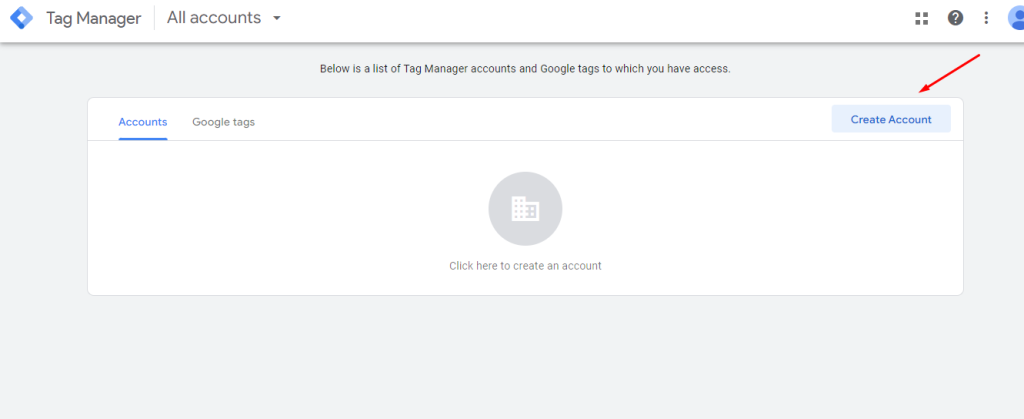
Google Tag Manager account

Fill out all required information such as name of your organization or business and URL of where GTM will be used before clicking “Continue” at the bottom right corner of the page.

  1. Set Up Your Container

After creating an account, set up your container by selecting either web or mobile app depending on what type of platform you are using for your website or application development project respectively; then enter a name for your container before clicking “Create” button at the bottom right corner of the page again .

This will generate two snippets which should be added into every webpage/app screen that needs tracking – one snippet goes into <head> section while other goes just after opening <body> tag on each page/screen respectively .
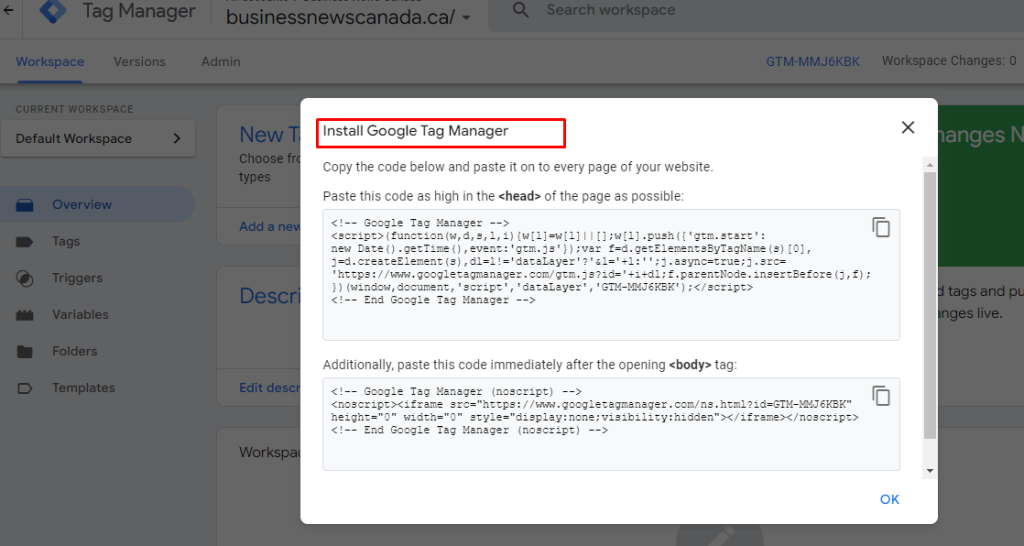
Install Google tag manager

  1. Add Tags

Now it’s time to start adding tags! Go back into GTM dashboard and select “Tags” from left side menu bar; here you’ll find various types of tags available like Adwords Conversion Tracking, Facebook Pixel etc., choose appropriate tag according to requirement & fill out necessary details like conversion ID / pixel ID etc., before saving changes made.
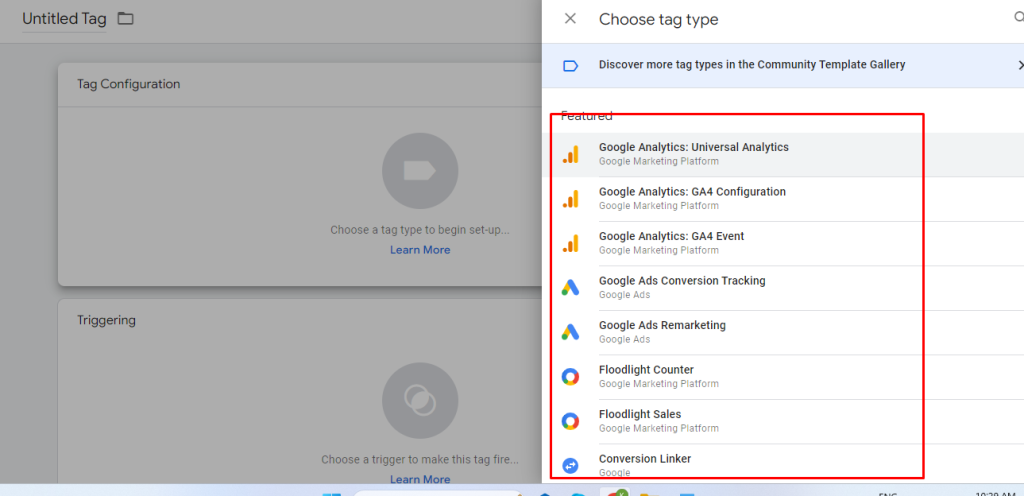
Choose tag type in GTM

Add Triggers to activate your tags. You need to set up triggers to tell Google Tag Manager when to fire your tags. Click on “Triggers” in the sidebar and select “New Trigger“. Follow the prompts to create a new trigger.
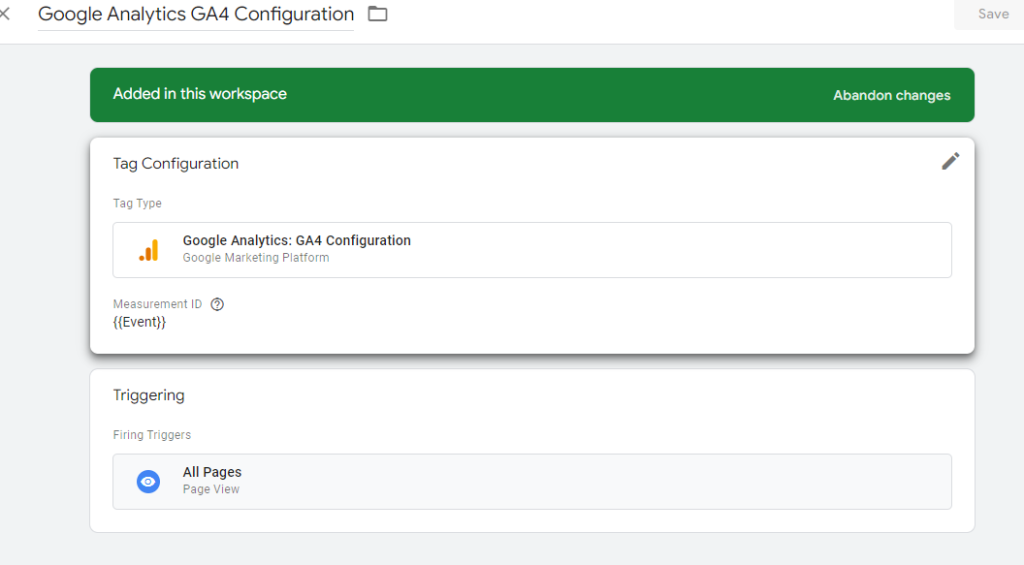
Activate triggers in GTM

  1. Publish Changes

Once all desired tags are added & configured properly , its time publish them live onto webpages/apps screens ; simply click “Publish” button located at top right corner & confirm publishing action by entering description about changes being made along with version number (optional) – this way any future modifications can easily tracked down !
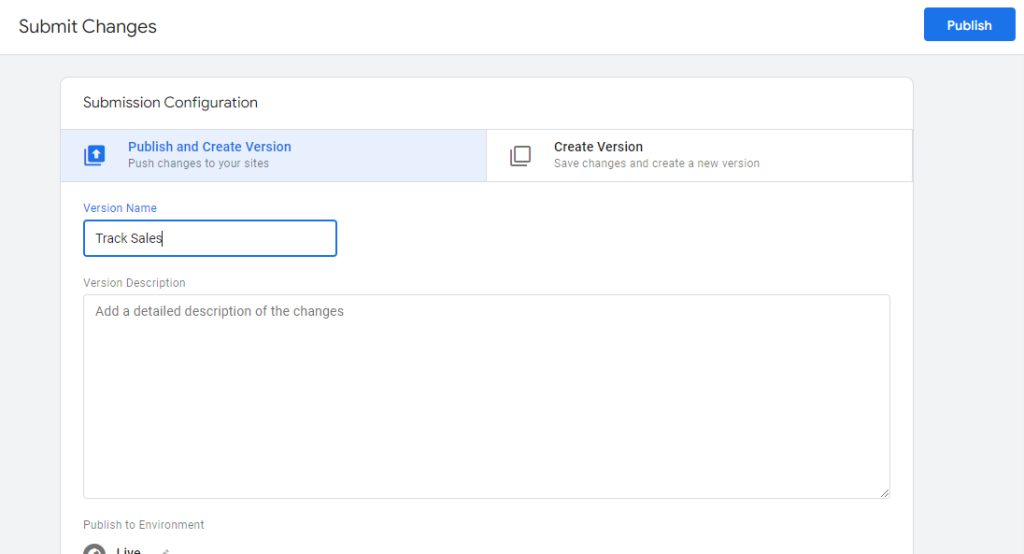
Submit changes in GTM and publish

  1. Test Everything Out

Make sure all newly implemented tags are working correctly by visiting pages/screens where they were placed & verifying data collected through respective analytics platforms like Google Analytics / Facebook Ads Manager etc., If something doesn’t seem quite right then double check configuration settings once more before making any further adjustments.
check configuration settings on GTM

Final Words

Setting up Google Tag Manager is an important step in website optimization and analytics. With the help of GTM, you can easily add and manage tags on your website without having to manually edit the code. It also allows you to track and measure user interactions, which can be used to gain insights into how your site is performing and what changes need to be made. By following this guide, you should now have a better understanding of how to set up Google Tag Manager for your website.

Google Tag Manager – How is it helpful to SEO?

Data is essential to the success of digital marketing. Understanding how users engage with your site is crucial regardless of the type of site you have, be it a big e-commerce site, a personal website, or one for a small business. Even though it has its limits when utilised by itself, Google Analytics can offer many of the crucial insights you’re seeking for. However, you may gather more data than you otherwise could by tagging your website and utilising Google Tag Manager in conjunction with Google Analytics. This blog will give you a detailed explanation of Google Tag Manager.

What is Google Tag Manager?

What is Google Tag Manager?

Google Tag Manager (GTM) is a free monitoring tool and managing platform that enables the user to add advertising tags, or snippets of the script, to your website to monitor and collect marketing data. It enhances the quantity and quality of information gathered while enabling customers to quickly apply Google Tag Manager tags without changing the code.

Using Google Tag Manager with Google Analytics makes it a beneficial tool.

How Does It Work?

Usually, Google Tag Manager works with the help of three components, such are

  • Tags
  • Triggers
  • Variables

What are Tags?

Tags are coding fragments or monitoring pixels from outside tools. These tags provide instructions to Google Tag Manager.

The following are some typical tags found in Google Tag Manager:

  • Google Analytics Universal tracking code
  • Adwords Remarketing code
  • Code for Adwords Conversion Tracking

What are Triggers?

The tag you set up can be fired using triggers. They instruct Tag Manager on how, when, and where to complete your requests. For example, do you want to trigger tags on a link click or a page visit, or is it custom?

Typical triggers in Google Tag Manager include, for example:

  • Page Views
  • Clicks on the Links
  • Submission of Forms

Page Views

What are Variables?

Variables are a prerequisite for triggers, whereas tags are not. Variables hold the value that triggers must assess to determine whether or not to fire. The tag compares the variable’s value to the trigger’s value, and if the variable satisfies the trigger’s requirements, the tag will fire. The variables are primarily of what, when and how exactly the tags and triggers have to do.

Benefits of Using Google Tag Manager

Benefits of Using Google Tag Manager

Google Tag Manager offers several advantages for your company and team because it is a comprehensive and simple-to-use website and digital marketing solution. The use of Google Tag Manager has the following four primary advantages.

No Coding Knowledge Required

Users, including marketers, may utilise Google Tag Manager to implement tags without deeply understanding the code. Although it is advantageous to have some experience in the subject, users can change, remove, or add Google Tag Manager tracking code using the user-friendly interface without the help of web professionals. This makes it possible for small enterprises with little access to technical assistance to make the most of online tracking.

Flexible To New Experiments

Google Tag Manager allows marketers to experiment with various tactics or concepts because it doesn’t call for a web developer. It offers flexibility to swiftly put trials into practice and enhance methods that fit with new developments in digital marketing without needing outside help.

Fast Loading Pages

The configuration of Google Tag Manager makes it so that the tags fire asynchronously instead of synchronously. Instead of waiting for each tag to load before firing, each tag is deployed as soon as it loads. As a result, there is no longer a chance that one tag’s delayed loading speed may prevent the other tags from deploying.

Spot For Everything

Google Tag Manager streamlines and enhances the process of employing tags because all the Tag Manager tracking code is managed in a single location instead of being developed and executed on many platforms. In addition, it considerably increases efficiency in creating and examining all deployed tags from a single, straightforward interface, as this eliminates repetition and potential errors.

Google Tag Manager vs Google Analytics


Google Tag Manager vs Google Analytics

Google Analytics is a free analytics tool used to evaluate your company’s web and app presence of your company, much like Google Tag Manager. It is a comprehensive platform offering a detailed digital and marketing campaign performance analysis.

Google Tag Manager is the technology used to transfer data points, while Google Analytics serves as the central centre for website data analysis. In essence, Google Tag Manager manages the data given to Google Analytics for research. The data is transferred to Google Analytics because Google Tag Manager is the platform for deploying and storing the tags but cannot view analytical results.

Google Tag Manager and Google Analytics track and gather crucial data for measuring and enhancing your website.

How does Google Tag manager help SEO?

Despite the fact that Google Tag Manager can track an almost limitless number of websites and digital marketing activities, there are a few typical ones that most companies utilise for Search Engine Optimisation are,

Track Website Scrolls

GTM can track scrolling behaviour on your website and pages, which is another reason to utilise it.

Understanding how users access and engage with the material on your website offers essential information about site activity.

  1. What parts of the pages get the most interaction
  2. What information is more or less interesting
  3. Where scrolling users usually stop

You may create a detailed picture of how most users scroll through each page of your website using the Google Tag Manager data that has been gathered. In exchange, you can develop a plan to enhance user experience on your website.

  1. How is your website set up
  2. What information do you share
  3. Locations that require improvement

Track Clicks

Track Clicks

Google Tag Manager has the advantage of being able to trace link clicks, particularly those that users made while on your website. Knowing a user’s clicking and scrolling behaviour can tell much about your visitors’ path.

  1. How does a user navigate across your website’s pages?
  2. Which calls to action (CTAs) get the most clicks?

But the real reason to utilise Google Tag Manager is to use the data it provides, not merely to comprehend backlinks data.

  1. To increase conversions, examine pages with many clicks or refresh pages with few clicks.
  2. Update the copy for CTAs that receive fewer clicks by learning what causes a CTA to have a high click rate.

Track Submissions

Every business website should have forms; whether it’s for registering for an event, answering a survey, or subscribing to a newsletter, each form has a distinct purpose. GTM controls the precise tracking of form submissions.

Conclusions

Google Tag Manager is an interface that you can use to control how tags are used on any site easily. It makes it easier for you to create and add those tags to your sites. Additionally, it guarantees that you always have an up-to-date list of all the tags you use. You need GTM if you’re serious about the analytics for your website.