The Ultimate Guide to SEO Hosting for Private Blog Networks (PBNs)

Introduction to SEO Hosting for PBNs

As an SEO expert and the founder of ClickDo, one of London’s leading digital agencies, I have spent years mastering the art of ranking websites with smart and ethical SEO strategies. One of the most powerful methods for building authority and ranking websites is using a private blog network (PBN). However, the biggest challenge in managing a PBN is ensuring it remains undetectable to search engines like Google. This is where SEO Hosting comes into play.

In this comprehensive guide, I will break down everything you need to know about SEO hosting for multiple IP addresses and how SeekaHost provides the best SEO hosting solutions with footprint-free IPs for your PBN success.

What is SEO Hosting?

SEO Hosting is a specialized hosting solution that provides multiple unique IP addresses (A, B, and C-Class) to host websites. This is crucial for SEO professionals managing PBNs because it prevents search engines from identifying the network of sites as connected.

By diversifying your PBN’s IP addresses, you can reduce footprints and increase the effectiveness of your backlinking strategy. With SeekaHost’s SEO hosting solutions, you get access to high-quality, footprint-free hosting with multiple Class A, B, and C IPs to ensure your PBN remains safe and effective.

Why SEO Hosting is Essential for PBNs?

Why SEO Hosting is Essential for PBNs

If you are serious about using PBNs for SEO, then standard hosting will not work. Here’s why SEO hosting is the game-changer:

1. Footprint Elimination

One of the primary ways Google detects and penalizes PBNs is through hosting footprints. If all your PBN sites are on the same server and IP address, Google can easily link them together. SeekaHost’s SEO hosting provides unique IPs across different classes (A, B, and C) to eliminate footprints.

2. Improved Link Juice Distribution

When PBN sites are hosted on separate IPs, the links passing from one site to another appear natural. This means better link juice distribution and a more effective ranking strategy.

3. Better Performance & Security

SeekaHost’s SEO hosting ensures that each website has dedicated resources, reducing downtime and improving website loading speeds, which is an essential ranking factor. Additionally, it enhances security by keeping your sites isolated from each other.

SeekaHost: The Best SEO Hosting Provider

As someone who has tried multiple SEO hosting services, I can confidently say that SeekaHost offers the best SEO hosting solution in the market. Here’s why:

1. Multiple Class A, B, and C IP Addresses

SeekaHost provides footprint-free hosting with different class IPs, ensuring that your PBN remains undetectable by Google.

2. Affordable and Scalable Packages

Whether you’re starting with a small PBN or managing hundreds of sites, SeekaHost offers flexible hosting plans tailored to your needs.

3. Easy-to-Manage Control Panel

The SeekaHost.app platform makes it incredibly easy to manage multiple PBN sites from a single dashboard. It’s user-friendly, even for beginners.

4. 24/7 Expert Support

SEO hosting can be complex, but with SeekaHost’s dedicated support team, you have experts ready to assist you whenever needed.

5. Blazing Fast Servers

Hosting speed impacts rankings. SeekaHost’s servers are optimized for performance, ensuring fast load times and better user experience.

How to Use SEO Hosting for PBNs Effectively?

How to Use SEO Hosting for PBNs Effectively

1. Diversify Your IPs & Hosting Locations

Never host all your PBN sites under the same IP class. SeekaHost allows you to get different Class A, B, and C IP addresses to create a natural footprint.

2. Use Different CMS Platforms

While WordPress is the most popular choice, consider mixing up your PBN with other CMS platforms like Joomla or HTML-based websites.

3. Keep Whois Information Private

Always register domains with private Whois to ensure anonymity. SeekaHost provides domain privacy protection to safeguard your PBN.

4. Unique and High-Quality Content

Avoid using duplicate or spun content. Every site in your PBN should have unique, high-quality content to make it appear natural and valuable.

5. Use Natural Link Building Strategies

Don’t over-optimize anchor texts. Make your links appear natural by mixing branded, naked URLs, and generic anchor texts.

6. Monitor and Maintain Your PBN

Regularly update your sites, monitor their indexing status, and ensure all plugins and themes are updated to avoid security issues.

Common Mistakes to Avoid in PBN SEO Hosting

Common Mistakes to Avoid in PBN SEO Hosting

Many SEO professionals fail in PBN management due to the following mistakes. Here’s how to avoid them:

  • Using the same hosting provider for all sites → With SeekaHost, you can get diverse hosting locations.
  • Reusing themes and plugins → Change site structures to make them look unique.
  • Over-optimizing anchor texts → Keep your link-building pattern natural.
  • Not tracking indexing status → Always monitor whether your PBN sites are indexed and performing well.

Conclusion: Elevate Your SEO Game with SeekaHost SEO Hosting

If you want to build a powerful and footprint-free PBN, then SeekaHost’s SEO hosting is your ultimate solution. With multiple Class A, B, and C IP addresses, secure and high-performance servers, and an easy-to-use dashboard, it is the best choice for any serious SEO professional.

As an SEO expert with years of experience, I highly recommend SeekaHost’s top-tier SEO hosting for building a safe, effective, and high-ranking PBN. Don’t risk your investment with subpar hosting – choose SeekaHost and dominate Google rankings!

Check out SeekaHost SEO Hosting today and take your SEO to the next level!

The Impact of Top-Level Domains on SEO Tips to Optimize Your Domain Name

Website’s domain name is one of the most important factors that affecting your site’s search engine optimization (SEO). Choosing a right domain name is one of the most important investments you can make for your business. There are many factors that contribute to a strong SEO strategy, your domain name is one among them, consider as an important factor. A well-chosen domain name can give you a major boost in search engine rankings, helping you to attract more visitors and customers.

Same time having a poor domain name choice can hurt your SEO and make it harder for people to find your site. So, how can you choose the right domain name for your business?

In this blog, we’ll discuss the impact of top-level domains on SEO and offer some tips for choosing a domain name that will help you optimize your site for the search engines.

What are top-level domains?

A top-level domain (TLD) is the last part of a domain name, such as .com, .net, or .org. There are also country-specific TLDs, such as .us, .uk, or .jp. While the choice of TLD may seem like a small detail, it can actually have a significant impact on your SEO.What are top-level domains

In coming section, we’ll take a look at the different types of TLDs and how they can impact your SEO. We’ll also offer some tips on choosing the right TLD for your website. By the end, you’ll have a better understanding of how to optimize your domain name for SEO.

What are the different types of top-level domains?

Top-level domains (TLDs) are the highest level in the hierarchical domain name system of the Internet. They are divided into different categories based on their purpose or geographical association. Here are the main types of top-level domains:

1. Generic Top-Level Domains (gTLDs)

These TLDs are not associated with any specific country and are open for registration to individuals, organizations, and businesses worldwide.

For Example

.com: Commercial organizations

.org: Non-profit organizations

.net: Network infrastructure providers

.info: Informational websites

.biz: Business or commercial use

.name: Personal websites

2. Country Code Top-Level Domains (ccTLDs)

These TLDs are associated with specific countries or territories. They are often used by individuals, businesses, or organizations based in those countries, but they can also be registered by anyone.

For Example

.us: United States

.uk: United Kingdom

.de: Germany

.jp: Japan

.cn: China

.ca: Canada

3. Sponsored Top-Level Domains (sTLDs)

These TLDs are managed by private organizations or interest groups that have specific eligibility criteria for registration.

For Example

.gov: Government agencies (United States)

.edu: Educational institutions (United States)

.mil: U.S. military

.aero: Aviation industry

.museum: Museums

.coop: Cooperatives

4. Infrastructure Top-Level Domains

These TLDs are used for technical infrastructure purposes and are not typically available for public registration.

For Example

.arpa: Address and Routing Parameter Area (used for technical infrastructure)

.root: Reserved for the DNS root zone

Along with these categories, there are also internationalized country code top-level domains (IDN ccTLDs), which use non-Latin characters to represent country codes.

The benefits of using a top-level domain for SEO

Using a top-level domain for SEO has several advantages. Country code TLD can be used to target audiences in specific countries or contexts. A country-specific TLD, such as .us or .ca, can indicate to search engines that the web page is intended for residents of that country.

The generic TLDs, such as .com and .net, have a certain level of trust and authority in the eyes of search engines. This increases the chance of a page ranking higher in search engine results pages for relevant keywords.

TLDs can even help with keyword optimization. For instance, if your brand is associated with a certain industry or service, you can use a relevant TLD, such as. hotel or. tech, to signal to search engines what the content is about.

Best practices for choosing the TLD

When selecting a top-level domain (TLD), it is important to take the time to choose the one that will best suit your needs. There are a few best practices to follow to ensure you choose the right TLD for your website.

  1. Look at available options:

Before making your decision, take the time to look at the available options. Some of the common TLDs include .com, .net, .org, .gov, and the country code TLDs. In addition, you may need to research alternative custom or branded TLDs, such as. cooking,. app,. blog, or. shop

  1. Research TLD restrictions:

For certain TLDs, such as .gov and .edu, there are restrictions on who can purchase them. Therefore, consider whether the TLD is right for you before making your decision.

  1. Consider the target audience:

Take the time to consider your target audience. Does the TLD reflect who you are targeting and the products and services you offer?

  1. Establish a budget:

When making your decision, make sure to consider your budget. Different TLDs have different prices, so you need to make sure you are staying within your budgetary limits.

Tips to optimize your domain name for SEO

To optimize your domain name for search engine visibility, here are some tips you should consider:

  1. Use relevant keywords:

Using relevant keywords in your domain name is essential for optimizing your domain name for SEO. Consider including words in your domain that accurately describe your business and the services you offer. This will help your website stand out in searches.

  1. Choose a short domain name:

Shorter domain names are easier to remember, which may help to increase traffic to your website. Long domain names tend to be harder for Google to accurately identify keyword content, which can have a negative impact on your search engine ranking.

  1. Avoid hyphens and numbers:

When selecting a domain name, it is best to avoid hyphens and numbers. Hyphens can be confusing for search engine crawlers and numbers can be easily misread by people. Plus, using a keyword in your URL is more effective for SEO.

  1. Use a top-level domain:

As discussed above, using a top-level domain has a range of SEO benefits. Therefore, take the time to choose a domain that is optimized for search engine visibility

These best practices will help you make an informed decision about the TLD you choose. Make sure you take the time to conduct thorough research and consider all the factors before

Conclusion

Selecting the proper TLD for your website is an important process that must not be taken lightly. It affects how your website will be perceived and whether it will be successful in the search engine rankings.

The five best practices mentioned above should be taken into consideration when selecting a TLD. Make sure you take the time to research the available options, consider the target audience, look into any restrictions, and establish a budget. Doing so will ensure that you choose a TLD that will be beneficial for both your website and your business.

How to Find Quality Expired Domains: A Comprehensive Guide

An expired domain is a domain name that has been registered by an individual, company, or organization, but is no longer being used. Expired domains are often auctioned off by domain registrars, with the winning bidder assuming ownership of the domain.

The benefits of acquiring an expired domain are many. For starters, an expired domain usually comes with an established backlink profile. Expired domains often come with a history of traffic, which can be helpful in boosting your SEO efforts.

Keep in mind not all expired domains are created equal. In order to avoid wasting time and money on a worthless domain, it’s important to know how to find quality expired domains. This guide will provide you with everything you need to know in order to find quality expired domains that will help boost your business.

Why are Expired Domains Important?

The acquisition of an expired domain can be a great asset to any business. First and foremost, an expired domain typically comes with an existing backlink profile that can be beneficial for SEO. An expired domain can often come with a history of existing traffic, which can help to boost website visibility and organic reach.

Another benefit of acquiring expired domains is the potential to use them as 301 redirects. By redirecting visitors from an expired domain to the active website, website owners can ensure that the visitors will be directed to the intended page. This can be especially useful for websites that have recently gone through a rebranding process or have changed their URLs.

When it comes to SEO and visibility benefits, expired domains can help to establish a brand’s credibility. There is an increased likelihood that a domain that has been in active use for some time will be more popular, credible, and trustworthy than a new domain. This can help to give your brand a boost in the eyes of potential customers.

How to Find Quality Expired Domain?

There are many different sources for locating quality expired domains. Some of the most popular include:

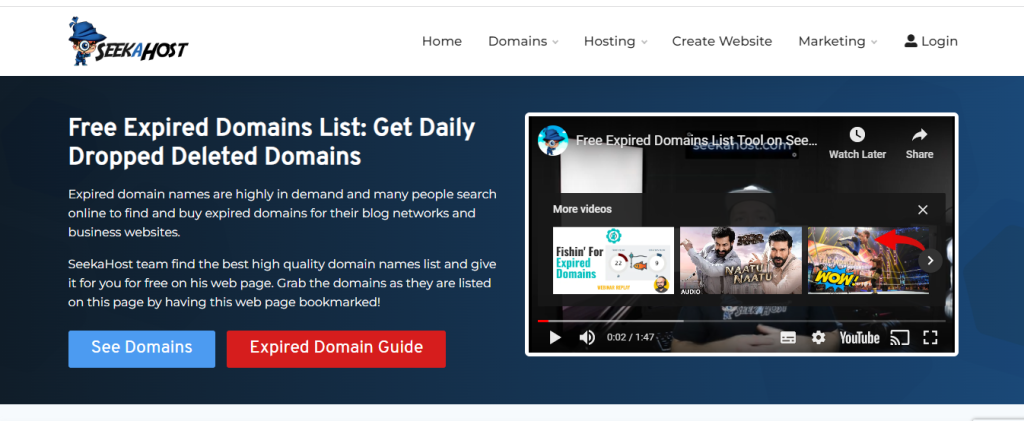
Domain registrars: Most domain registrars will display a list of expired domains at competitive pricing.seekahost domain hosting

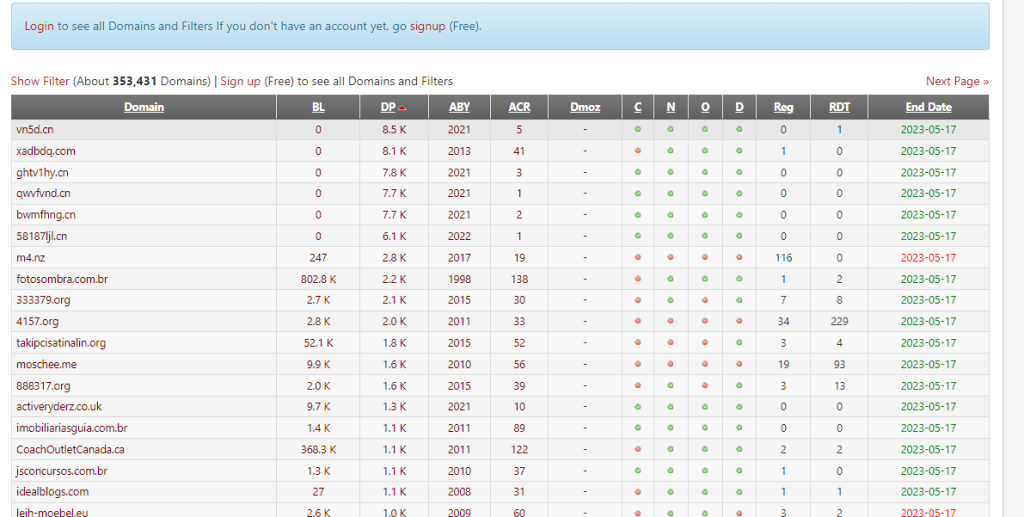
Domain auctions: Popular domain hosting  such as SeekaHost, GoDaddy and expireddomains.net often display expired domains with bids that reflect the domain’s estimated market value. Visit these platforms and search for expired domains based on your preferences. Here we used expireddomains.net to find the expired domains.List of Expired Domains

Set search filters: Utilize the search filters provided by the marketplace or registrar to narrow down your results. These filters may include domain extension, price range, keyword inclusion, and domain authority.

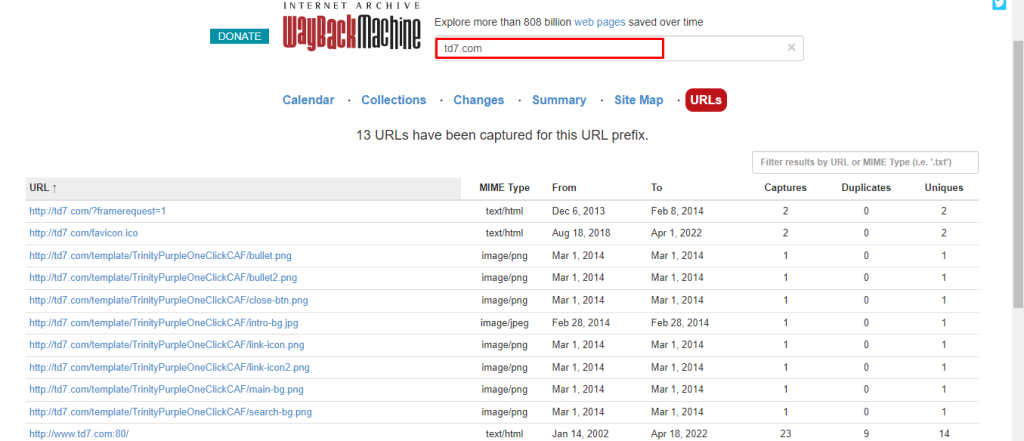
 Check domain history: Once you find a potential expired domain, examine its history using tools like Archive.org’s Wayback Machine (web.archive.org) to see how the website used to look and what content it had. This step helps ensure the domain doesn’t have a problematic past.How to check domain History

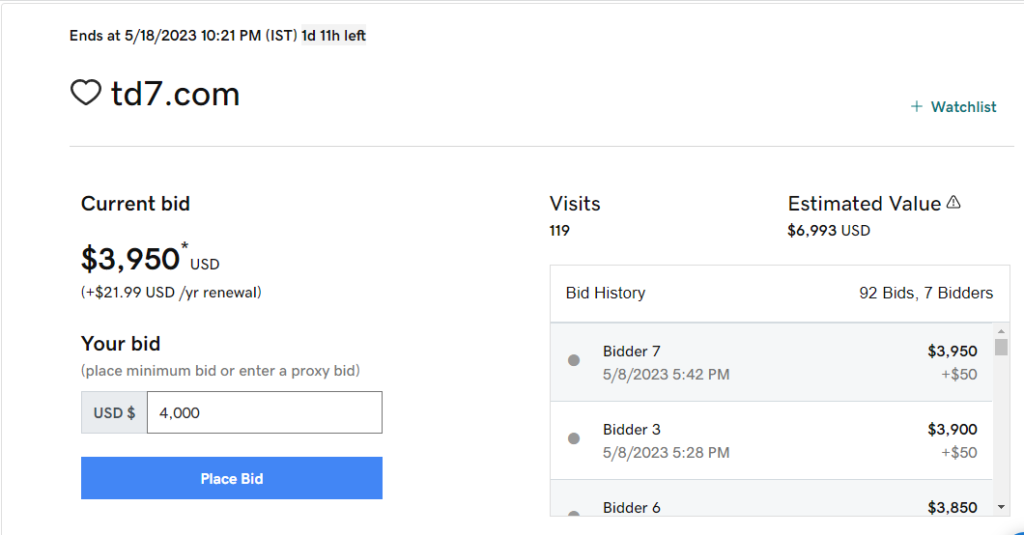
Bid or purchase the domain: If you’re satisfied with the domain and its value aligns with your budget, you can place a bid or make a purchase through the marketplace or registrar. Follow the specific instructions on the platform to complete the transaction.Bid a Expired Domain to place order

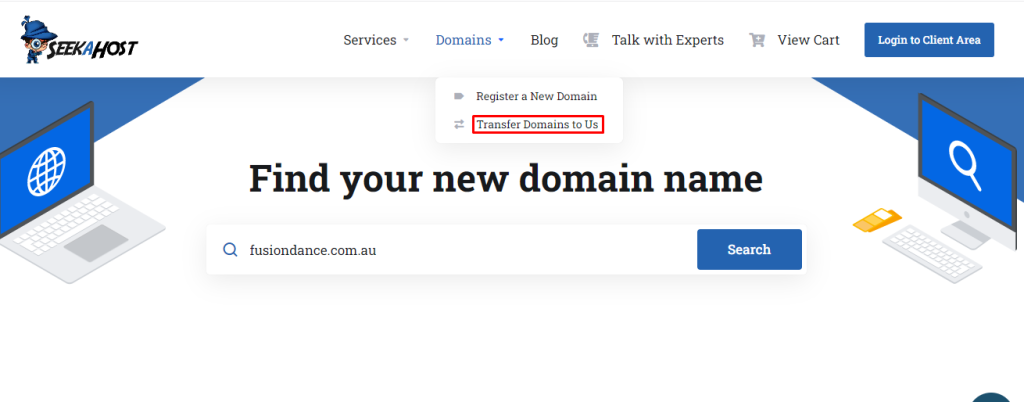
Transfer the domain: After successfully acquiring the domain, you’ll need to transfer it to your preferred domain registrar. Each domain marketplace or registrar will have specific procedures for transferring domains, so refer to their guidelines for detailed instructions.Transfer a Domain

Renew the domain: Keep in mind that expired domains may have been unused for a while, so it’s crucial to promptly renew the domain registration to secure it. Failure to do so might result in losing the domain to someone else. 

Important Metrics for a Quality Expired Domain?

Finding a quality expired domain can be a challenge. When it comes to selecting the right expired domain, there are five key metrics to consider: authority, trust, link profile, age, and relevance.

  1. Authority: Expired domains with a high domain authority (DA) will give your own website more of a boost. This metric measures the power of a given domain and shows its ability to rank in search results.
  2. Trust: Trustworthiness is another crucial metric to consider when selecting an expired domain. You want to ensure the domain isn’t associated with any negative press or spammy content.
  3. Link profile: You should also consider the link profile of any expired domain you’re considering. This indicates the number of external websites linking to the domain, which can give you more of an indication of the quality of the domain.
  4. Age: The age of any expired domain is also important to consider in your selection process. Older domains tend to carry more weight with search engine algorithms.
  5. Relevance: You also want to make sure the expired domain is relevant to your industry. This increases the chances of the domain helping you rank higher in search engine results.

Inspecting an Expired Domain

Once you’ve identified the expired domains you’re interested in, inspecting them is the next step. There several things to look for when inspecting an expired domain.

  1. Previous owners: The first thing to look at is who owned the domain before. Do your own research to determine if the previous owner had any negative history attached to the domain. Knowing who owned it can help you know what type of content is likely to be associated with the domain.
  2. URL structure: Checking the URL structure is the next step. The URL should be easy to read and make sense given the type of content the domain is associated with. It should also contain relevant keywords and phrases to ensure it’s able to be found in search engine queries.
  3. Page speed: You’ll also want to make sure the URL loads quickly, so you may want to check the page speed of the domain.
  4. Backlinks: You’ll want to check if the domain has any active backlinks from other sources. If the domain has a significant number of backlinks from sources like blogs, websites, and social media accounts, it can indicate the domain has a good foundation.
  5. Age of domain: The age of the domain also matters. Old domains tend to be more reputable and trusted by users.

Wrapping Things Up

Research for the perfect expired domain involves several steps. Start by making sure you have all the essential information that you need. Make sure your list includes domain authority, trust, link profile, age, and relevance.

Once you have your list of domains that fit your criteria, create a spreadsheet to compare the metrics and narrow your list down.

The next step is to research the domain further and check for any potential reputation issues. You may want to run the domain through a few online tools to make sure no malicious activity is associated with it.

Make sure the domain is within your budget. You can find domains in all price ranges, so make sure to find one that fits your budget.

How to migrate WordPress site to another domain?

If you are planning to migrate your WordPress site to another domain, there are a few things you need to take into account.  Migrating a WordPress site from one domain to another domain is not a complicated process, but there are a few steps you need to follow to for a smooth transition.

This blog explains the steps involved in the process of migrating your WordPress site to another domain. We will also provide you with some tips on how to make the transition as seamless as possible.

So, if you are ready to learn how to migrate your WordPress site to another domain, let’s get started!

Reasons to migrate your WordPress site

Migrating your WordPress site to another domain might be necessary for a number of reasons. Here are a few of the most common:

migrate WordPress site to another domain

  • You want to create a new website, but want to keep the same content
  • You want to expand your reach by creating a new website on a different domain
  • You want to switch to a new hosting provider
  • You want to move to a subdomain or subdirectory
  • You want to change the name of your domain

Other than this, the reasons to migrate your WordPress website to a different domain is to take advantage of a new trend, change the focus of the site, or simply because you want to start over with a new domain. Whatever the reason, you need to ensure that you follow the right steps to ensure a smooth migration.

How to Migrate your WordPress site to another domain – A step-by-Step Procedure

The process of migrating your WordPress site to another domain involves Following steps

Step 1:  Choose a Domain Hosting

Choosing a Domain hosting providers is the first step in the website migration. Select a best domain hosting provider, before starting a migration process. Read the plans and services provided the various hosting providers and go with the best package. Here we listed some of the web hosting providers.

SeekaHost Hosting services for website migration

  • SeekaHost
  • BlueHost
  • GoDaddy
  • Hostingar
  • SiteGround

We recommend to choose a SeekaHost- best web hosting platform, provides free WordPress website migration.

Step 2: Create a  Backup Your WordPress website

Before doing any kind of migration activities, it is important to create a Backup for your WordPress website.  It helps to recover your website if any unexpected issues during the migration process. A website backup is essentially a copy of your website’s files and database that can be used to restore your website to a previous state.

To create a backup, you can use a backup plugin or tool that is designed for your website platform, or you can use a manual process to copy your website files and database to a secure location, such as a cloud storage service or a local computer.

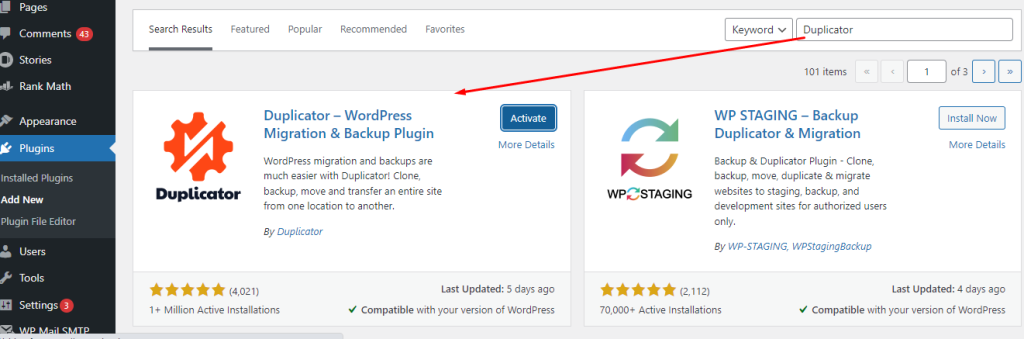
There are number of WordPress plugin available, Duplicator is one among them. Here we shared tips to create a Duplicator package of your WordPress site using the Duplicator plugin:

  1. Install and activate a WordPress plugin to your older website. After activating a Duplicator plugin, it will be added in your WordPress MenuDuplicator plugin
  2. Navigate to the Duplicator menu in your WordPress dashboard and click on the Packages tab. Click on the Create New button to create a new package.Duplicator menu- New Package for website Migration
  3. Follow the prompts to set up the package options, including the package name, storage location, and archive and installer filenames.New package creation for website Migration
  1. Once the package creation process is complete, you can download the package files to your computer or upload them to a cloud storage service
  2. To use the package to duplicate your site on another server, you’ll need to upload the package files to the server and run the Duplicator installer script.

Step 3: Download All Files in your website

Download all essential files in your website. This ensures that you have a backup copy of your website in case something goes wrong during the migration process. This is also stated as Manual Backup.

To download all the files from your website, you can use an FTP. You will need to connect to your website server using your FTP credentials and navigate to the root directory of your website. From there, you can select all the files and folders and download them to your local computer.

It’s important to note that some files and folders may not be necessary for the migration, such as cache files or temporary files. You can exclude these files from the download to save time and storage space

Step 4: Export the Database

After the completion of backup process, you will need to export the database. Exporting the database is an important step when migrating a WordPress website. The database contains all the content and settings of your website, including posts, pages, comments, and user accounts, among other things. Exporting the database allows you to transfer this data to the new domain, so that your new website has the same content and settings as your old one.

To export the database from your WordPress website, you can use the built-in Export tool. This tool allows you to export your website’s content in an XML format that can be imported into another WordPress website.

  1. Go to Tools > Export.Export the database for wordpress migration
  2. Select the content you want to export (e.g. all content, posts, pages, etc.).choose the file format
  3. Choose the file format you want to export the data in.
  4. Click the “Download Export File” button.

Step 5: Updating a WordPress on New Domain

Make sure that the content of your old website is accessible on the new domain, you will have to update the domain settings. This will ensure that all the links on the previous domain point to the new domain. This step ensures that visitors who access your website through the old domain are redirected to the new domain,

Updating a WordPress on New Domain

  1. Log in to your domain registrar’s account
  2. Locate the DNS settings for the old domain.
  3. Change the CNAME record to point to the IP address or domain of the new website.

Step 6: Import the Database.

After changing the domain settings, you can proceed to import the database that you previously exported from your old website. Importing the database into the new website ensures that all the content and settings from the old website are transferred to the new website.

For importing a file,

  1. Go to Tools > Import.Import the Database.
  1. Choose “WordPress” from the list of options.
  1. Click the “Choose File” button and select the XML file containing the exported database from your old website.
  2. Click the “Upload file and import” button.

The  process may take several minutes, depending on the size of the database and the number of media files being imported.

Step 7: Set up a Redirect

After importing all files to the new site, Make sure to set-up a redirect.  Setting up a redirect from the old domain to the new domain brings all your visitors to your new website. This step will prevent your website from losing traffic or visitors due to the domain migration. Go with 301 redirect, because it is a permanent redirect that tells search engines and visitors that the content has moved permanently to a new location

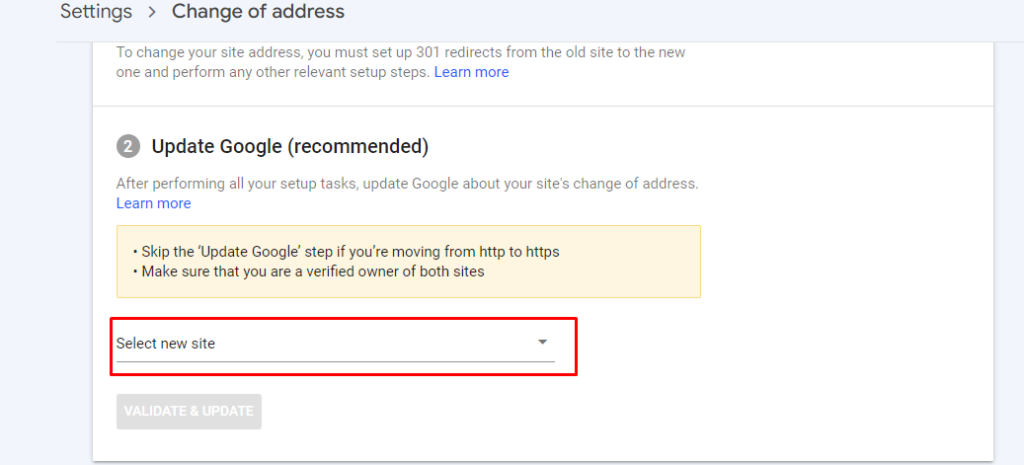
Step 8 : Submit your New domain in Google Search Console

After the migration process submit your new WordPress site to the Google Search Console after migrating it to a new domain.

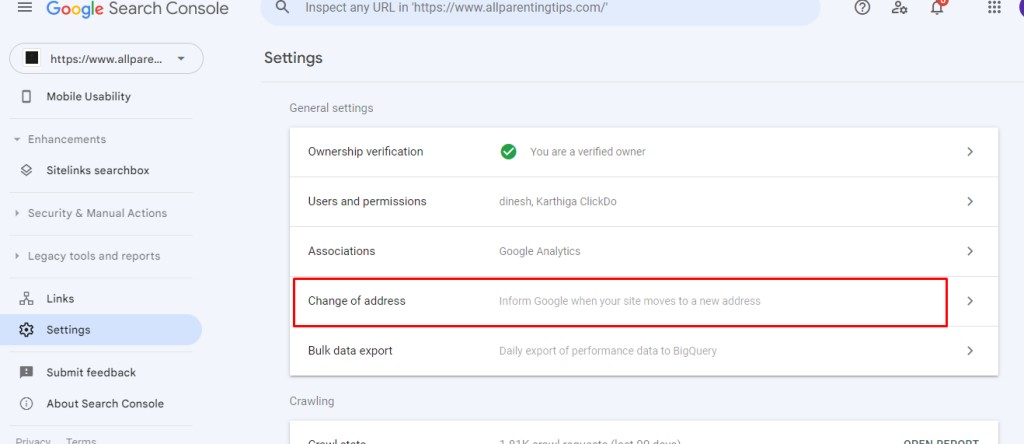
  1. Go To your Google search console account, select your property and click settings.Submit your New domain in Google Search Console
  1. In settings option look for “change of addresss” option
  1. Select new domain name on the “Update Google” option and click validate and update.Update new domain on Google Search Console

Now Google will validate your new domain and update it for a better search.

Wraping – UP

Migrating a WordPress website from one domain to another can be a challenging process, but following the steps outlined in this guide, can help make the process more manageable. By preparing the website for migration, taking a backup, getting a new server, copying the files and database, updating the DNS, and creating 301 redirects, the migration can be completed quickly, efficiently, and without any major complications.

What is web hosting and how does it works?

Web hosting is a service that allows individuals or organizations to make their website accessible on the internet. It involves storing webpages, images, videos files and audio files on special computers called servers. In this blog we will discuss what web hosting is and how it works.

What Is Web Hosting?

Web hosting refers to the process of making websites available online by providing space for them on a server connected to the Internet. This type of service enables people or businesses to create an online presence without having their own physical infrastructure such as hardware and software. The web host stores all content related to your site including HTML documents, CSS stylesheets, JavaScript code, media files (images/videos), databases and more in its data center so that visitors can access these resources when they visit your website.

What Is Web Hosting?

How Does Web Hosting Work?

To understand how web hosting works you first need to know about two components: domain name registration and server setup & configuration. Domain name registration simply means registering a unique address (domain) which points towards your website’s location on the internet while server setup & configuration involves setting up a computer with specific software applications needed for running websites efficiently over time like Apache webserver application along with other necessary tools like MySQL database system etc. Once both are complete then users can start uploading contents onto their hosted environment using FTP clients or cPanel control panel provided by most hosts today allowing easy management of sites from single interface itself.

Steps involved in web hosting

Web hosting is the process of providing storage space and access for websites on servers that are connected to the internet. The following are the steps involved in web hosting:

  1. Choose a web hosting provider

There are many web hosting providers available, and it’s important to choose one that meets your needs. Consider factors such as price, features, uptime, and customer support.

  1. Select a hosting plan

Most web hosting providers offer multiple hosting plans with different features and pricing. Choose a plan that meets your website’s requirements and budget.

  1. Register a domain name

A domain name is the address people use to access your website. You can purchase a domain name from a registrar or use one that is provided by your web hosting provider.

  1. Set up your website

After you’ve chosen a web hosting provider and plan, you’ll need to set up your website. This may involve installing a content management system (CMS) such as WordPress or building your website from scratch.

  1. Upload your website

Once your website is ready, you’ll need to upload it to the web hosting server. This can be done using FTP (File Transfer Protocol) or a web-based file manager.

  1. Test your website

Before making your website live, test it to ensure that everything is working correctly. Check links, images, and functionality.

  1. Launch your website

Once you’re satisfied with your website, it’s time to launch it. This involves pointing your domain name to your web hosting server and making your website accessible to the public.

  1. Maintain your website

After launching your website, it’s important to maintain it by keeping software up-to-date, backing up your data, and monitoring for security issues.

What are the types of web hosting?

What are the types of web hosting?

When it comes to setting up a website, one of the most important decisions you will have to make is what type of web hosting service to use. There are many different types available and each has its own advantages and disadvantages. In this article, we will explore the various types of web hosting services so that you can choose the best option for your needs.

1. Shared Hosting

Shared hosting is one of the most popular options as it offers an affordable way to get started with a website. With shared hosting, multiple websites share resources on a single server which helps keep costs down. The downside is that if another user’s site experiences high traffic or uses too many resources, then your site may suffer from slow loading times or other issues related to resource usage.

2. VPS (Virtual Private Server) Hosting

VPS hosting provides more control over how your website functions compared to shared hosting as it gives users their own virtual private server space within a larger physical server environment. This allows users greater flexibility in terms of customizing their setup but also requires more technical knowledge than shared hosting does since they must manage all aspects themselves such as security updates and software installations/updates. VPS plans tend to be more expensive than shared plans due largely in part because they offer higher levels of performance and reliability when compared side by side with similar specs between both types.

Shared Hosting

3. Dedicated Server Hosting

Dedicated servers provide complete control over every aspect associated with running a website including hardware configuration, operating system selection, and even full root access for those who needs it. As such dedicated servers require much more technical know-how than either VPS or Shared hosts do make them ideal only for experienced developers or businesses looking for maximum customization capabilities at any cost. Furthermore, these plans typically come at premium prices depending on specifications needed.

4. Cloud Hosting

Cloud based solutions allow companies large & small alike take advantage scalable computing power without having invest heavily into infrastructure upfront like traditional dedicated servers would require. These cloud environments allow customers pay only what they use while still being able leverage powerful features like load balancing & clustering among others along with increased uptime guarantees not found elsewhere. However, some drawbacks include lack transparency regarding pricing models & potential vendor lock-in scenarios should customer decide switch providers later down line after investing time building out applications specific provider’s platform.

When deciding which type of web host solution works best for you there are several factors worth considering before committing long term contract such as budget, desired level control /customization and scalability requirements.

Conclusion:

Web hosting provides individuals or organizations with an affordable way to have their own virtual presence online without needing any technical knowledge themselves – all thanks to powerful technology behind it working silently in background taking care everything else required for successful functioning of websites across world wide web.

Web Hosting Companies in Dubai – Top 10 Companies in Dubai

Do I have to tell you if you’re looking for the most excellent web hosting in UAE Dubai? So that means you’ve come to the right place if you’re looking for the best web hosting services in Dubai.

So, you’ve finally chosen to establish your website or anything else online. Selecting a better UAE Dubai hosting company is the first step in crafting your business website and objective.

So how can you pick the best and most affordable web hosting providers when practically all web hosting firms say “we are the finest” and there are innumerable web-hosting providers to test each one by one?

If the answer is “Yes,” keep reading because you’ve come to the right place. We’ll look at the finest WordPress hosting in Dubai in 2023.

Top 10 Web Hosting Companies in Dubai

1. Hostinger

hostinger

Website: https://www.hostinger.in/

Hostinger has been on a mission since 2011 to provide hosting services that make life easier for developers and their consumers. They keep their pledge by regularly upgrading server technology, enhancing customer service, and fine-tuning their proprietary hPanel. Hostinger achieves this stage by constantly improving server technology, providing experienced help, and providing a faultless online website hosting experience.

2. AE Server

ae server

Website: https://www.aeserver.com/

Since 2008, AEserver has hosted over 100,000 websites in the United Arab Emirates. You can choose between on-site and off-site data centre hosting services. They provide Linux (cPanel) and Windows hosting options, as well as WordPress CMS and Ecommerce web hosting. Their web hosting services include Linux web hosting, windows web hosting, managed WordPress hosting, and reseller Linux and windows hosting.

3. HostArmada

HostArmada

Website: c

HostArmada is a privately owned and independently funded web hosting company with the freedom to design and implement novel concepts. They are set to go on their journey into the expanse of the Web hosting world as the result of a visionary team established with one solitary goal in mind – to deliver fast, secure, and dependable Web Hosting Service! Why HostArmada? – Happy customers and super quality service.

4. Siteground

Siteground

Website: https://world.siteground.com/

SiteGround is a holding company with offices in the United States, the United Kingdom, Cyprus, Bulgaria, and Spain that maintains three offices and provides hosting services in many data centre locations worldwide. The Most Effective WordPress Hosting Available Siteground is not only the quickest managed WordPress hosting provider available, but it is also the most economical.

Their web hosting services include domain names, web hosting, WordPress hosting, cloud hosting, reseller hosting, WooCommerce hosting, and agency web hosting services.

5. DreamHost

dreamhost

Website: https://www.dreamhost.com/

The Most Effective WordPress Hosting Available DreamHost is not only the quickest-managed WordPress hosting provider available, but it is also the most economical. Dreamhost provides industry-leading unlimited web hosting plans with limitless features for everybody out there and a free website builder to help you develop websites quicker without spending money on third-party builders. In addition, Dreamhost provides unlimited storage, email accounts, bandwidth, and the ability to host domains at highly reasonable prices.

Why DreamHost?

  • 24/7 support for customers
  • 400k happy customers
  • 5 million websites
  • 750k plus WordPress installations, etc.

6. GoDaddy

go daddy

Website: https://www.godaddy.com/

GoDaddy is one of the world’s leading services platforms for global entrepreneurs. They’re on a mission to empower the international community of over 20+ million customers — and entrepreneurs globally — by providing them with all the tools and resources they need to succeed online.

GoDaddy is where people name their ideas, build a compelling brand and a beautiful website, attract consumers through digital and social marketing, and manage their projects. In addition, they provide direct one-on-one instruction with a personal connection when no tool suffices.

7. Hostgator

hostgator

Website: https://www.hostgator.in/

One of the most well-known web hosting service providers, it excels in speed, dependability, and customer care. It offers market-leading hosting and domain solutions, with plans ideal for website owners, small companies, and large organizations. Hostgator is a dependable, quick, and robust platform for all your hosting and domain name administration needs. Its interface (cPanel) is so simple to use that you can construct a website in less than 5 minutes.

8. SimpleHosting

simply hosting

Website: https://www.simplyhosting.com/

With 15 years of industry expertise, SimpleHosting is convinced that it can simplify even the most sophisticated Technology. Their services span from VPS and public cloud to complete IT infrastructure outsourcing. In addition, they collaborate with you to find your optimum IT infrastructure. They provide you with everything you need to effectively publish your websites/domains on the Internet. The Hosting Control Panel allows you to manage all hosting offerings.

Why SimpleHosting?

  • FREE Windows Server OS
  • High specifications
  • Reasonable costs begin at £5.99
  • Super-fast SSD storage.

9. GreenGeeks Web Hosting

GreenGeeks Web Hosting

Website: https://www.greengeeks.com/

The management team at GreenGeeks has almost 40 years of expertise in delivering high-quality, low-cost website hosting. Your account will only use the most excellent server hardware, stable network providers, and recent software applications accessible online.

Furthermore, your GreenGeeks account will have a beneficial environmental impact since it will replace your website’s energy three times with wind power credits.GreenGeeks web hosting also offers one-click installs, through which you may install hundreds of scripts.

10. Namecheap

namecheap

Website: https://www.namecheap.com/

Namecheap was founded in 2000 to provide the most significant domains at the best cost and support. They’ve since added hosting, security, managed WordPress, and several other features to our platform. People’s online goals, ideas, and objectives have developed with you. They’ve just evolved to provide you with whatever you require.

The Most Effective WordPress Hosting Available Namecheap is not only the quickest managed WordPress hosting provider available, but it is also the most economical. Namecheap web hosting plans are particularly developer-friendly, including free SSL and SSD hosting and guru staff assistance 24/7 to assist you with any difficulties.

Why Namecheap?

  • UAE Host at a low price
  • Domain name for free
  • Guaranteed uptime of 99.9%

We provide detailed evaluations, discounts, and comparisons for the finest UAE web hosting services. So now you know what some of the best Dubai web hosting providers are in today’s thriving industry. And finally, thank you for your valuable time to take to read this article.

HTTP Status Codes – Most Used Responsive Codes

Servers can communicate with users online using these codes or answers. These codes are three-digit response codes or messages known as HTTP status codes transmitted by a server, search engine, or browser to a browser or user at the other end of the server. These codes let users know whether a server is up and running when a request is made to see a specific website or Web page. This blog will give you a detailed explanation of those HTTP status codes and their purpose.

What are HTTP Status Codes?

Three-digit HTTP status codes are the server’s answers or responses to browser-side requests. Most people have probably encountered the well-known 404 page not found error. However, there are many other HTTP client error status codes besides that one.


What are HTTP Status Codes?

There are many code classes based on the type of information being communicated by the server and the browser. These status codes (also known as response status codes) facilitate communication between the two. The first digit of the error number indicates the different classes of errors. For example, exactly as a 404, any other 4xx will suggest that the page or website could not be accessed for whatever reason, while a 2xx indicates that your request was fulfilled correctly.

Different Types of HTTP Status Codes

There are five distinct groups into which HTTP status codes fall. Even if you need to know the precise answer code, each category will provide you with suggestions as to what the response was. Such are,

  • 1xx – Informational: The request has been received, and the server is executing it
  • 2xx – Successful: The request was fulfilled, and the browser got the requested data
  • 3xx – Redirection: You have been redirected, and more action is needed to complete the request
  • 4xx – Client Error: The website or page could not be accessed because it needed to be made available or the request had an incorrect syntax
  • 5xx – Server Error: The request looks to be genuine, but the server was unable to process it

The most used HTTP status codes for SEOs

The most used HTTP status codes for SEOs

Every website owner and professional SEO should know the status codes that affect SEO the most.

Imagine you’re working on a website that frequently displays 5xx problems, you’ll want to be able to identify that this is a server issue right away. The visitor experience is affected by 4xx problems, so you should immediately consider any modifications you may have made to your URLs or whether you have deleted any pages. Once you identify the root of the problem, you can design a custom 404 page or consider using the super-effective 301 redirects to route visitors to the appropriate page.

The most important status codes for Search Engine Optimisation that should be learned and committed to memory are,

Status Code 200 – Ok

The 200 OK response code is the status code for a functioning page when viewed from an SEO perspective, as all the linked sites are functioning as they should. A 200 indicates that search engine crawlers can successfully crawl the page and is added to their index.

Status Code 301- Permanently Redirect

Status Code 301- Permanently Redirect

Anytime a URL has to be permanently redirected to another, a 301 redirect should be used. Visitors and bots who arrive on that page will be directed to the new page URL through a 301 redirect. A 301 redirect also transfers link equity or the influence that all of those arduous links to your content send to the new URL. Despite Google’s claims, studies have revealed that not all 3xx redirects are processed equally. Therefore, for permanent page redirection, a 301 redirect continues to be the technique of choice.

Status Code 302 – Temporary Redirect

Similar to a 301 redirect, a 302 redirect passes visitors and bots to the new page but may not convey link equity. Therefore, the use of 302 redirects for long-lasting modifications is not advised. In addition, using 302s makes the redirect transitory in the eyes of search engine crawlers, which may prevent it from passing along the link equity that code 301 accomplishes.

Status Code 404 – Not Found

This indicates that the server could not locate the file or page that the browser was requesting. 404 errors don’t say whether a page or resource is gone forever or just momentarily. By entering a URL that isn’t valid, you may see how this appears on your site. It feels like you’ve hit a brick wall. Your visitors will encounter a page with a 404 error, just as you have, and will either try again (if you’re lucky) or leave to visit another website that contains the data they’re looking for.

Status Code 404 - Not Found

Every website will occasionally have pages that produce 404 error messages. There are other choices besides constantly redirecting these pages. The idea that merely 301 redirecting 404-returning pages to the given domain’s home page are an SEO best practice is frequently held in error. In most circumstances, this is a bad idea because it could confuse users, unaware that the webpage they were attempting to access doesn’t exist.

Employing 301 redirects to the most relevant page is recommended if the pages generating 404 errors have high authority, high traffic, or marked URLs that visitors or links are intended to reach.

Status Code 410 – Gone

A 410 indicates that the page has been deleted and is more permanent than a 404. The server no longer hosts the page, and no forwarding address has been established. If you find links on your website that point to a 410 page, remove them from your content because they send bots and visitors to a dead resource.

Status Code 500 – Internal Server Error

The 500 Internal Server Error status code indicates that the server has run into a problem it cannot resolve.

When viewed from an SEO perspective, the 500 Internal Server Error denotes a server issue rather than the content’s accessibility. As a result, your website will lose bots and human visitors, and your link equity will freeze quickly. You should look into these status codes and get them corrected as soon as you come across them because search engines favour well-maintained websites.

Status Code 503 – Service Unavailable

Status Code 503 – Service Unavailable

A 503 response, another variation of the 500, indicates that the service is down. Everyone (human or otherwise) is requested to return later. This can result from the server being temporarily overloaded or server maintenance. A 503 status code ensures that the search engines are informed that the page or site will only be unavailable for a brief period and to check back shortly.

How to Check the Status Code of the URL?

The process is very simple, you can do it by following the below steps,

  • Use your browser to access the URL you want to check.
  • Navigate to the “Network” tab in the Developer tab (F12).
  • Reload the page.
  • Locate the first request of the “document” type by scrolling to the top of the list of requests.
  • You can now locate the HTTP response code in “Status.”

Conclusion

Knowing the most typical HTTP errors should give you a solid foundation for resolving problems with your web servers or applications. If you experience any errors listed above, now you know what the exact message that code means.

SSL Certificates – Why is it Important for SEO?

Nowadays, SEO is a hot topic in the digital world for E-commerce stores, startups, and more progressive ideas. So, the search engines like Google and Bing want their users to secure their websites, and search engines and more prioritised Secure websites which use SSL over non-secured websites. This blog will explain SSL certificates and the importance of SSL certificates in Search Engine Optimization.

What are SSL Certificates?

An SSL certificate, also known as Secure Socket Layer, is a digital certificate that permits an encrypted connection and verifies the legitimacy of a website. A secure Sockets Layer, or SSL, is a security protocol that establishes a secure connection between a web server and a web browser.

Adding SSL certificates to websites is necessary for businesses and organisations to protect client data and secure online transactions.

SSL secures internet connections and stops hackers from accessing or altering data sent between two computers. A padlock icon next to the website URL in the address bar indicates SSL protection for the website you are currently visiting.

How SSL Does Work?

How Does SSL Work?

When a user visits a website or transfers data between two systems, SSL ensures that the data is encrypted and hard to read. In addition, data in transit is encrypted using algorithms to prevent hackers from accessing it as it travels over the connection. This information includes details that could be considered sensitive, such as names, addresses, credit card numbers, or other financial information.

Why are SSL Certificates necessary for SEO?

Most people can now see that Google dominates the field of search engines in this day and age. When people look for anything, including song lyrics, sports scores, store hours, and product information, they turn to them first. Because of this, every website must abide by these standards whenever Google updates an existing SEO standard or establishes a new one to retain and improve its SEO.

A website that doesn’t follow Google guidelines can get lost in the SEO wilderness, where no one looks. The ability of a website to establish its credibility is one of Google’s essential Search Engine Optimisation requirements. While crawling search engines, Google’s search algorithm has prioritized HTTPS in recent years as a crucial ranking factor.

Because they reassure users and consumers that their privacy and information are safe and secure from hackers when they visit these certified websites, HTTPS-enabled website URLs and pages will be given higher SEO authority by Google. Google will consider sites without a valid SSL certificate untrustworthy and offer them inferior rankings if they ever rank.

Types of SSL Certificates

Types of SSL Certificates

Different SSL certificate kinds and levels of validation are available. The following are the six primary types,

  1. Extended Validation certificates (EV SSL)
  2. Organization Validated certificates (OV SSL)
  3. Domain Validated certificates (DV SSL)
  4. Wildcard SSL certificates
  5. Multi-Domain SSL certificates (MDC)
  6. Unified Communications Certificates (UCC)

Extended Validation certificates (EV SSL)

The most valuable and pricey kind of SSL certificate is this one. High-profile websites that gather data and accept payments online frequently use it. As soon as it is implemented, this SSL certificate causes the browser address bar to show a padlock, HTTPS, the company name, and the nation. The address bars display the website owner’s details to aid in separating legitimate websites from fraudulent ones.

The website’s owner must pass a defined identity verification procedure to demonstrate that they are legitimately entitled to the domain’s exclusive rights before setting up an EV SSL certificate.

Organization Validated certificates (OV SSL)

Since the website owner must undergo a rigorous validation process to receive one, this SSL certificate version offers an assurance level comparable to that of the EV SSL certificate. For added protection against rogue websites, this kind of certificate also shows the website owner’s details in the address bar.

The primary function of OV SSL certificates, often the second most expensive (behind EV SSLs), is to encrypt sensitive user data during transactions. An individual must install an OV SSL certificate on commercial or public-facing websites to guarantee that any consumer information disclosed remains private.

Domain Validated certificates (DV SSL)

Domain Validation SSL certificates offer lower confidence and little encryption because the validation procedure to obtain this SSL certificate type is modest. In other words, websites that do not collect data or accept money online, such as blogs or informational websites, tend to employ them. One of the cheapest and quickest SSL certificate types is this one.

Domain Validated certificates (DV SSL)

Website owners must confirm domain ownership as part of the validation procedure by replying to an email or phone call. The only information in the browser’s address bar is HTTPS and a padlock; the company name is not visible.

Wildcard SSL certificates

One certificate for a wildcard SSL allows you to secure an unlimited number of sub-domains in addition to the base domain. Therefore, a Wildcard SSL certificate purchase is far less expensive than purchasing separate SSL certificates for each sub-domain if you need to safeguard more than one.

Multi-Domain SSL certificates (MDC)

Many domains and subdomain names can be protected using a Multi-Domain certificate. Except for local/internal TLDs, this includes merging distinct domains and sub-domains. Sub-domains are not by default supported by Multi-Domain certificates. If you need to secure both www.yoursite.com and yoursite.com with one Multi-Domain certificate, both hostnames should mention when getting the certification.

Unified Communications Certificates (UCC)

Unified Communications Certificates (UCC) are also considered as Multi-Domain SSL certificates. UCCs were first created to safeguard servers for Live Communications and Microsoft Exchange. However, any website owner can now use these certificates to allow the security of many domain names on a single certificate.

UCC Certificates show a padlock on a browser and are organizationally validated. In addition, UCCs can be used as EV SSL certificates to provide maximum assurance to website visitors through the green address bar.

To choose the appropriate SSL certificate for your website, you must be aware of the many types of certificates.

How to Get SSL Certificate?

It’s time to purchase an SSL certificate now that you know its function! The processes for obtaining an SSL certificate are listed below.

How to Get SSL Certificate?

Select the certificate that best meets your needs

Determine which certificate best meets the demands of your company before beginning the process of obtaining an SSL certificate. There are six possibilities, so pick the one that offers you the level of security you require.

Verify the accuracy of your information

Ensure all the information about your business is accurate to obtain a valid SSL certificate. For example, your website’s name, organization’s name, and address are included in this information.

Determine the Certificate Authority (CA)

You must select a Certificate Authority to obtain your SSL certificate (CA). Several well-known CAs are,

  • DigiCert SSL Certificate
  • Sectigo SSL Certificate
  • Geo trust SSL certificate
  • Rapid SSL Certificate
  • Thawte SSL Certificate

Make a Certificate Signing Request (CSR)

You will produce a Certificate Signing Request (CSR) on your server once you have found the provider you want to utilize. If you’re using a hosting provider, you can ask the provider for assistance with this step.

Wait for the confirmation

wait for confirmation

You must wait for the CA to verify your domain and company information after you have submitted your CSR to it. Once it’s done, they will provide you with the certificate for the price.

Conclusion

No matter what kind of website you run, installing an SSL certificate will help it succeed as the web becomes a more secure environment. SSL keeps your data safe, promotes user confidence, and maintains your website up to date with industry standards.